








Extra! Extra! Read about new features, release notes, and product updates!
Recently active
Hello Automox Community! I’m Tyler Schmidtke, one of the engineers on the Integrations team at Automox. We’re very excited to announce the release of our new integration partnership with ServiceNow, the Service Graph Connector for Automox!The Service Graph Connector for Automox is a ServiceNow native integration that is certified by ServiceNow as part of their Service Graph Connector program. If you are currently using ServiceNow as your CMDB, you may be familiar with the Service Graph Connector program, which unifies the CMDB experience across many of the import sources available in the ServiceNow Store, which now includes Automox.This initial release focuses on importing new computer configuration items (CIs) into the CMDB based on devices available in Automox zones (or organizations) that you select for import. In addition, existing CIs are updated when matching details are found between a device in Automox and a CI in ServiceNow. The import includes many of the key details that you
Hello and HAPPY NEW YEAR, Automox Community! Can you believe it’s 2022, already? Well, I’d love to start off the new year with a feature update! Pleased to announce that we’ve made some changes to our Overview Report!We made the following enhancements to this page: The most obvious change is the STYLING. This report now uses newer design elements and a more modern look and feel. The Overview Report was one of the few pages left that we needed to update and modernize. We are so stoked that we almost have all pages using our modern and distinctly Automox styling! This report is now mobile-friendly for any of you on-the-go power users. Lastly, we’ve added links from this report to a filtered Devices page so that you can quickly locate any devices that need attention. Here are some screenshots of the new and improved Overview Report:Updated Overview Report Now Mobile-Friendly!On top of that, we also updated our Weekly Summary E-mail, which is an auto-generated e-mail Automox sends out
Hello Automox community! My name is Eric Huber and I’m the new Agent Product Manager here at Automox. I am excited to announce that Agent 36 is now available to download in the Automox Console! This release is for Mac devices only. Here’s what’s new: New: Enhanced patching capabilities for all supported macOS operating systems (Intel & Apple Silicon). To reiterate, the below operating systems are supported: macOS 10.15 “Catalina” (Intel) macOS 11.x “Big Sur” (Intel & Apple Silicon) macOS 12.x “Monterey” (Intel & Apple Silicon) Change: The commands to enable the Automox Service Account for patching Apple Silicon devices have changed. IMPORTANT: the old flags will no longer work on Agent 36. Please review our updated documentation here. New Flags--automox-service-account <enable|disable>--automox-user-prompt <enable|disable> Change: The user prompt will appear immediately for entering a password after running the --automox-user-prompt ena
Hello, Automox community!Wanted to share some enhancements we’ve made to Automox this past week!Software Page Export The Software page can now be exported! This is really helpful for when you want an inventory of all the software in your environment.Export Option on the Software Page Activity Log ImprovementsWe’ve also prettified the log output in the Activity Log so that it is easier to read and get a sense of what happened to a device:Prettified Log Output in the Activity Log Let me what you think in the comments! Cheers!Vania
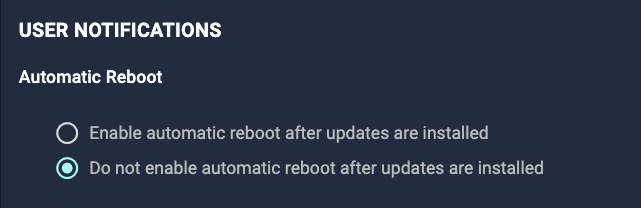
Happy hump day ya’ll. We’re very excited to announce that we’ve just pushed reboot notifications and deferral options for Worklets live! Previously, Worklets were only able to be scheduled, however, reboot notifications and deferrals were not available. This is a powerful feature as it offers users the ability to run custom evaluation and remediation scripts, and assuming this is enabled, devices that successfully receive remediation script will reboot respecting the notifications and deferrals configured in the Worklet policy. Some interesting use cases that you might consider: Reboot only recurring policy for all targeted devices with notifications and deferrals Reboot prior to policy run or during scheduled maintenance windows And many more! We’ll have Product Docs up shortly, but you can access this feature by going to Create Policy > Worklets > Enable Automatic Reboot After Updates Are Installed. (Note: all existing Worklets will default to disabled, but can be updat
Are there any release notes yet for this agent or is this due to security vulnerabilities not yet available?
Hello Community! Agent 35 is now available to download in the Automox Console. This release is for Mac devices only.Here’s what’s new:Fix: users experience unexpected reboots on macOS devices after deferring a reboot. Fix: agent does not always reconnect after the device wakes from sleep (Mac devices only). Fix: an M1 Mac user might be mistakenly prompted by the agent when they do not have the appropriate permissions to grant secure token access. Fix: notifications displaying “Terminal” on macOS 12 (Monterey). Change: agent log files will be written to /var/log/amagent.log instead of /var/log/system.log. Change: the Apple Silicon (M1) user prompt is now disabled by default. New: macOS 12 Monterey support. New: IT Admins can run a command against the Automox Agent, on each Apple Silicon (M1) Mac device, to grant secure token access to the Automox service account. These permissions are needed to install macOS updates (e.g. patching from 12.0 to 12.1) on Apple Silicon devices using the ag
Hey folks, quick AXAgent update: Automox Security and third-party security researchers have discovered two high severity vulnerabilities in the Automox Agent: CVE-2021-43326 and CVE-2021-43325. These vulnerabilities impact Windows devices only. A non-administrative user can leverage these vulnerabilities to read and write content to the Automox execution directory, which can then execute commands with elevated privileges. CVE-2021-43325, The Automox Agent Version 33 incorrectly sets permissions on a temporary directory while running in Windows environments. CVE-2021-43325 has a CVSS score of 7.8 (High). Automox has fixed the directory permissions.CVE-2021-43326, The Automox Agent prior to Version 32 incorrectly sets permissions on a temporary directory while running in Windows environments. CVE-2021-43326 has a CVSS score of 7.8 (High). Automox has fixed the directory permissions.Starting on Thursday, November 12th we began a phased rollout of the Automox Agent 34 release for all Windo
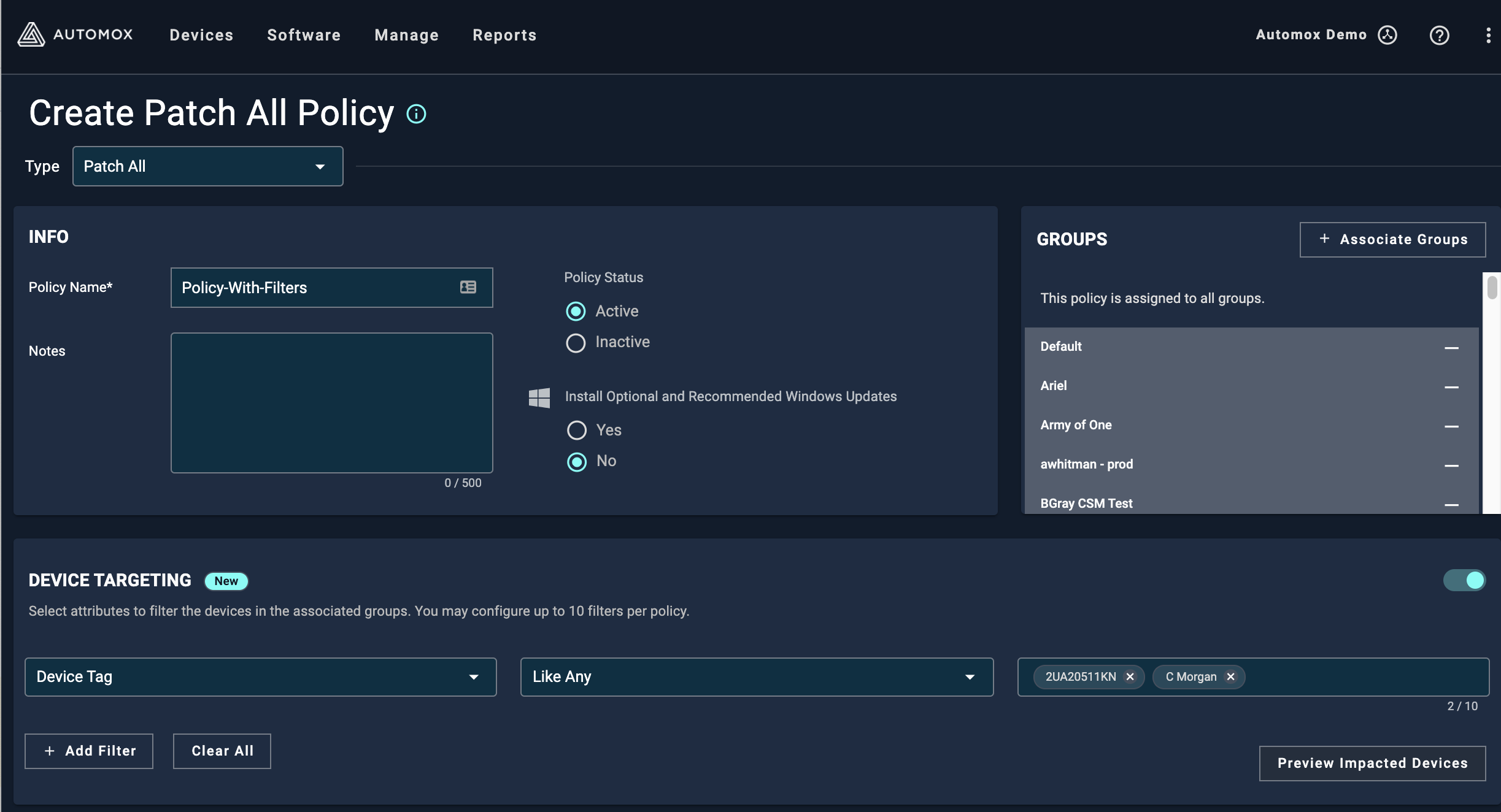
Hello Automox Community! I’m Vania 👋 - a Product Manager here at Automox! I’m excited to announce that we’ve released “Flexible Device Targeting” today. With Flexible Device Targeting, you will see a new option called “Device Targeting” while creating and modifying policies that allow you to create filters based on the following device attributes: Tags Hostname OS IP Address Any policies that have device targeting enabled will only run on devices that match the device filters you’ve created. With this new capability, policies become even more flexible as you will now be able to run policies on a subset of devices regardless of what group the devices are in. In the following screenshots, you can see the new section called “Device Targeting” as well as the “Preview Impacted Devices” pop-up that shows you in real-time the devices the policy will target. Screen Shot 2021-07-06 at 3.47.25 PM2446×1324 258 KB Screen Shot 2021-07-06 at 3.47.42 PM2446×874 141 KB Screen Shot 2021-
It worked! Okay, there’s still a lot of dust and yes it’s a white background (which we may update), but overall, what’s your feedback? Keep in mind we still haven’t dumped tons of content or enabled a lot of the “fun” stuff - just trying to get all the technical stuff worked out first. Speaking of....there’s a chance or two for hiccups this weekend, obviously. If you see any, please let us know - you can either DM me or @Brittany, or email us at community@automox.com.
Happy Monday, y’all…Chad here. Now that I’ve gotten that oxymoron out of the way, I just wanted to remind everyone that the current Community is going read-only tomorrow morning. You’ll no longer be able to post or comment, but you’ll still be able to search for past threads, answers, etc. If you have any questions you can always email me or hmu over on the Community Slack. Stay tuned! 🤘 🤞
Hello Automox Alive! Chad here. We have some really exciting news to share with you: We’re moving! Well, not physically…but we are migrating the community to a brand new platform. In the coming weeks, you’ll see a shiny new layout, more specific categories, a ranking system, updated badges, and more! Plus, we’re introducing a content hub filled with plenty of videos and articles to help you learn more about Automox and the world of IT operations. More on that to come… Now, this does mean that the community will be Read Only for a couple of days as the team finalizes the migration. You’ll still be able to visit the community but you won’t be able to create any new discussions. This will be happening on November 16th and 17th, so be sure to ask any questions you have now! This has been in the works for quite some time and we’re excited to finally bring this incredible community experience to you. We hope to see you again for the launch on November 18th! Feel free to hmu with any question
Hello Community! Next week we will begin a phased upgrade rollout of Agent 33. The new release is available now for manual installations. This release includes two changes, both for Mac devices only: Fix for an intermittent issue that caused Mac user devices to unexpectedly reboot after a deferral. The Automox Agent can now apply macOS updates on Apple Silicon (i.e. M1) devices. Note: for M1 support, the Agent will create a local service account on Apple Silicon devices only. Please see this page for additional details. The agent will automatically update to the latest release across your endpoints. If you have any questions or wish to delay the Automox agent from automatically updating in your organization, please let Automox Support know at support@automox.com.
Happy Friday, everybody. We’re all extremely excited to announce our new integration partnership with Splunk! In short, the add-on(s) will allow data from Automox to be ingested & displayed on a dashboard in Splunk (Enterprise or Cloud). By using a combination of the Technology Add-On and the Dashboard for Splunk, users will be able to visualize and search across the data imported from Automox. Personally, I think it’s awesome to partner with a SIEM solution like Splunk! Some key benefits include: Faster Data-Driven Decisions: Triage events faster with access to merged contextual data with Splunk data sources. Cross-Team Visibility: View a single source of truth for quick operational and security decisions. Customizable Alerts, Reports, and Visualizations: Uncover device patterns and trends with enriched data insights and viewing capabilities. Documentation from our Support team can be found here, and includes how-to’s for installation, configuration, troubleshooting, and more.
Bring radical efficiency to your custom integrations with the all new Automox Software Development Kit (SDK) for Python. Our SDK is built on top of the REST API, so you can accomplish more with fewer lines of code and no library maintenance. Write applications to create device groups in Automox based on your Active Directory Organizational Units or ServiceNow CMDBs. Or, accomplish a more specific use case and update devices in Automox with a CSV file. Whatever your use case, our SDK will empower your teams to create bespoke solutions to your organization’s unique IT challenges.To access and download the SDK, visit our Github page. Big thanks to @Peter-AX who wrote most of this while I was taking a nap at lunch. 🤘
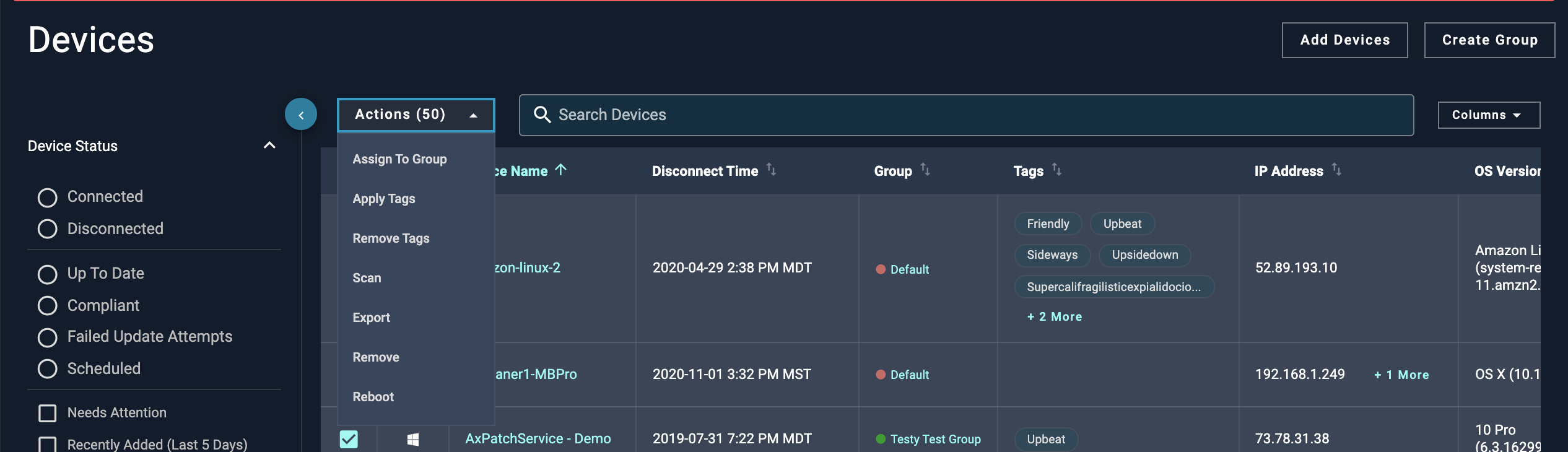
Hello Automox Community! I’m excited to announce that we have released the ability to bulk apply and remove device tags. With this feature, we’ve made it super easy to add tags to multiple devices with as few touchpoints as possible, and you can just as easily remove them. With this feature, you’ll be able to: Apply multiple existing and/or new tags to multiple devices Remove multiple tags from multiple devices Utilize our new batch APIs to automate applying and removing devices If you’d like to see how this looks, check out the following screenshots: Screen Shot 2021-09-01 at 9.51.58 AM2532×730 125 KB image1156×328 19.4 KB image1172×840 36.3 KB For more information, check out the updated documentation: User Documentation: Managing Devices | Automox Knowledge Base API Documentation: Updates multiple devices (server objects). As always, we’d love to hear your feedback on this new feature: What use case does this new feature help you with? How could we improve this feature?
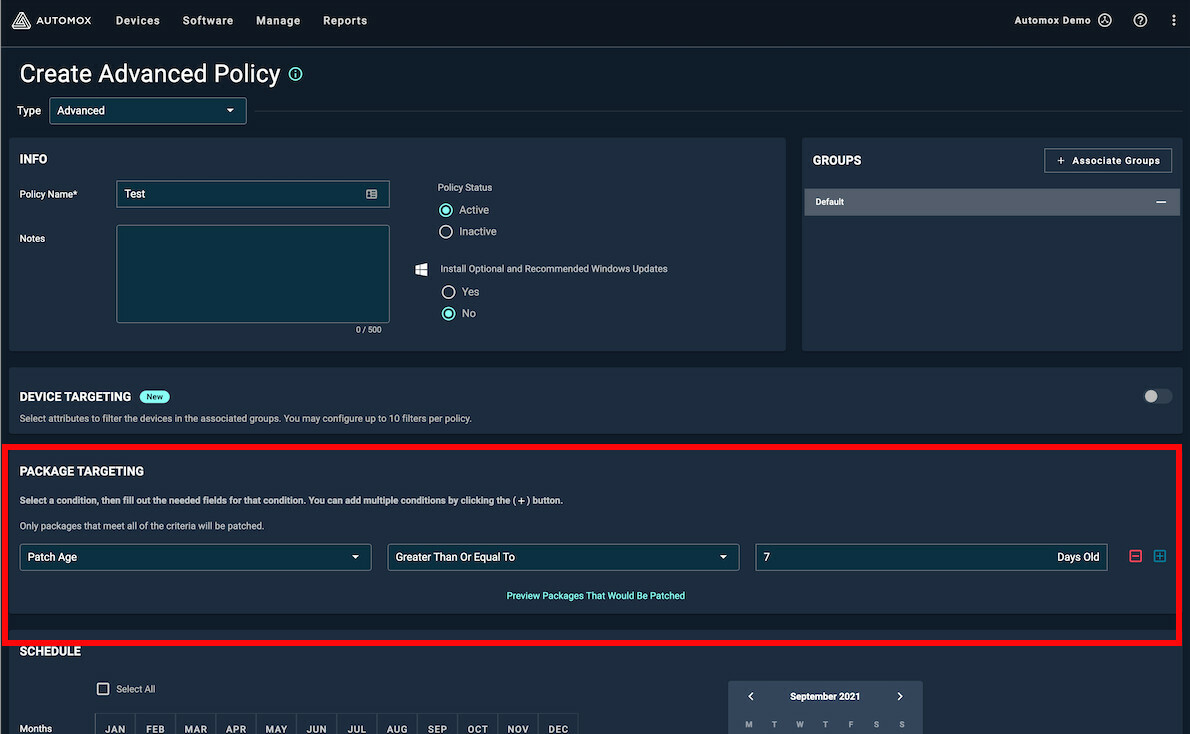
Today we released a new filter in the Advanced Policy for Package Targeting. This feature will be enabled in the Advanced Policy only. The package targeting section of the Advanced Patch Policy will: Allow the user to enter a # Days Old with validation from 1 to 180 Support greater than and equal to advanced_policy1190×734 114 KB As always, provide us your feedback.
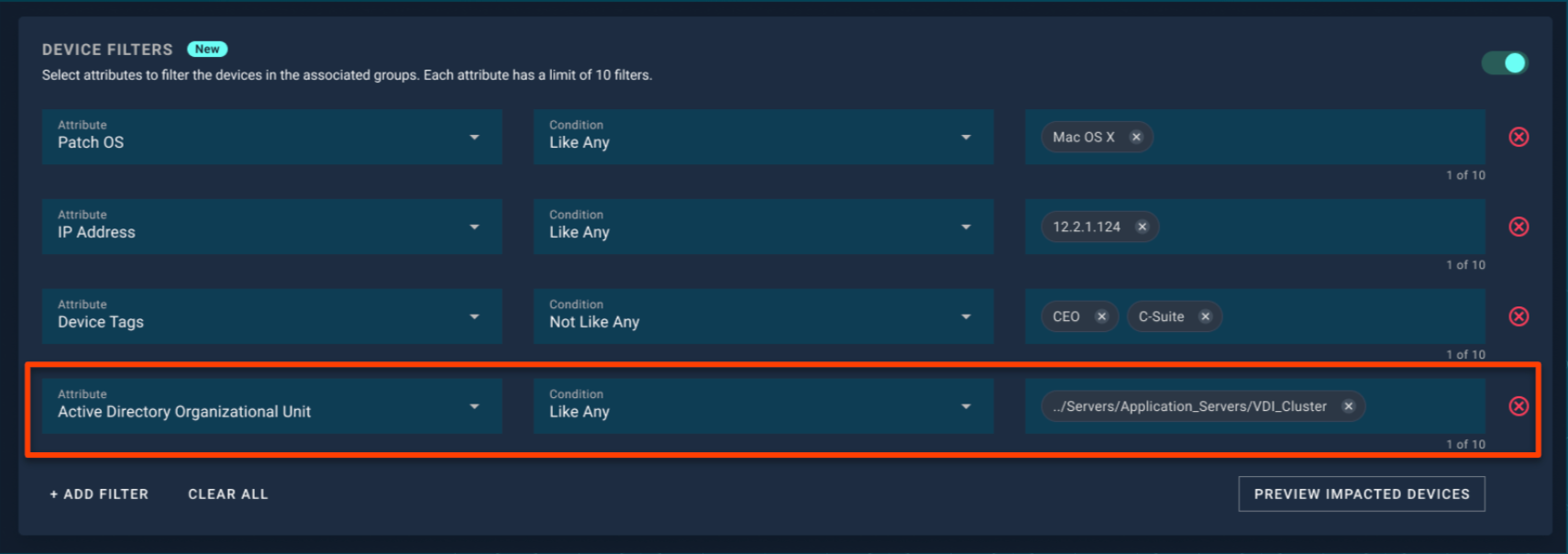
Hey Automox Community! I’m excited to announce that we’ve released an enhancement to the Flexible Device Targeting feature today. The new enhancement surfaces Active Directory Organizational Units as another filter option, so you will now be able to target devices based on their OU information. Whenever there’s a device scan, Automox will query the OU information for each device, and you can use the Flexible Device Targeting feature to create a filter. The OU information is surfaced in a path format, and you’ll be able to do a partial and exact string match on the path. Here’s a screenshot of what this looks like: image1710×604 128 KB For more information, check out the updated documentation links: User Documentation: Device Targeting with Filters | Automox Knowledge Base API Documentation: Policy Device Filters Preview As always, we’d love to hear your feedback on this new feature: What use case does this capability help you with? What other enhancements could we add to make Fl
We are beginning a phased rollout of Agent 32. This release includes additional security enhancements to the agent. I also want to note that we continue to work on Apple Silicon support for Agent 33, which is expected to be released soon after Agent 32. The agent will automatically update to the latest release across your endpoints. If you have any questions or wish to delay the Automox agent from automatically updating in your organization, please let Automox Support know at support@automox.com.
Hey All, We’re really excited to launch our brand new Developer Portal available here: https://developer.automox.com/ The Developer Portal contains our most up-to-date public API documentation, resources for programmatic use of the Automox platform and the ability to execute authenticated requests against the APIs directly in this user interface. Use this resource to see what’s new with our APIs and to review any upcoming major changes, as well. We look forward to continuing our investment in Automox APIs to further enable customers to bake Automox directly into their custom business logic. Next up are things like client libraries and SDKs to help folks get moving even faster! We’d love to hear your feedback on the Developer Portal and what other things you look forward to seeing from the Automox team when it comes to our APIs.
https://support.automox.com/help/release-notes-for-week-ending-07302021
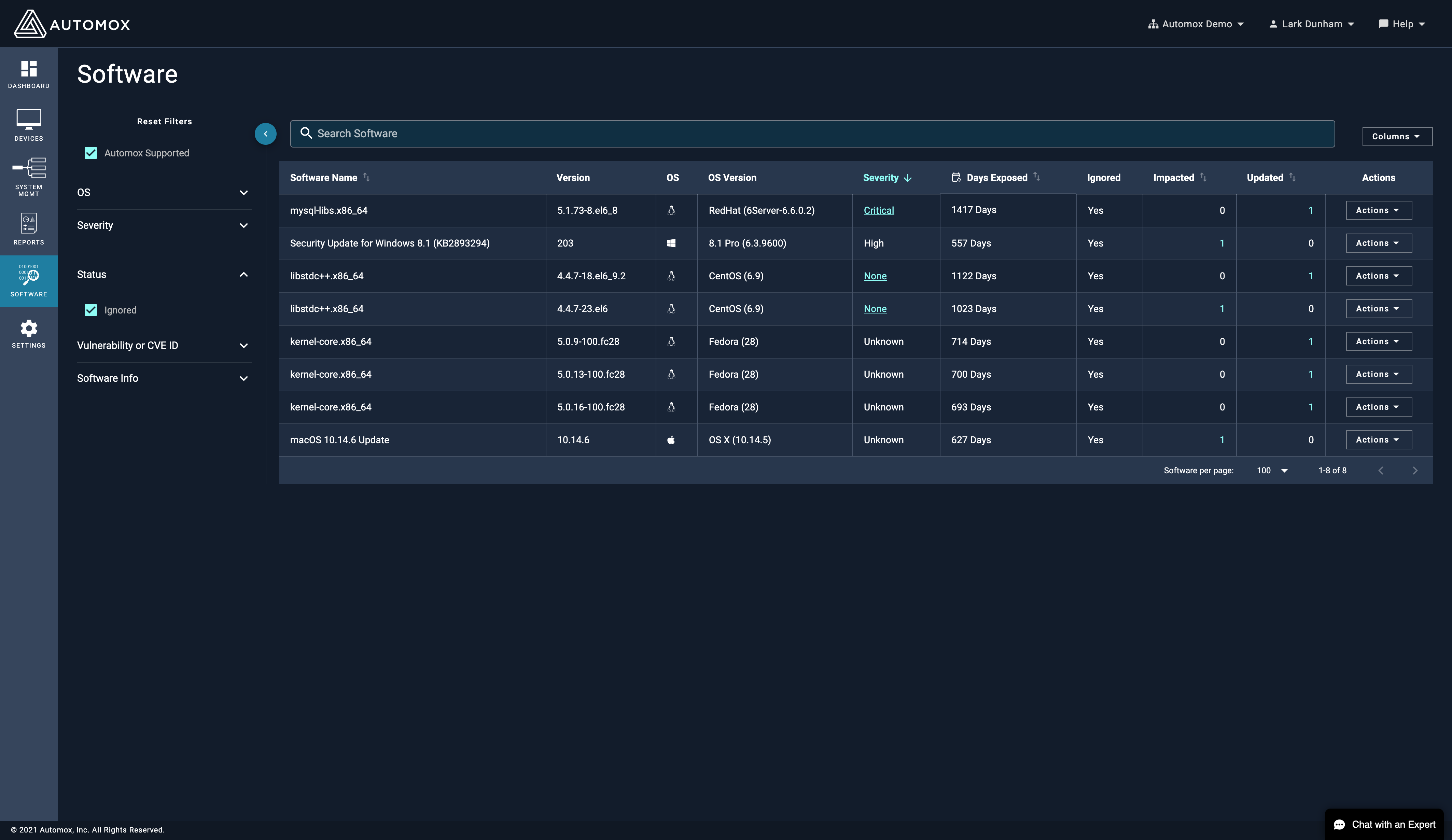
The Software page on the console now has a filter to show Ignored software. screencapture-console-automox-software-2021-04-09-13_39_074252×2460 597 KB Happy Friday!
https://support.automox.com/help/release-notes-for-week-ending-07162021
The Automox agent will be compatible with macOS’s latest major release, Big Sur, which debuted as a stable release on November 12, 2020. All of Automox existing functionality will be available on macOS Big Sur. Please note that all new mac hardware will only run macOS Big Sur. Additionally, older hardware will ship with Big Sur installed out of the box (technically downgrade-able). We will continue our work to eventually support ARM based devices, however, Apple’s Rosetta 2 emulator will ensure compatibility for newer mac hardware in the meantime. We are planning on release in early December. Please check back for updates! CC: @ncolyer
https://support.automox.com/help/release-notes-for-week-ending-07092021
Already have an account? Login
No account yet? Create an account
Enter your E-mail address. We'll send you an e-mail with instructions to reset your password.