










Extra! Extra! Read about new features, release notes, and product updates!
Recently active
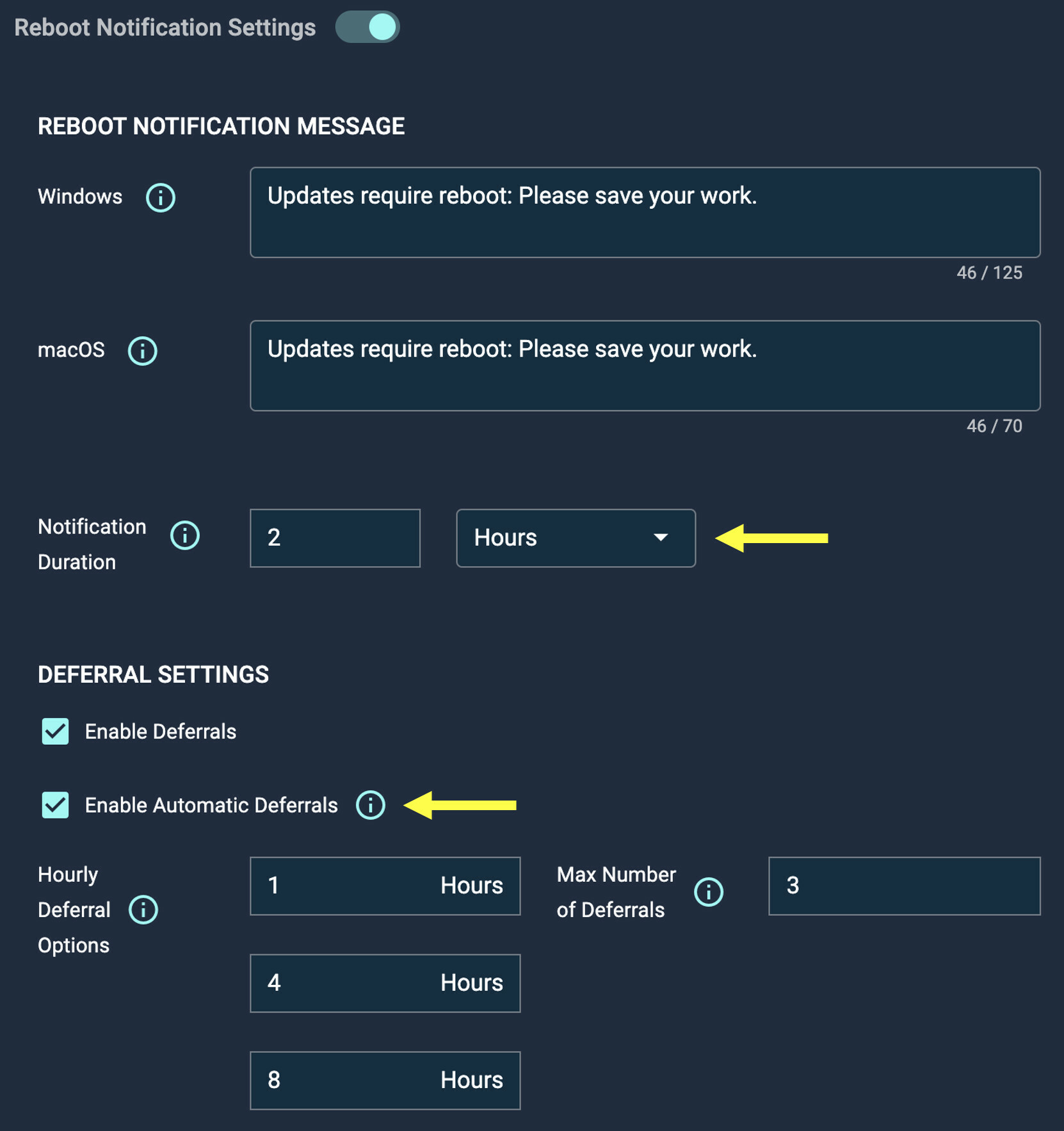
Today we released two new patch policy features to give admins even more control over end user notifications: Customizable Reboot Notification Length Admins can now customize the length of time that a reboot notification is displayed to the user, from 15 minutes up to 8 hours. Automatic Reboot Deferrals Admins can now enable automatic reboot deferrals when end users do not acknowledge the reboot notification at all. One of the user’s available deferrals will be automatically consumed on behalf of the user until they are out of deferrals. Automox will choose the longest available deferral time. Once a user is completely out of deferrals, their machine will restart instead. image1662×1766 184 KB
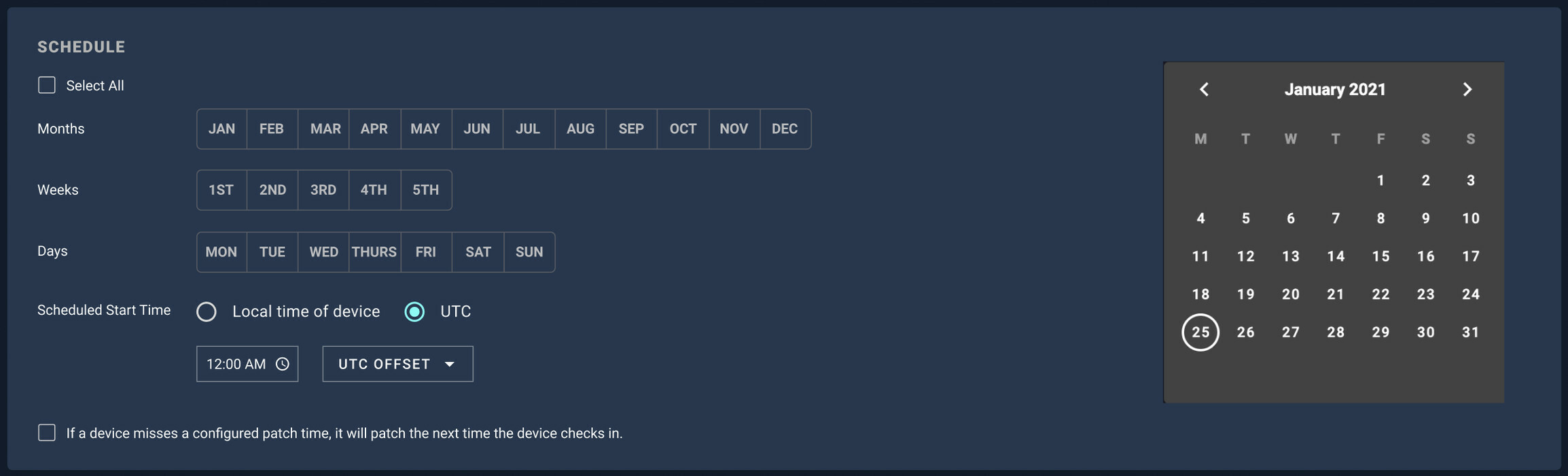
Today we released a feature that will allow for configuration of a UTC time for policy execution. We will continue to support local device time as well. Essentially, we can now grant users that choice. You’ll be able to patch off hours in a local user’s time zone. Or, you’ll be able to pick a precise start time for patching, regardless of time zone. Companies are more distributed than ever, and we’re giving you a powerful choice in policy scheduling. image2308×700 110 KB image2308×698 111 KB As always, we would appreciate your comments and feedback.
https://support.automox.com/help/release-notes-for-week-ending-06182021 Bug Fixes Fixed an issue with creating Data extracts in Firefox.
https://support.automox.com/help/release-notes-for-week-ending-05282021 A new Data Extracts option is available on the Reports page that allows customers to export detailed device information data and historical patching activity. More info: Data Extracts | Automox Knowledge Base
For those of you deploying Automox via your image deployment software, here’s instructions on how to setup Automox for the gold image to avoid duplicates showing up in the console. https://support.automox.com/help/how-to-create-a-gold-image-vm
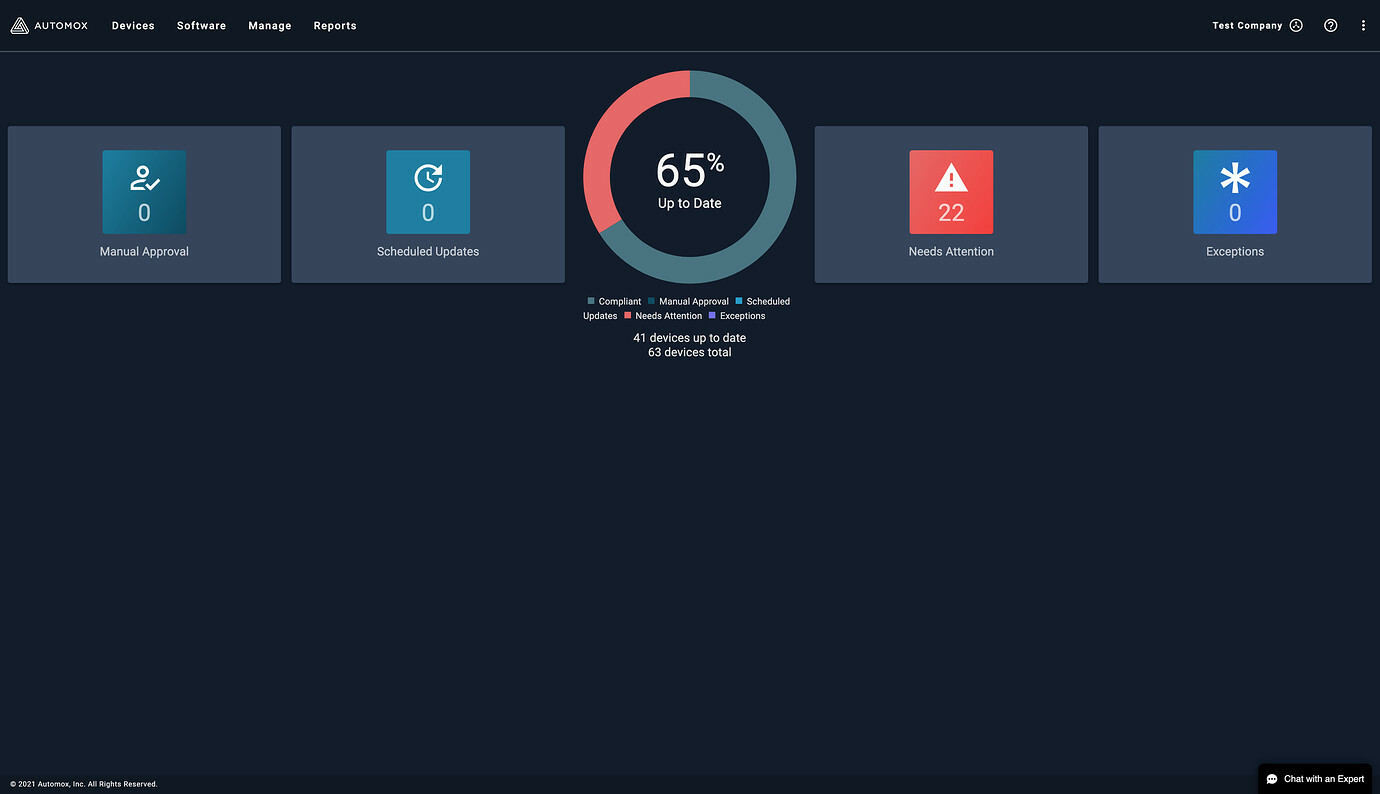
Today we released new console top navigation! We hope you enjoy the additional screen real estate and more intuitive navigation. Reply to this thread to provide us feedback. Thanks! image1380×794 65.2 KB
https://support.automox.com/help/release-notes-for-week-ending-572021
We’re very proud to announce our next funding round! Get all the details here: blog.automox.com Automox Secures $110 Million in Series C Funding to Modernize IT Operations Automox, the cloud-native endpoint management provider, today announced it has secured $110 million in Series C funding to accelerate its vision to modernize IT operations with a comprehensive, cloud-native platform.
https://support.automox.com/help/release-notes-for-week-ending-04232021 Bug Fixes Resolved an issue in detecting the device reboot status on RHEL 8.3.
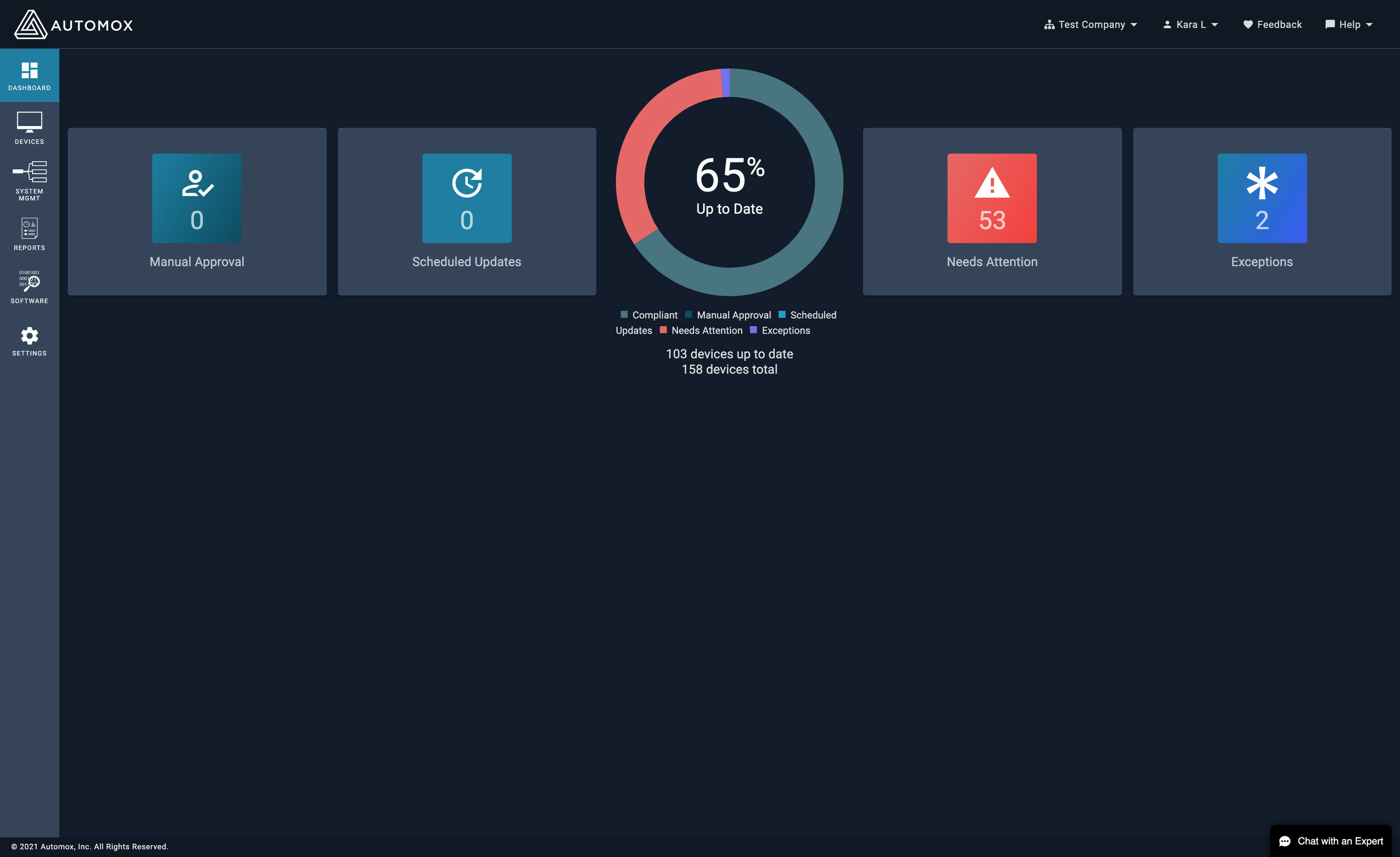
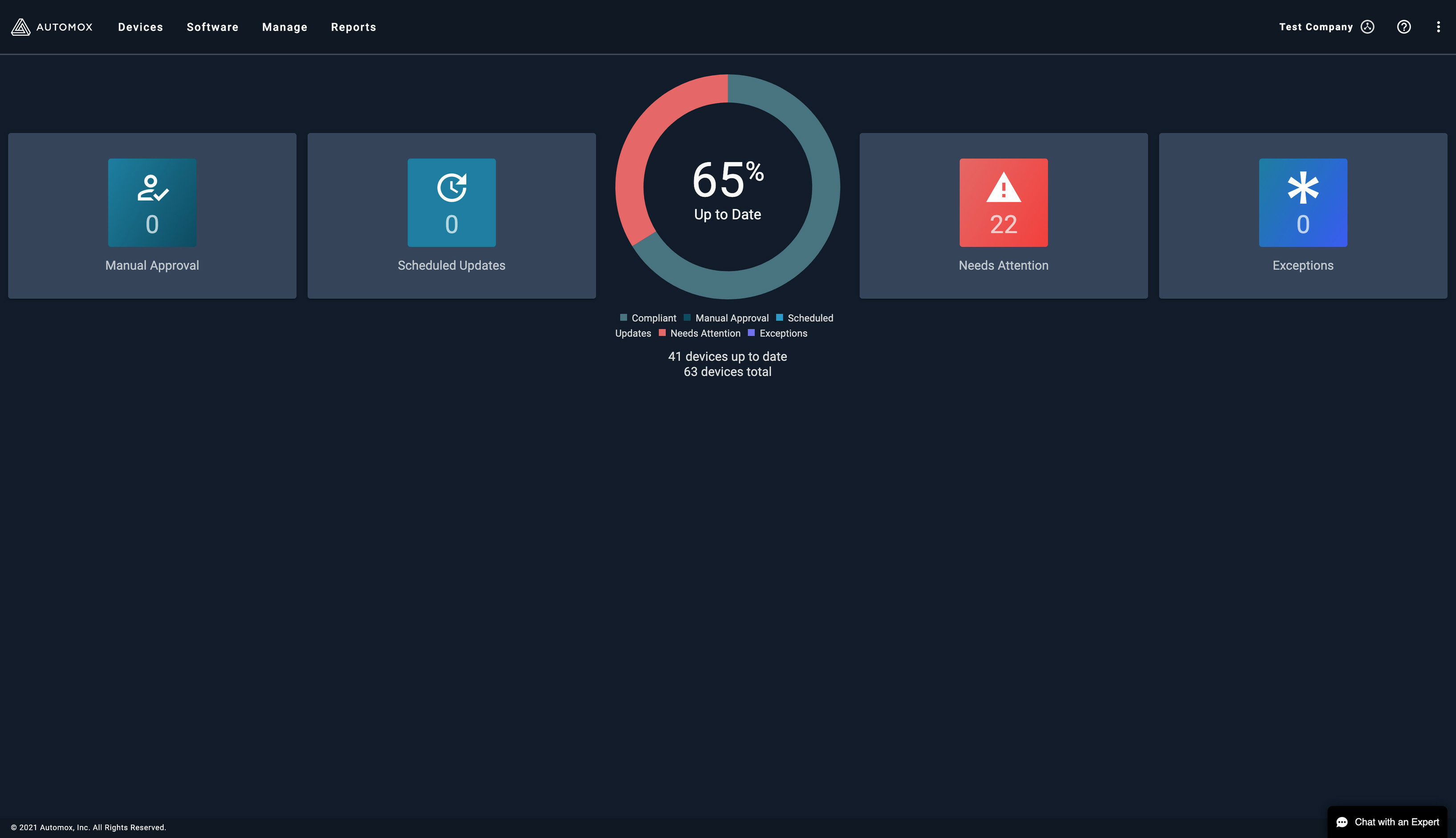
Later this week we will be releasing an update to the console to refresh the colors to better align with our new Design System. We are excited to release this foundational work over the coming months which will help us build a more consistent and user friendly experience for console users. A few screenshots below: image3354×2053 255 KB image3354×3910 957 KB image3354×1957 327 KB We welcome your feedback once our new colors are live.
Next week we plan to launch a new navigation on the console, moving from a left navigation to a top navigation design. The change will hopefully be very easy for you all, most of of the button just move from the left to the top with the biggest change to the Settings button moving to the far right of the top navigation. Below are some screenshots: image3270×1882 216 KB Top Navigation: image1184×174 25.2 KB Org Navigation: image822×700 25.5 KB Documentation Navigation: image550×618 22.4 KB Settings Navigation: image528×726 21.6 KB
https://support.automox.com/help/release-notes-for-week-ending-04162021 Bug Fixes Performance increase and bug fix for larger Activity Log report runs.
https://support.automox.com/help/release-notes-for-week-ending-04092021 Enhancements Release of this will prepare us for slow-roll upgrade of Agent 31 deployment, however agent downloads will now point to Agent 31. Policies using uploaded files will now use more secure presigned URLs for downloads. The deduplication algorithm on the Activity Log report has been improved for both speed and accuracy, customers should see fewer duplicates and a much more responsive interaction with this report. Updates the number of scheduled updates in the dashboard within a few seconds of a customer ignoring software updates. You will no longer be able to submit os_family via API as a configuration option for a Patch Policy. If you submit an os_family, it will be automatically removed during the processing of the request.
We will begin a phased rollout of the Automox Agent starting tomorrow, April 6. This release includes quality of life and security enhancements. These include the following: Custom policy logging changes Fix for a typo when issuing the --help command against the agent The agent will automatically update to the latest release across your endpoints. If you have any questions or wish to delay the Automox agent from automatically updating in your organization, please let Automox Support know at support@automox.com.
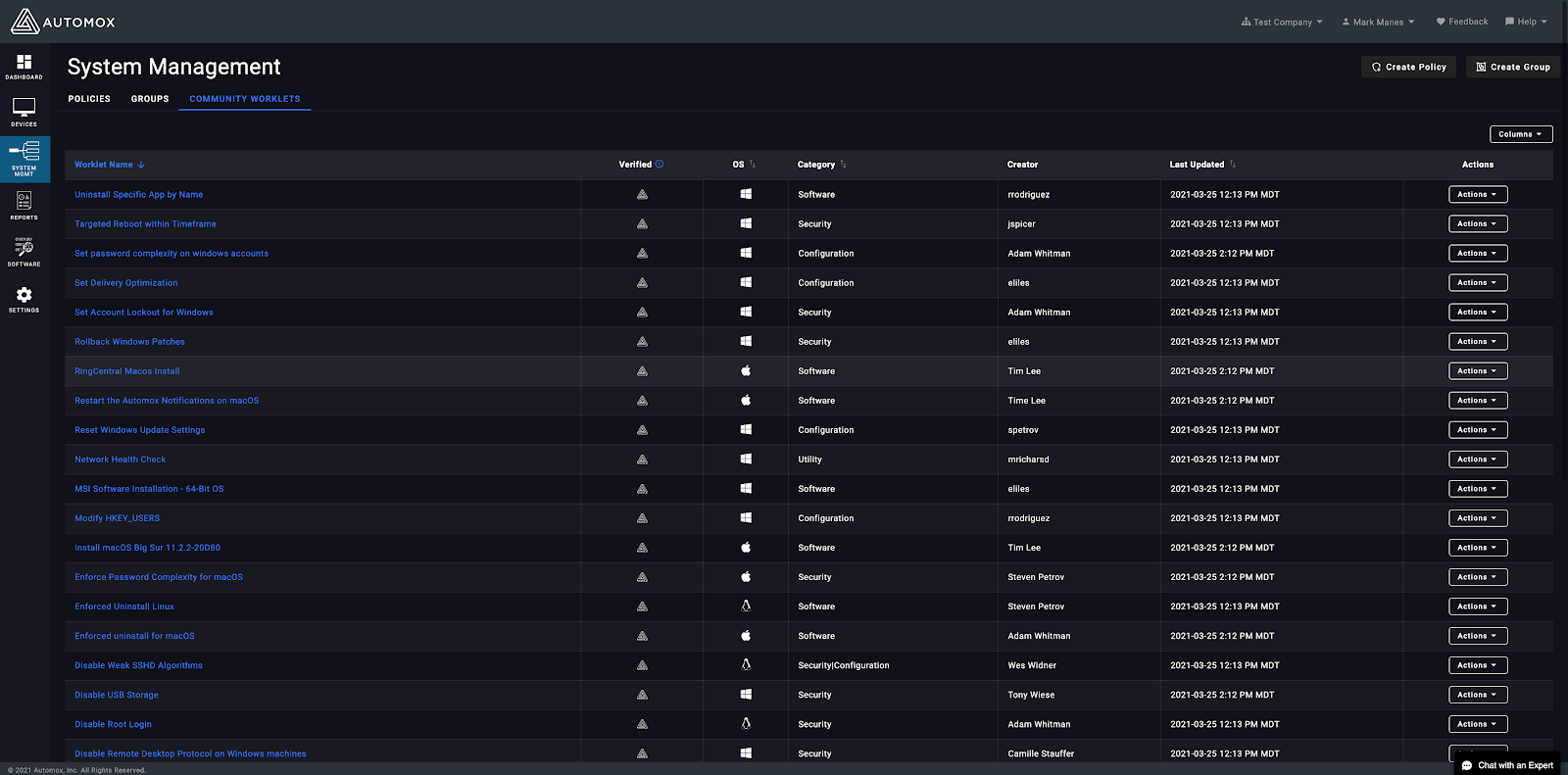
We are excited to announce the release of a new capability empowering the review, customization, and adoption of Community Worklets all from within the Automox Console! This capability can be found within the System Management page as depicted in the trailing screenshot below. From the Community Worklets tab, click any choice Worklet to review and preview the associated details of Evaluation, Remediation, Author, Notes, and more. Create Policy will draft the selected Worklet into the existing Worklet creation convention. If unfamiliar, this process is detailed in the Automox Console documentation. Be sure to consider fellow co-workers when testing new Worklets by applying an appropriate naming convention or prefix of intent such as “testing”. This helps in sorting later to prune temporary creations easier. Read more about this exciting new capability on our blog and leave us your feedback! image1600×791 202 KB
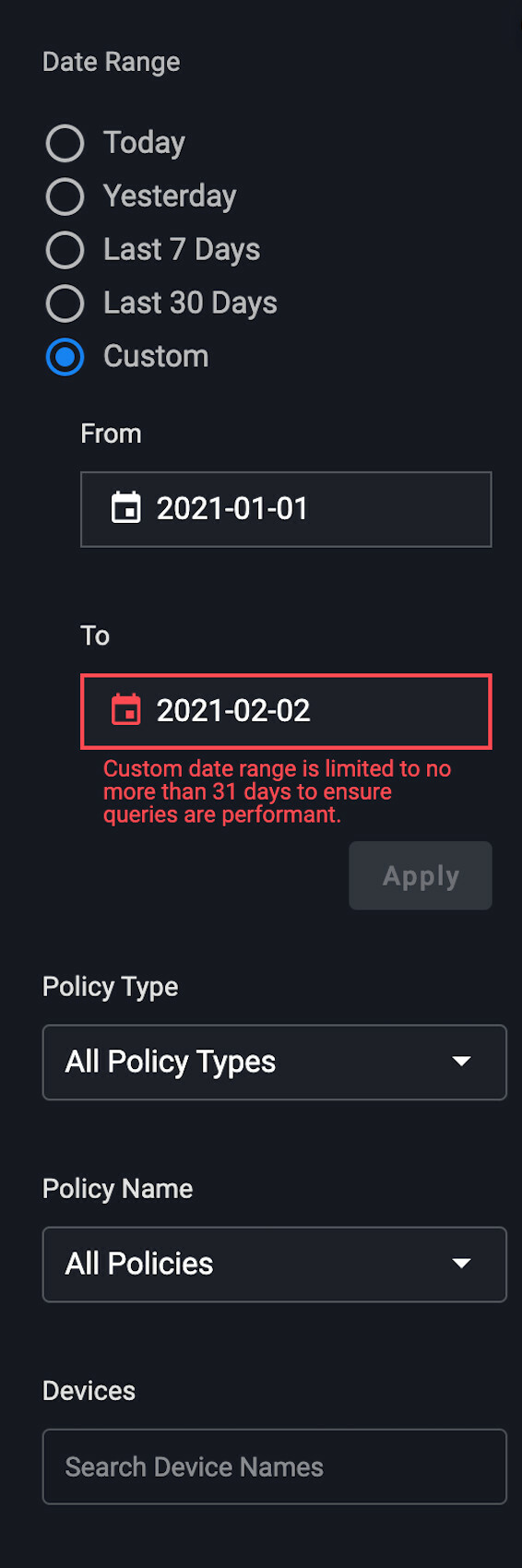
We will be rolling out updates to the Activity Log likely later this week based on final testing efforts. Highlights include: Faster queries and results Custom date ranges are limited to 31 days Results page has pagination image566×1700 99.9 KB image980×124 3.06 KB Post here if you have any questions.
Bug Fixes The Device ID sort on the Devices page will now work as intended. Sorting by group name now works correctly, with the special case of the Default Group always being first by name. Users will see an status of expired if a previously completed report is no longer available.
https://support.automox.com/help/release-notes-for-week-ending-03122021 Bug Fixes Resolved an issue with the Device ID sorting on the new Devices page.
Release notes: https://support.automox.com/help/release-notes-for-week-ending-03052021 Enhancements A new or existing user invited to an organization is no longer automatically logged in on acceptance, they must log into an organization first. (03/05) Bug Fixes Worklets run with the Execute Now feature will only execute on the corresponding OS associated with policy. (03/05) For those who keep up on our release notes, you’ll have definitely seen that the last few weeks have been quiet. It isn’t for lack of doing, but for a lack of saying. Going forward we will be making a stronger effort to keep you all informed of all the great bug fixes, features, and workflow enhancements that come out. Catch you next week!
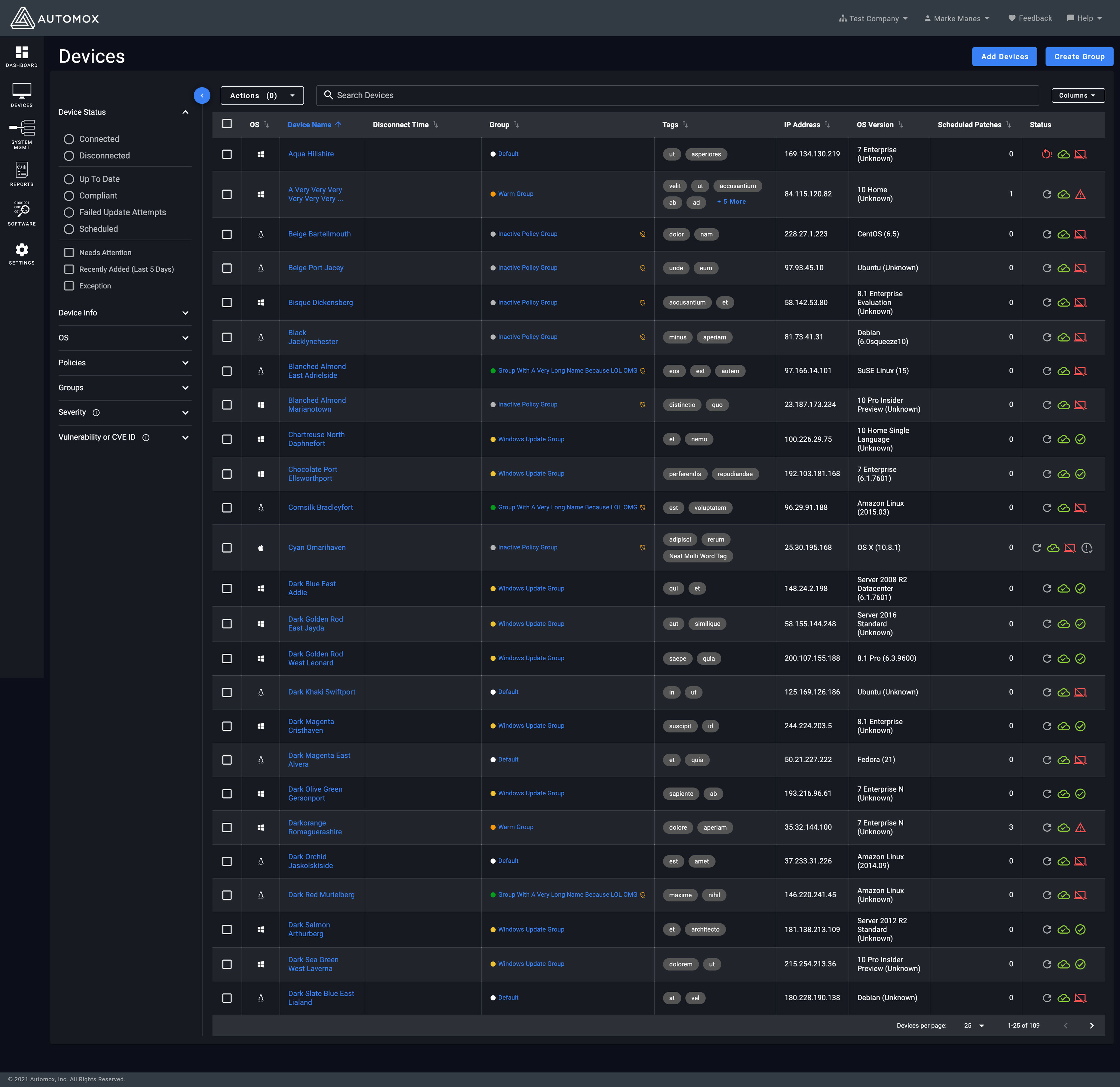
The anxiously awaited Device Page will be migrated to Vue very soon! The targeted release is in the next couple weeks, pending final testing. The updated page includes: device, policy and connection status with the new icons configurable columns including the ability to add Last Logged in User cleaner interface for bulk actions Screenshots: image3726×3615 1.1 MB Columns: image416×1016 31.6 KB Device Filters: image524×2150 73.9 KB
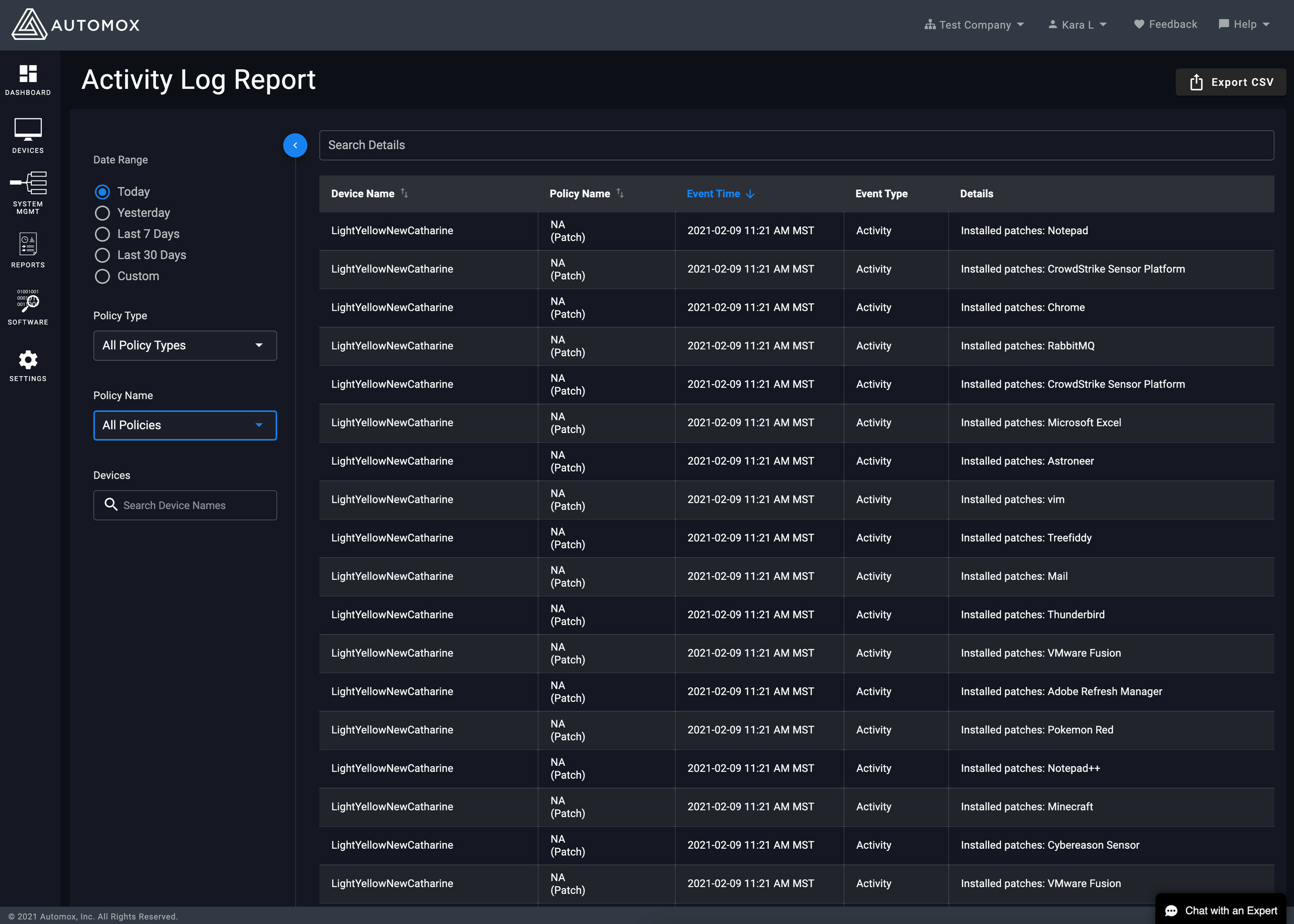
Later this month, we will be releasing an updated look and feel for the Activity Log. We will be moving the Activity Log to a dark theme. We have also moved the search and filters to a collapsable left panel. Both of these updates will bring the Activity Log more inline with the rest of the console experience. Some screenshots: image2564×1831 494 KB image536×1012 37.1 KB image562×1146 42.3 KB
We are excited to announce the release of Agent 30 for Automox coming Thursday December 10th. This agent will include several key improvements such as: Being able to pass the starting group argument to the MSI installer for Windows Bulk installs. Big Sur support. Better and more secure Automox agent. The Automox agent will have an even smaller footprint on systems with a 30% reduction in overall size. Several other improvements in overall functionality/reliability of the Automox agent. The agent should automatically update to agent 30 without having to do so for your Automox endpoints. If you wish to delay the Automox agent from Automatically updating, please let support know at Support@automox.com.
https://support.automox.com/help/release-notes-for-week-ending-01292021 Enhancements A new design for the Device Details page Details available Here
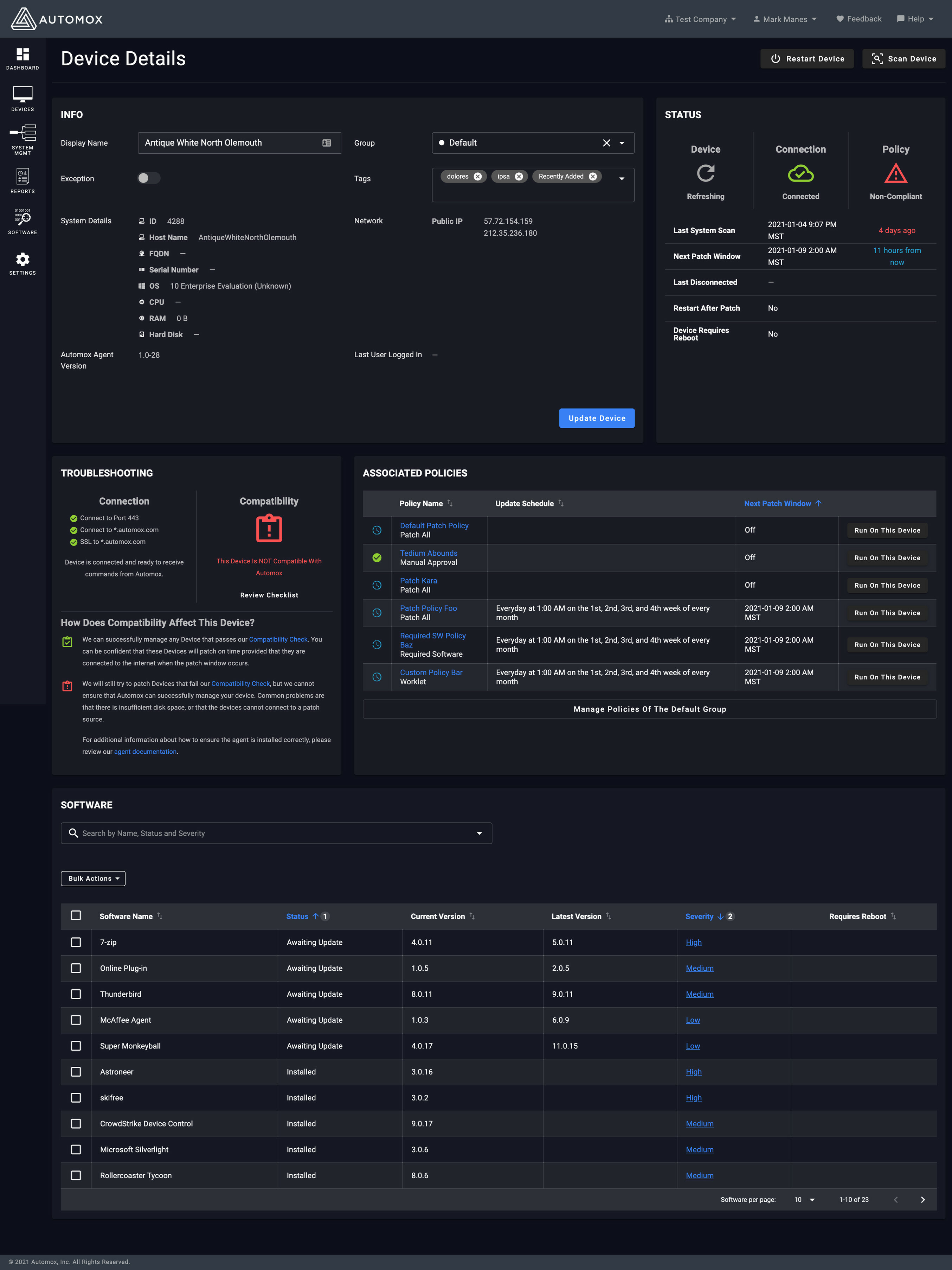
Today we released a new Device Details page as part of our overall Vue migration. The updated design of the Device Details page has been updated with a few enhancements. Auto save for editable Device attributes has been changed to an explicit action. We are now exposing the status for the Device, Connection and Policy. The icons for each status has had a minor refresh. The policy and software tables remain sortable with the same actions exposed. As always, we would love to hear your feedback - so feel free to reply to this thread with your thoughts. image2708×3611 738 KB
As an admin, you can now enforce email 2FA for your entire organization. Please navigate to Settings > Security to check it out! To manipulate individual users, please go to User Accounts, select the user(s) and click on the Actions drop down button. Drop a line with any questions. Have a great weekend.
Already have an account? Login
No account yet? Create an account
Enter your E-mail address. We'll send you an e-mail with instructions to reset your password.