








Get the latest product updates, ask technical questions, and learn best practices
Recently active
Anyone using Automox to track missing mandatory software on a workstation? Such as CrowdStrike, etc.
I am trying to install MSI file using automox. unfortunately everything I try fails exept executing the MSI install from BAT file. If I place the MSI command in a BAT file the deployment works correctly. Here is the BAT file command which works for deployment using automox: QuickCardSetup.msi /qb tclientkey=ClientKeyHere then in automox I have: return $(Start-Process “cmd.exe” “/c quickcard.bat” -Passthru -Wait).ExitCode if I try to do the same using powershell the execution will eventually time out: exit(Start-Process -FilePath ‘msiexec.exe’ -ArgumentList (’/qb’, ‘’“QuickCardSetup.msi” “tclientkey=ClientKeyHere”’) -Wait -Passthru).ExitCode I have tried different arguments without any luck /i /qn Not sure what I am missing. Any help is appreciated.
https://support.automox.com/help/week-in-review-release-notes-for-week-ending-10162020 Enhancements: New third-party title Viscosity available for both Windows and Mac. (10/15) Bug Fixes: The Automox installer now properly detects RHEL 7 Workstation and installs the agent. (10/16) There were so many infrastructure and backend optimizations made this week that aren’t being noted here. Happy Friday, everyone!
Got a worklet you’ve written that you haven’t gotten around to sharing on the Automox community? We’ve got just the thing to motivate you: an Automox Yeti mug as a reward. How does it work? Post your original worklet to the community and we’ll send you a mug, just that simple. You can get multiple mugs if you post multiple worklets. Or if you’ve got more mugs than you know what to do with, we can send you other Automox swag instead. To share a worklet, click on New Topic then select Worklets as the category. After putting in the title and your code, click on Create Topic. Note that new worklets don’t go live immediately as they go into a queue for review. Once we’ve tested out your code to make sure it works and doesn’t do anything malicious (such as “sudo rm -rf /”), your worklet will go live and you’ll receive details on how to redeem your mug. Tip for posting code blocks to the community: put three backticks on the line above and below your code to format it as a code block.
October Patch Tuesday updates are now available! Check out what Automox experts have to say about this month’s release and what you should consider: https://blog.automox.com/automox-experts-weigh-in-on-octobers-patch-tuesday-release
Not sure if this is the right forum / place for it (feel free to move) but figured I’d snap a pic with the fine mug y’all graciously sent over. Feel free to post your mugs and favorite drinks! Cheers! IMG_12713024×4032 1.39 MB
https://support.automox.com/help/week-in-review-release-notes-for-week-ending-10092020
You know how there is a checkbox in the worklet schedule for "If a device misses a configured patch time, it will patch the next time the device checks in” ? What constitutes a “checks in” event? If I reboot my computer, and then the machine starts up again and the Automox agent connects back to the Automox cloud, does that count as a “checks in” event?
In mid 2019, Microsoft implemented a change to the way Windows 10 Feature Updates are managed with Windows Update. Once the May 2019 Cumulative update is installed (for all supported Windows 10 production channels), Feature Update deferrals were no longer honored, and the Windows update Agent became aware of the Installer split between the CBS (patches) and the Upgrade Engine (for Feature Updates) in the Unified Update Platform (UUP). Get started with Windows Update - Windows Deployment Improving the Windows 10 update experience with control, quality and transparency This change caused Feature Updates to no longer appear as Windows Updates under device software in the Automox Console. NOTE: Before a Windows 10 version is scheduled to go out of support, Microsoft publishes the Feature Update differently and they become visible again. Microsoft explains this experience in the link above: “When Windows 10 devices are at, or will soon reach, end of service, Windows update will continue to
New Automox customer/Admin here. Just onboarding my fleet and had a question about managing defender definitions. We’re a Defender ATP customer, also leveraging Intune for system/policy management. We’ve decided to offload the patching to Automox. So I’m following this best practice article : https://support.automox.com/help/what-are-the-recommended-best-practices-for-patching-in-automox Question is, do you all let Automox manage your defender definitions? Or any Intune folks out there that let MS handle that? Kind of on the fence of which way to go.
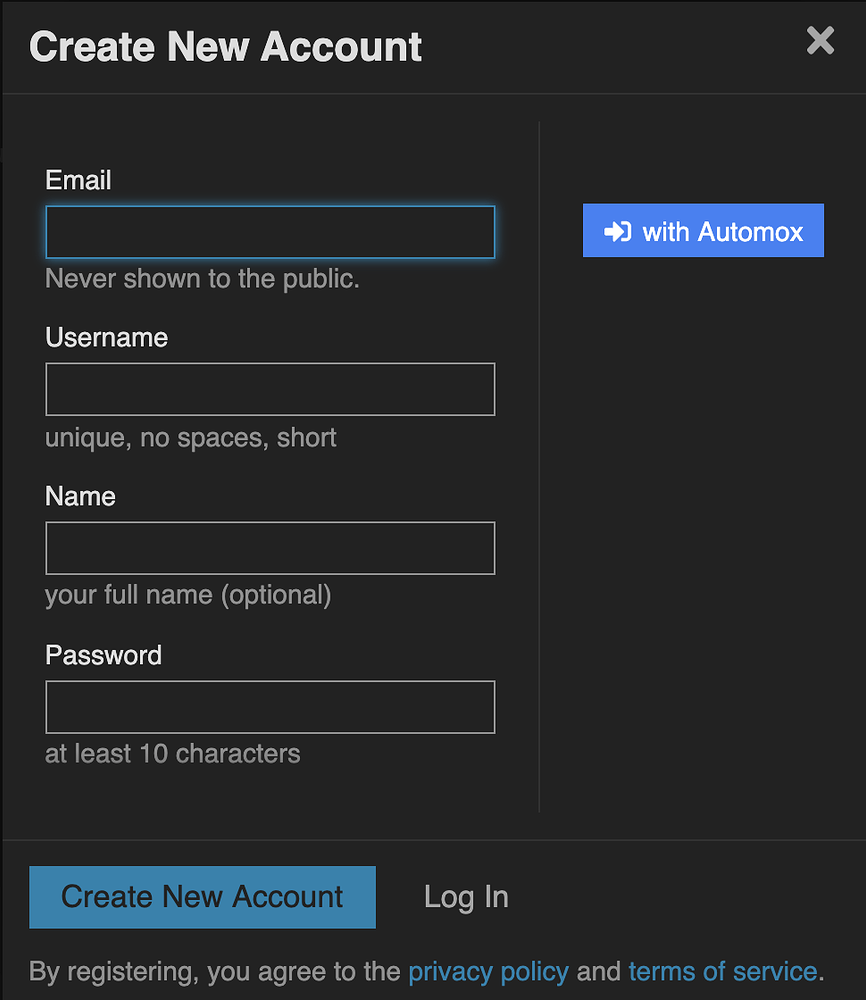
We’ve recently added the ability to log into the Automox community using your console credentials via Oauth. This is the same process that is used when you click on a “Log in with Google” or “Log in with Facebook” button on a website to avoid having to create and remember a new password. If you’re new to the community and want to create your community account using your console credentials, click on Sign Up and then click on the “with Automox” button: image866×1000 56.9 KB If you are already logged in to the console with your Automox credentials (in the same browser) then you’ll be prompted for permission to allow the community to make use of your console account to log in. If you aren’t logged in then you’ll be prompted to first log into your console then the request for authorization will appear: Screen Shot 2020-10-01 at 10.10.55 AM1170×944 43.5 KB Clicking on Authorize will allow you to complete the signup process: Screen Shot 2020-10-01 at 10.12.19 AM960×912 55.5 KB Note that yo
This script will apply multiple policies from your organization to a system. Say you always apply the same five policies to a newly built system, you could use this to apply those policies with one click to your new system. This will install any policy available in your organization regardless of whether it is attached to the group the system is in or not. Make sure you’re not attempting to apply a macOS/Linux worklet or required software to a Windows device. Just set the following: $apiKey = 'YOUR_API_KEY' - in your console, go to Settings->API and select the API key. Note that the API key is per admin user, so you and another admin in your console will have different API keys. $orgID = 'YOUR_ORG_ID' & $serverID = 'YOUR_SERVER_ID' - put your Org ID & Server ID which can be found by looking at the URL on the device page and selecting the value after the “?s=” & “?o=”: [https://console.automox.com/device-detail?s=99999&o=1234]. In this example the Server ID is 999
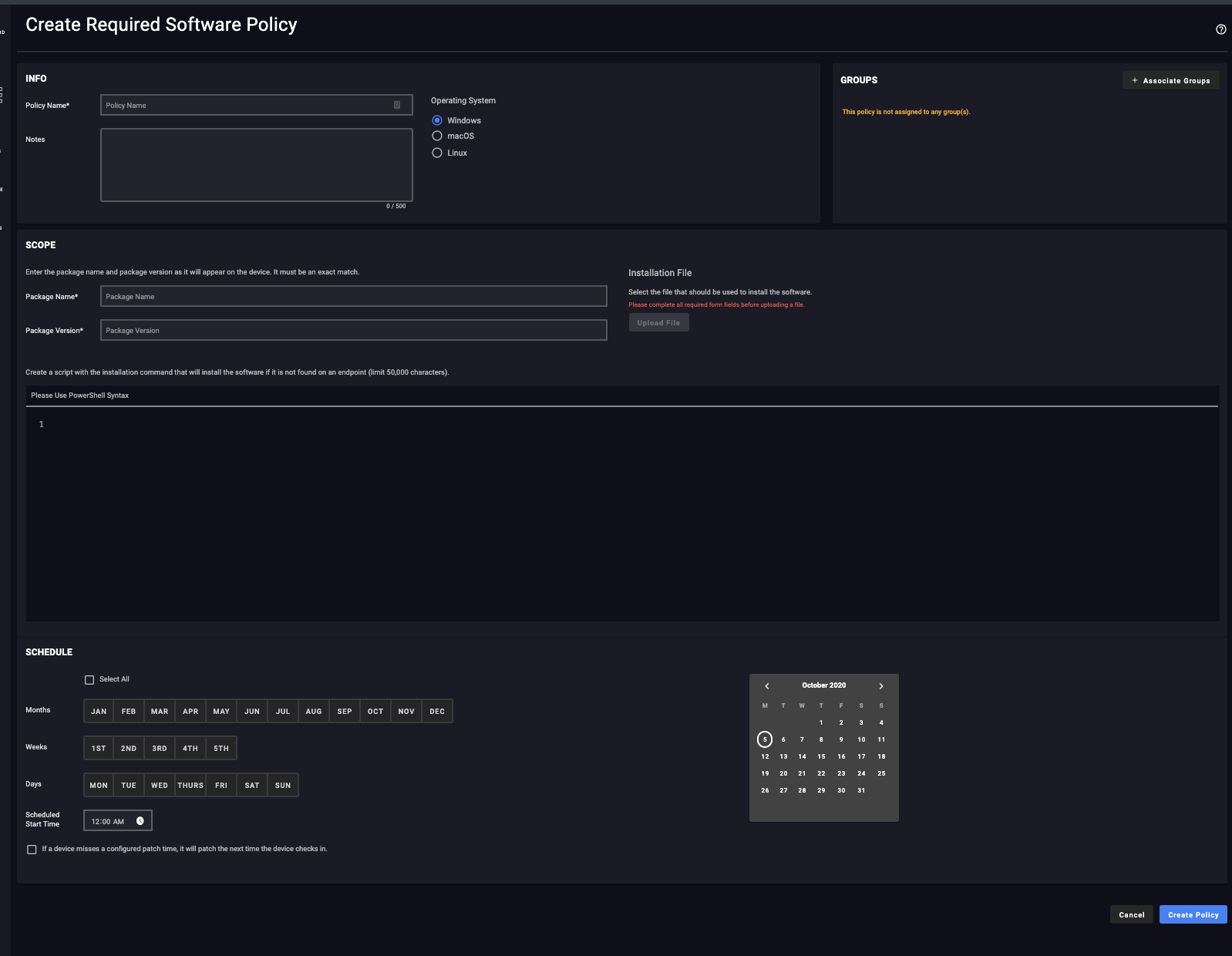
Today we released an update to the Required Software policy page. You will see some of the same updates we made on Worklets on this page. Screenshot is below: image1598×1240 66.2 KB Coming Soon: In the coming weeks, we will be releasing updates to the remaining Policy pages. There are no significant changes to the Policy functionality, but the update includes a more polished design with improvements to the user experience. Small usability improvements include a more intuitive interface for the calendar and notifications. Additionally, the manual policy workflow has been improved by separating out the policy information from the patch approval process.
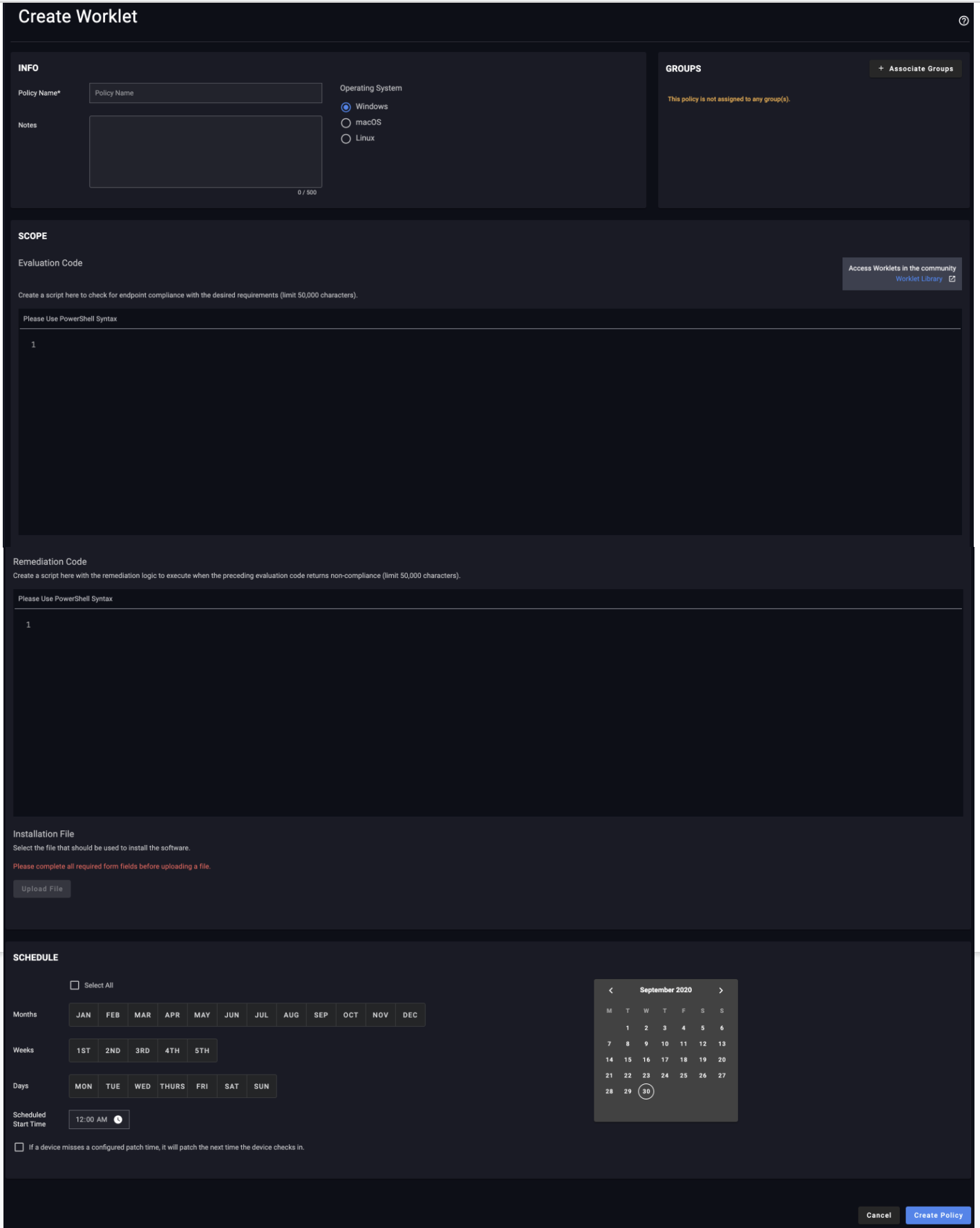
Today we released the first in a series of updates to the console policy pages - Worklets. The page has an updated look and feel as well as some usability improvements in the group association and the schedule function. We’ve also included a direct link to the community contributed worklets. We’d love to hear your feedback on the new designs, please reply to this message. More updates in the coming weeks for the Required Software and Patch Policy pages. image1418×1776 194 KB
I’m starting work on a project to turn the community homepage into more of a landing page to collect all Automox resources and information. Something similar to this: https://communities.vmware.com/welcome What information is most crucial for you to see on this new homepage? Vote for features below and add your suggestions by replying to this post. We’ll be using your votes to determine what to include and placement on the page: Latest KB articles Release Notes Latest/Top Worklets Latest Critical Patches Community Leaderboard Featured & Upcoming Videos/Webinars Top Feature requests Latest Product Roadmap Blog & Twitter feeds Latest Community Topics My Support Tickets Automox StatusPage Automox Job Openings Documentation Updates API Updates Swag Store Featured Interviews Community Polls Latest Photos Featured Community Member 0 voters
What’s the best way to get email alerts sent to a non user address? I’d like to send patch failures to our helpdesk. Should I just set up a user account for this task? Thanks
To execute - run .\CleanAutomoxDevices.psl (includes help on required paremeters) Example run MVP run: .\Clean-AutomoxDevices.ps1 Params: orgID (required) - Your Automox Org ID apiKey (required) - Your Automox API Key maxDays (optional) - Defaults to 120 days. Override with any reasonable number. apiEndpoint (optional) - What is the API endpoint to communicate with Automox? logFolder (optional) - Override log folder. Defaults to popping out a log where script is run apiTable (optional) - Override location in URI servers are found. This probably will never be used weaponize (optional) - must be set to $true if you want anything other than a test run. -verbose: All meaningful output not in the log can be brought to screen using this command. Most screen output is hidden without this param. Destrictive run: .\Clean-AutomoxDevices.ps1 -weaponize $true All parameters are position and will be acceppepted either by their location in this above list - or using -. Also supported use -verbos
https://support.automox.com/help/week-in-review-release-notes-for-week-ending-09252020 Enhancements: For CrowdStrike linked accounts: Addressed issues where the trial status was occasionally out-of-sync between CrowdStrike and Automox. (9/23) Misc. query optimizations and performance enhancements. Bug Fixes: Improved SAML Setup using Identity Provider (IDP) XML Metadata and addressed issues with Azure IDP XML content. (9/23)
Automox currently supports Windows’ WSUS server functionality, and coming soon we will also support their alternate WSUS field. This means your roaming/remote users will be able to fail over to an externally facing WSUS server. Stay tuned for a future post announcing when this will be live!
We are excited to announce that Pascal Borghino has joined Automox as VP of Engineering and Architecture. His experience at IBM, Yahoo!, WeWork, and Twitter brings a unique vision, passion and excitement to Automox. Check out our press release announcing this news: https://blog.automox.com/engineering-infrastructure-professional-pascal-borghino
Looks like typical Microsoft introduced a new GPO option in the Security tab, and it breaks part of MMC. Theres a workaround that involves deleting the regkey and readding it once a hotpatch comes out. We experienced this error and caused a fair amount of confusion. Hopefully it saves one of you guys from a panic attack. Cheers. https://borncity.com/win/2020/09/14/windows-server-2016-update-kb4577015-verursacht-gpo-mmc-wsecedit-dll-fehler/
Hello Automoxville, I was wondering if any of you wonderful people have tried to uninstall the AlienVault agent with Automox? We just switched to a different SIEM vendor and AlienVault’s documentation for uninstalling the agent via script is not very helpful. https://cybersecurity.att.com/documentation/usm-anywhere/agents/agent-script.htm?Highlight=uninstall%20agent Any assistance would be greatly appreciated.
Hi Guys, I was curious, are any of you guys deploying certificate signed PS scripts with Automox? Are Worklets with code inside treated as ‘ad-hoc commands’? Or do we need to upload the signed .ps1 and reference it in the remediation of the worklet? I haven’t found a ton of information in the knowledge base or on the forums. My security team is pushing me to stop running unsigned scripts in our environment (for obvious reasons). I’d love some feedback on this, Thanks.
Now Live!! I am happy to announce we have released a new email template for the Automox emails. Please refer to this thread for more details: Coming Soon: Updated Email Design Reply to this post should you have any questions.
I am running into an issue with a cleanup worklet I am writing. If I try to do anything in a users Downloads folder (/Users/username/Downloads) the commands return nothing, as if the directory is empty. The same behavior exists whether its a find command, or just a simple ls. I can do an ls on /Users/username, but not /Users/username/Downloads, and both directories are world readable. running the same bash script from the command line both as root and as a non admin user show the script working fine. I must be missing something obvious, but is there a reason automox wouldn’t be able to do this? or do I have some permission messed up?
Already have an account? Login
No account yet? Create an account
Enter your E-mail address. We'll send you an e-mail with instructions to reset your password.