






Get the latest product updates, ask technical questions, and learn best practices
Recently active
has anyone any details on how to implement single signon?
It would be really nice if I could have the option to go to the reports page and click on a date range and see what items are scheduled to patch (if it’s in the future), or what did patch (if it’s in the past).
Would it be possible to bulk ignore patches? Microsoft released a couple of seriously broken patches, and at the moment I have to manually ignore them as per: It would be useful to have a tick box like we have under a device here; to bulk ignore patchesCheers.
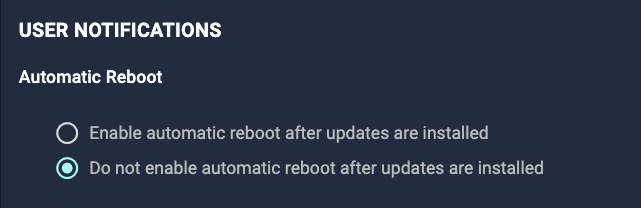
Happy hump day ya’ll. We’re very excited to announce that we’ve just pushed reboot notifications and deferral options for Worklets live! Previously, Worklets were only able to be scheduled, however, reboot notifications and deferrals were not available. This is a powerful feature as it offers users the ability to run custom evaluation and remediation scripts, and assuming this is enabled, devices that successfully receive remediation script will reboot respecting the notifications and deferrals configured in the Worklet policy. Some interesting use cases that you might consider: Reboot only recurring policy for all targeted devices with notifications and deferrals Reboot prior to policy run or during scheduled maintenance windows And many more! We’ll have Product Docs up shortly, but you can access this feature by going to Create Policy > Worklets > Enable Automatic Reboot After Updates Are Installed. (Note: all existing Worklets will default to disabled, but can be updat
What are you doing for updates for your tablets?
Happy Holidays Automoxers!For some reason a majority of our mac endpoint are not receiving the Mac Big Sure updates to 11.6.1 or 11.6.2. Our user see the Automox System Update Notification, click now, and nothing seems to happen.Some of our users will eventually get the Automox Reboot notification window, but when they click on it, they are logged out instead of a restart. When we check the activity logs, we see that our mac endpoints have had all the apps as well as as Mac OS 11.6.2 update installed. However, when we go to check the OS version, we see nothing has been updated.We are using jamf pro, with filevault enabled, and jamf connect. Any advise would very much apprecaited!
I have a couple hundred policies in Automox for patching. If I want to make a change to all of them, there are multiple ways to do it via API. I’m wondering what the most efficient method for doing it is. For example, if I just want to change the patch severity on all of them from, say “high” to “low” - what’s the recommended method for doing that on 100+ policies?
Anyone have examples of supporting a mix of RHEL 5,6,7 and older oracle instances with older repositories?
HiPlease can someone let me know how often the agent pulls settings from the console?I’m having a spot of bother with changing the WSUS settings, as per the screenshot.I’m setting a number of patches to ignore, but something isn't quite right and the patches are redeploying, even though Automox is set to ignore them.These are the setting I'm desperately trying to update on the agents deployed (to block those broken windows patches).Cheers.
Hi all, I’ve realised that Firefox doesn’t appear to be updating in our environment for most users and this appears to be because we’re using the British language (EN-GB) version. Is this currently unsupported in Automox? It looks like the EN-US client gets updated fine. I guess I might need to setup a worklet to patch it manually for the moment. Kind Regards, Mike
A while ago we ditched our then MDM and moved over to InTune to take on our MDM capabilities. Additionally, move our imaging solution to InTune as well. As we had Automox it was meant to be a fairly light implementation with Automox undertaking OS and 3rd party updates and InTune doing the rest. Long story short our light implementation seems to have backfired as between Automox and InTune something is causing devices to fail updates. We have engaged an external resource familiar with Intune but not Automox and at a follow-up call next week I am pretty sure we are going to here we need to make a choice between one or the other, InTune or Automox. Posting here if anyone else has found themselves using InTune and whether they encountered issues using alongside Automox. I get at a level these products overlap and compete but in others they don’t. Interested in other peoples views and experiences to help which direction and or questions, would be very much appreciated.
Can anyone describe how amagent autoupdates on linux, such as it doesn’t use apt. I need technical details of the process to satisfy a very technically savy user - developer/programmer. ThanksJames
I just had my first proper go at adapting some stock worklet code to install some different software and noticed that testing evaluation code in Automox isnt terribly practical. According to the docs “Manual Execution… triggers the remediation script regardless of the compliance status of the device.” So when using manual execution (which is the easiest way to test new worklets) the evaluation code is completely ignored. I think the solution I would like to see would be a manual execution “Debug” mode that you could run to test both evaluation and remediation code, and would preferably also return the full output from both scripts (feedback from the scripts themselves seems a bit thin atm, so it would be nice if the activity log or something was more verbose). Am I just doing things wrong atm or is this actually a worthwhile suggestion? How does everyone else go about testing their scripts before running them in production?
Are there any release notes yet for this agent or is this due to security vulnerabilities not yet available?
Hello everyone, I'm new on here and also a new IT student aspiring to become a cybersecurity expert.. I'll be so happy to make new friends in my new career to help me walk through.. I have been watching a lot of tutorials on automox and I believe I'll meet the right people in this community to help me drive through Best regards
Hello Community! Agent 35 is now available to download in the Automox Console. This release is for Mac devices only.Here’s what’s new:Fix: users experience unexpected reboots on macOS devices after deferring a reboot. Fix: agent does not always reconnect after the device wakes from sleep (Mac devices only). Fix: an M1 Mac user might be mistakenly prompted by the agent when they do not have the appropriate permissions to grant secure token access. Fix: notifications displaying “Terminal” on macOS 12 (Monterey). Change: agent log files will be written to /var/log/amagent.log instead of /var/log/system.log. Change: the Apple Silicon (M1) user prompt is now disabled by default. New: macOS 12 Monterey support. New: IT Admins can run a command against the Automox Agent, on each Apple Silicon (M1) Mac device, to grant secure token access to the Automox service account. These permissions are needed to install macOS updates (e.g. patching from 12.0 to 12.1) on Apple Silicon devices using the ag
We have >1K servers that are distributed among ~50 different groups and policies that patch according to specific maintenance windows based on the application they run.Our policies allow the server to reboot if the patch being applied requires it, but I’d like ALL the servers to reboot at the end of the monthly maintenance window regardless of installing any patches.What’s the recommended way to implement this?
Hey folks, quick AXAgent update: Automox Security and third-party security researchers have discovered two high severity vulnerabilities in the Automox Agent: CVE-2021-43326 and CVE-2021-43325. These vulnerabilities impact Windows devices only. A non-administrative user can leverage these vulnerabilities to read and write content to the Automox execution directory, which can then execute commands with elevated privileges. CVE-2021-43325, The Automox Agent Version 33 incorrectly sets permissions on a temporary directory while running in Windows environments. CVE-2021-43325 has a CVSS score of 7.8 (High). Automox has fixed the directory permissions.CVE-2021-43326, The Automox Agent prior to Version 32 incorrectly sets permissions on a temporary directory while running in Windows environments. CVE-2021-43326 has a CVSS score of 7.8 (High). Automox has fixed the directory permissions.Starting on Thursday, November 12th we began a phased rollout of the Automox Agent 34 release for all Windo
Hi Team,Please could anyone let me know if there is a way to have the new community site use a dark theme, the old one was perfect.Cheers.
Introduction See it in Action What is Vulnerability Sync? How does it Work? How Does Automox Consume the Scan Data? How do I Patch the CVEs, are Reboots Automatic? What Errors may I see? What Does Each Task Status Mean? What are the Technical Constraints? Frequently Asked Questions Conclusion IntroductionVulnerability detection and remediation play critical roles in protecting your environment from the “easy” stuff, aka known issues. However, different teams often own detection of the vulnerability vs actually remediating it. Historically, the process of patching detected vulnerabilities is disjointed and arduous. That’s why we created Vulnerability Sync. See it in Action What is Vulnerability Sync?Vulnerability Sync is an all new Automox feature that can consume vulnerability scan data from Crowdstrike, Rapid7, Tenable, and more to quickly remediate those detected vulnerabilities with Automox. How does it Work?Vulnerability Sync consumes vulnerability scan data from a number of ve
Introduction How is the Documentation Organized? How do I use the API Documentation? Can I Submit a Call from the Developer Portal? Conclusion Introduction A feature or set of features is only useful if you know how to use it. That’s why we place so much emphasis on our Support documentation at Automox, from User Guides to Knowledge Base, to our Developer Portal. Within the Developer Portal lives our API documentation. To help you harness the full power of the documentation and our API, we’ll review how to get the most out of the Developer Portal. How is the Documentation Organized?First thing’s first, you need to know how to get to the Developer Portal. If you’re planning to use the API frequently, just bookmark this page.At a high level, our API documentation is laid out like this: What’s New: this is where we meticulously document anything/everything new with the API and our API documentation Errors: this page provides a high level overview of errors you may run into throughout
Introduction What is an API, anyways? Where do I Start? What are the Security Considerations? Does Automox have a Software Development Kit (SDK)? ConclusionIntroductionThe Automox API gives your organization a framework to leverage the powerful data within Automox, and take action without interacting with the console. In this article, we’ll discuss the API at a high level, and what resources are available for you to get started. What is an API, anyways?An Application Programming Interface (API) is a set of protocols and definitions that allow an application to communicate with other applications. Essentially, it’s a way for you to make Automox execute an action (e.g. create a policy), integrate Automox with another application your organization uses, or automate a process, all without using the console. Automox is a cloud-native application, and we built our console on top of the RESTful (or REST) API. Since our user interface, or console, is built on top of the API, you can do anyth
We have had problems with large files that are generated in the path C: \ ProgramData \ amagent in some cases we saw files of up to 120 GB. We do not know why the agent is taking this behavior, has this happened to someone else?
Hello Automox Community! I’m Vania 👋 - a Product Manager here at Automox! I’m excited to announce that we’ve released “Flexible Device Targeting” today. With Flexible Device Targeting, you will see a new option called “Device Targeting” while creating and modifying policies that allow you to create filters based on the following device attributes: Tags Hostname OS IP Address Any policies that have device targeting enabled will only run on devices that match the device filters you’ve created. With this new capability, policies become even more flexible as you will now be able to run policies on a subset of devices regardless of what group the devices are in. In the following screenshots, you can see the new section called “Device Targeting” as well as the “Preview Impacted Devices” pop-up that shows you in real-time the devices the policy will target. Screen Shot 2021-07-06 at 3.47.25 PM2446×1324 258 KB Screen Shot 2021-07-06 at 3.47.42 PM2446×874 141 KB Screen Shot 2021-
Already have an account? Login
No account yet? Create an account
Enter your E-mail address. We'll send you an e-mail with instructions to reset your password.