











Get the latest product updates, ask technical questions, and learn best practices
Recently active
hi, I was wondering if any of you have trouble with the “remember me” checkbox on https://console.automox.com/? no matter what I do, it will not remember my user name nor password, that check box seems to be doing nothing…I have 4-5 different devices (Mac, pc, iOS) and none of them works…even created a new account and tried, still the same… thanks!
Hi, everybody - Chad here. We’ve seen/heard a few issues from users concerning certificates, and it turns out that our LetsEncrypt cert recently expired. From our Engineering team: "As of September 30, 2021, the previous root certificate leveraged by Let’s Encrypt - Automox’s certificate issuer - has expired. For most of our customers and their devices, this will not result in any expected impact to service due to the previously issued ISRG Root X1 root cert that is supported on modern browsers and devices as documented in more detail here: DST Root CA X3 Expiration (September 2021) - Let's Encrypt. In addition to this expiring root certificate, Automox rotates our Console and API certificates every 90 days, and in some cases more frequently, requiring any whitelisting of certificates to be handled accordingly. In order to ensure devices are able to continue communicating with the Automox platform, download content for policies, or communicate to the Automox API, please ensure the root
Bring radical efficiency to your custom integrations with the all new Automox Software Development Kit (SDK) for Python. Our SDK is built on top of the REST API, so you can accomplish more with fewer lines of code and no library maintenance. Write applications to create device groups in Automox based on your Active Directory Organizational Units or ServiceNow CMDBs. Or, accomplish a more specific use case and update devices in Automox with a CSV file. Whatever your use case, our SDK will empower your teams to create bespoke solutions to your organization’s unique IT challenges.To access and download the SDK, visit our Github page. Big thanks to @Peter-AX who wrote most of this while I was taking a nap at lunch. 🤘
I noticed when I am on the software tab and click on the number in the “Updated” column, it pulls up a nifty query on the devices tab. Is there a syntax guide that you could point me to for some of the advanced searches I would like to run? It looks like I could run some of the device searches from the console without having to run API scripts for this information. I couldn’t find anything on this in the KB. Example below. image708×55 6.51 KB
Months ago i deploy a Policy to install the 20H2 Windows version which was working fine, updated like 95% of the registered devices, then like 1 month ago i changed the Policy to install the 21H1 version, but after the change the policy isn´t doing nothing, none machine has been updated to 21H1 version, the policy is running at the same time, same settings, install optional updates, reboot if is required, only install “Feature update to Windows 10, version 21H1”, i try forcing the policy to run in 1 machine, but nothing happend. I connect with a machine and in the Windows Update panel appear the Feature 21H1 to be installed, but need to be done manually, anybody else with this issue? why the policy isn´t installing the 21H1 automatically as the 20H2? Anybody with similar issue?
I have many users who have not restarted their MacOS device. The BigSur 11.6 patch is held up, waiting for the user to restart. How can I create a Patch Only policy that warns, defers, and then eventually restarts the MacOS devices needing the latest OS update.
I was re-installing the Automox agent on a device where it had been removed, and now I get the error below in the log: Error from performRequest(“install”, body): Post https://api.automox.com/install: dial tcp 44.236.226.107:443: connectex: No connection could be made because the target machine actively refused it. 2021/09/28 10:25:46 main.go:370: ERROR: client.DoInstall(): Post https://api.automox.com/install: dial tcp 44.236.226.107:443: connectex: No connection could be made because the target machine actively refused it. Has anyone else experienced this before?
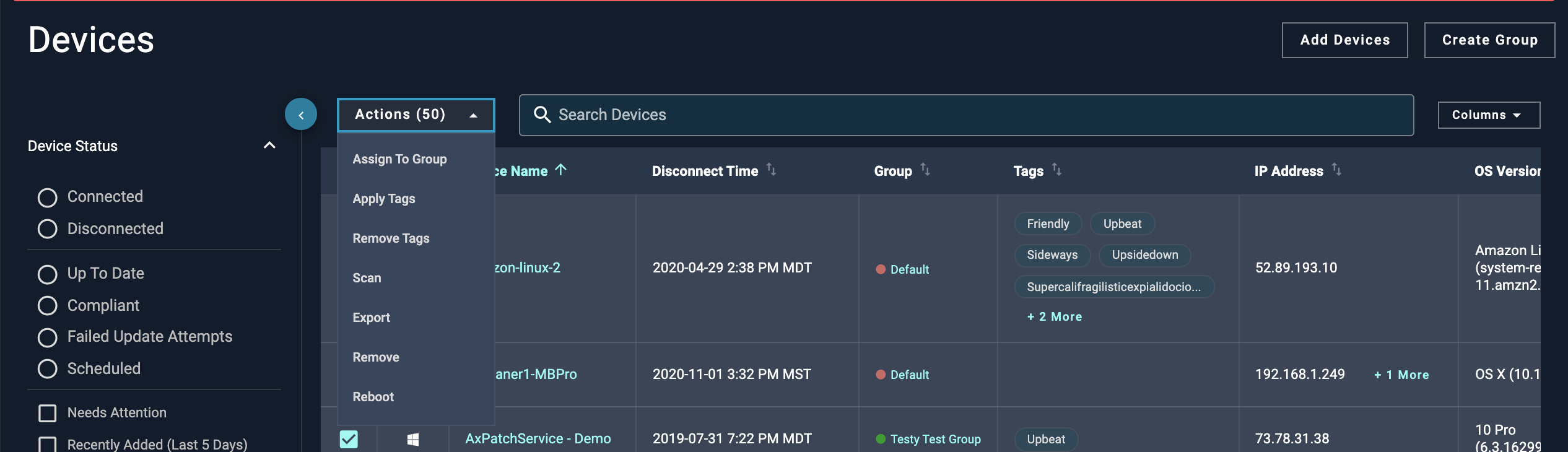
Hello Automox Community! I’m excited to announce that we have released the ability to bulk apply and remove device tags. With this feature, we’ve made it super easy to add tags to multiple devices with as few touchpoints as possible, and you can just as easily remove them. With this feature, you’ll be able to: Apply multiple existing and/or new tags to multiple devices Remove multiple tags from multiple devices Utilize our new batch APIs to automate applying and removing devices If you’d like to see how this looks, check out the following screenshots: Screen Shot 2021-09-01 at 9.51.58 AM2532×730 125 KB image1156×328 19.4 KB image1172×840 36.3 KB For more information, check out the updated documentation: User Documentation: Managing Devices | Automox Knowledge Base API Documentation: Updates multiple devices (server objects). As always, we’d love to hear your feedback on this new feature: What use case does this new feature help you with? How could we improve this feature?
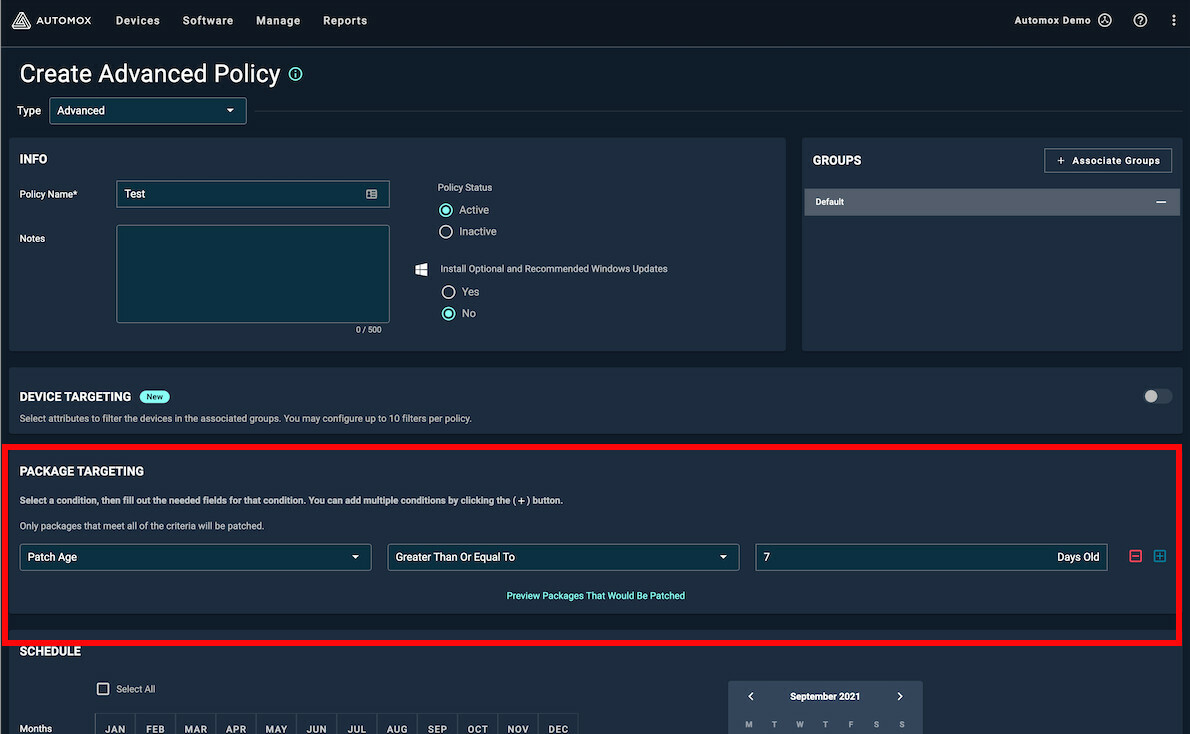
Today we released a new filter in the Advanced Policy for Package Targeting. This feature will be enabled in the Advanced Policy only. The package targeting section of the Advanced Patch Policy will: Allow the user to enter a # Days Old with validation from 1 to 180 Support greater than and equal to advanced_policy1190×734 114 KB As always, provide us your feedback.
Greetings, I’m new to a company and this product. We use Automox for our patching. Can we use the product to install MSI packages on servers? Thinking things like Infosec agents etc. I’m currently using cobbled together POSH scripts which work OK but it would be nice to use Automox against an established list of devices. Thanks for any insight. Ron
I have a server 2012 R2 that refuses to show in the Automox console under Devices. I have uninstalled the agent and reinstalled and received an email alert that a new device was added to Automox but I can’t find it anywhere in the console.
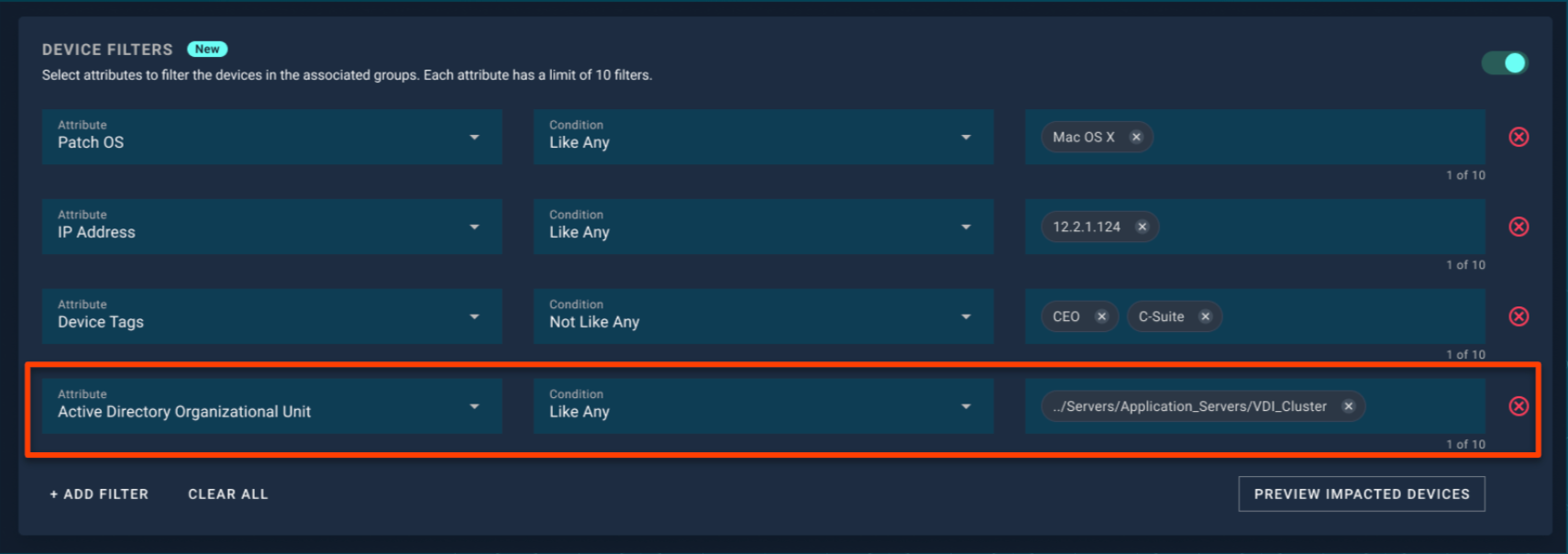
Hey Automox Community! I’m excited to announce that we’ve released an enhancement to the Flexible Device Targeting feature today. The new enhancement surfaces Active Directory Organizational Units as another filter option, so you will now be able to target devices based on their OU information. Whenever there’s a device scan, Automox will query the OU information for each device, and you can use the Flexible Device Targeting feature to create a filter. The OU information is surfaced in a path format, and you’ll be able to do a partial and exact string match on the path. Here’s a screenshot of what this looks like: image1710×604 128 KB For more information, check out the updated documentation links: User Documentation: Device Targeting with Filters | Automox Knowledge Base API Documentation: Policy Device Filters Preview As always, we’d love to hear your feedback on this new feature: What use case does this capability help you with? What other enhancements could we add to make Fl
Does Automox have actual support personnel that replies to anything?? So far on several open cases the only response is the BOT response that my ticket has been created. This is not an acceptable response.
Update: Thanks to @Douglas_C post, there is a way to obtain the latest version of Acrobat here: https://get.adobe.com/reader/enterprise/ Use it to do a more desirable single required software policy (the first policy listed below) which will update existing Acrobat installs and install it on systems that don’t have it. If you’re only looking to update systems that currently have it installed and not install on systems that don’t have it, use just my second policy with the .msp files. Due to a current issue with Adobe restricting how their software is distributed, Automox is currently only able to support patching Acrobat Reader DC up to version 20.013.20064. I’ve setup the following to be able to keep it updated to the latest version. First, I created a required software policy with the latest version I could get from their FTP site when it was active. This policy would at least install it on systems that didn’t have it or update it to that version if systems had an older version, b
Hi newbie to automox. I am trying to get all of my adobe acrobat readers up to date. a majority the patch works. for some it fails and I am not sure why - where do I look to see why it failed ? I have a policy that runs daily and I also look at devices and scroll to the bottom - select adobe and select click now
I have an open, ongoing support case with Automox on this already, but would like to put it out there to the community in case others are seeing this behavior as well. We are testing Automox and have about 240 Linux servers using Automox for patching. These systems are in various groups/policies that have different times. All groups and policies are exactly the same (all created by API’s) other than the name and they date/time - they all patch for Criticals and Highs when the OS is Linux. Automox identifies that the systems have scheduled patches to apply, but doesn’t actually execute against the systems and ‘skips over’ groups of systems. On some, it does patch them just fine. Our Automox policies are all set to use UTC time rather than the local system time because our maintenance windows are all defined using Eastern Time - and the servers reside in several different time zones. Again, I do have an open support case with Automox, but this is a HUGE issue as the main functionality
Hello Automox Community! After using 2 years SCCM, I have switched to Automox two months ago. So far I cannot find an adequate way to monitor the progress of an application’s rollout. Does I can’t see which devices failed to update certain application to the latest version or completely missing the app. I have tried this script - Use API to Determine if a Certain Software is Installed on All Devices but does not generate in the report information in the columns for application name and version. Only generates the names of all our devices. Could you please advise what is the best way to monitor the progress of rollout of application or to get in a report the name and the version of particular software on all devices? Thank you in advance 🙂
I’m a new user of Automox and created my 1st 3 Policy’s using the Recommended Best Practices for Patching on https://support.automox.com/help and they failed. Here are the details from the Report:Failed to apply patches (“2021-08 Cumulative Update for Windows 10 Version 1909 for x64-based Systems (KB5005031)” “Google Chrome” “Zoom 32-bit”): InstallMSUpdates : Install failed with ResultCode 4 and HResult -2145124318 At C:\ProgramData\amagent\execDir210347014\execcmd517446573.ps1:1357 char:17 + InstallMSUpdates $lst + ~~~~~~~~~~~~~~~~~~~~~ + CategoryInfo : NotSpecified: ( [Write-Error], WriteErrorException + FullyQualifiedErrorId : Microsoft.PowerShell.Commands.WriteErrorException,InstallMSUpdates InstallMSUpdates : Install failed with ResultCode 4 and HResult -2145124318 At C:\ProgramData\amagent\execDir210347014\execcmd517446573.ps1:1357 char:17 + InstallMSUpdates $lst + ~~~~~~~~~~~~~~~~~~~~~ + CategoryInfo : NotSpecified: ( [Write-Error], WriteErrorException + FullyQualifiedErrorId :
We are beginning a phased rollout of Agent 32. This release includes additional security enhancements to the agent. I also want to note that we continue to work on Apple Silicon support for Agent 33, which is expected to be released soon after Agent 32. The agent will automatically update to the latest release across your endpoints. If you have any questions or wish to delay the Automox agent from automatically updating in your organization, please let Automox Support know at support@automox.com.
It would be very useful if there was information about an update’s restart requirement in the Manual Approval table. I’d like to approve updates immediately that do not require restart. And I’d like to wait before approving updates that do require restart. Any suggestions to improve this workflow?
Many Automox customers have asked us for a flexible method to manage and execute policies on a subset of endpoints based on criteria that match their IT operational workflows. The result? Flexible device targeting, which gives you the ability to perform actions on endpoints based on device and user-defined attributes – without being locked in to rigid dependencies. What is Flexible Device Targeting? Flexible Device Targeting allows Automox users to add filters to policies so that the chosen policies will only run on devices that match those device filters. Plus, you can add up to 10 filters per policy to give you an amazing degree of precision to manage your endpoints. Current device filters include: Hostname Device Tag Operating System OS Version IP Address Active Directory Organizational Unit Here is how to access Flexible Device Targeting. Access “Manage” from the top menu and then go to “Policies.” Click on “Create Policy” on the upper right - Choose your policy type such
i am new to automox. took it over from someone who left. trying to figure out how to see if a certain patch has been applied to all window machines. i can see how to check each machine to see what has been apllied but i need to see if a particular patch has been applied across ALL machines
I see there is Package Targeting by severity. Is there a way to target packages that do not require restart? I’d like to create a policy that patches without notification, if a restart is not required. For patches that do require a restart, I’d like a policy with notifications and deferrals.
This script will set the tag(s) for all computers in a group. It will override any tags that are currently assigned to any of those systems. There are some areas in the code you’ll need to update to get the script to function: $orgID = 'YOUR_ORG_ID' - put your Org ID, which can be found by looking at the URL of your console and selecting the value after the “?o=”: https://console.automox.com/dashboard?o=999999 . In this example URL the Org ID is the 999999 portion. $apiKey = 'YOUR_API_KEY' - in your console, go to Settings->API and select the API key. Note that the API key is per admin user, so you and another admin in your console will have different API keys. $grpID = 'GROUP_ID_OF_SYSTEMS_TO_TAG' - put your Group ID of the systems you want to set the tags on. It can be found by viewing the group page that lists devices in that particular group and grabbing the value after “gid=” in the URL. One way to get to that page is to go to the System Mgmt page then find the group
Other RMM software supports a ton of titles, Automox supports only a few, will you support more in the near future and have ability to filter ‘third party titles’ when selecting this in a policy as it seems currently you either need to create individual policies to patch certain third party titles or create a worklet
Already have an account? Login
No account yet? Create an account
Enter your E-mail address. We'll send you an e-mail with instructions to reset your password.