








Get the latest product updates, ask technical questions, and learn best practices
Recently active
In the downloaded report the policy status column is showing as 'Non-Compliant'. Where can I check this status in Automox portal.
I’m currently testing things out on a Trial version, so it’s possible I guess that it’s causing my issue.On the Devices tab I’m check boxing a few devices, then going to Actions → Apply TagsAfter completing it I get a green box that says “1 tag is being applied to # devices. It may take a few minutes to complete.” Unfortunately it never completes the tagging though.
Let me know which subreddits I should be keeping up with! r/sysadmin is awesome, so I’m curious what other ones are out there!
This script will let you run an arbitrary number of required software policies or worklets against a list of devices exported from the Devices page, in essence giving you a workaround to implement a dynamic group functionality. Go to your devices page and filter for the devices you’d like to run the policies against. Click the select all box to select all of those devices. Click Export which will save a csv file that contains one line per device, named automox-devices.csv. Replace YOUR_API_Key with a valid API key from your console. Replace YOUR_ORG_ID with the orgID for your console (you can get this from the browser URL for your console: look for the o=1234 portion and that 1234 is your orgID). Replace PolicyID1,PolicyID2,PolicyID3,PolicyID4,PolicyID5,etc… with a list of the policies you want to run, each one separated by a comma. To find the PolicyIDs, edit the policy you wish to include and look for the pid=123456 in the URL. That 123456 is the Policy ID that you’ll put in the l
Did you know that 98% of orgs do business with a third-party vendor who has suffered a breach?At 320+ and counting, Automox has one of the industry’s most extensive third-party support catalogs to enable you to stop bad actors in their tracks. Most recently, we’ve added the following new vendors:Agent Ransack (Windows, macOS) Artweaver Free (Windows) Attendant Pro (Windows) Auto Dark Mode (Windows) AutoIt (Windows) AWS CLI v2 (Windows, macOS) BIMcollab ZOOM (Windows) Bitwarden (Windows, macOS) Camtasia ‘20, ‘21, ‘23 (Windows, macOS) Creo View Express (Windows) DBeaver Cmty Edition (Windows, macOS) IntelliJ IDEA Ult 2023.1 (Windows, macOS) JAWS 2022 (Windows) Visual C++ Redist 2015-22 (Windows) WinRar (French) (Windows) Zulu JDK 8, 11, 16, 17, 18, 19 (Windows, macOS)
Usage question here and potentially a feature request if it’s not available.Is there a way to filter the Software page to exclude software with an ‘Impacted’ value of zero? It would be a handy way to cut down the noise in reviewing software yet to be patched. Helps identify gaps or troublesome patching areas quickly.
[UPDATE] The new and improved Automox Community is here! Enjoy the changes! We’re also always open to feedback and suggestions, so let us know how we can be better 😀 Over the next few weeks, you'll notice some changes in the Automox Community! We’ve been working on a new look, feel, and structure so you can get way more value out of the community than ever before. We’re so pumped for you to see and use the new community! Keep an eye out for more information and please pardon our mess as we work!
Hi. We have a few software policies that run manually. If computers were offline when the policies run manually, will they automatically deploy when they become online? If not, how to make it run when they become online?
Just want to start and say that I love the new dashboard and the current widgets. Couple things.Would love to see a new dashboard widget that would show “Patches Applied” during that same similar timeframe as the Outstanding Patch Count widget. Maybe with one extra column showing the current week. Also if when you click in the Outstanding Patch Count, the number in the box when clicked would show the accurate systems behind those values, that would be a huge help for identifying the systems that need attention in those critical areas.
Thank you for being a Automox Customer.You have played a pivotal role in our success and we want to thank you for being a part of our journey. Your feedback, suggestions, and reviews have encouraged us to continually improve our products and services to better serve you.As a thank you, here are some of our top time-savings Worklets. In case you missed them, or in case you just need a little inspo to get through your day today: read on!Once again, thank you for being an incredible customer. Your support fuels our work, and we look forward to continuing to work with you in the future. If there is ever anything we can do to enhance your experience, please do not hesitate to reach out to us!Thank you. Thank you. Thank. YOU.
We hope you don’t mind a mini humble brag, but our engineers are pretty rock star! They are constantly adding more third-party titles to our support list (which means less work for you when it comes to patching third-party apps). At 260 currently supported apps, we’re excited to share our recently added vendors:8x8 Work for Desktop (Windows, macOS) ActivePresenter (Windows) Ai2 Starter (Windows) AirServer (Windows, macOS) Azure Data Studio (Windows, macOS) Bandicam (Windows) BIMvision (Windows) Blender (macOS) BlueGriffon (Windows, macOS) BlueJ (Windows, macOS) Bulk Rename Utility (Windows) Calibre (Windows, macOS) Camtasia 2022 (Windows, macOS) Charles (macOS) ClickUp (macOS) Clockify (Windows, macOS) CMake (Windows, macOS) KeePass PW Safe 1 (Windows) KeePass PW Safe 2 (MSI) (Windows) SQL Server Mgmt Studio 19 (Windows)Teams (macOS)
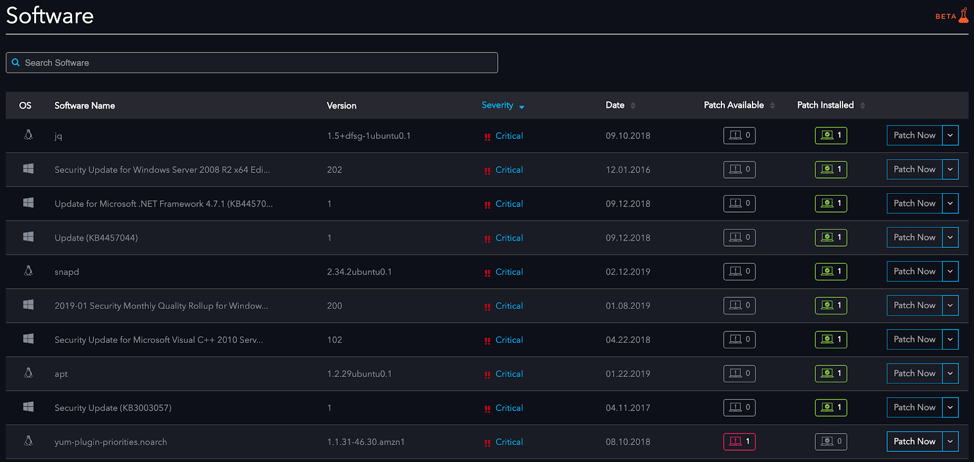
The new software page is available for all users on the Manage plan. See the full details here. Any questions or feedback on the new page? image974×462 99.3 KB
Morning, y’all - Chad here…Happy Almost Migration Day! We’re moving to the new platform this week, and going read-only on Discourse today. We’ll have some details coming to everyone in an email tomorrow, but as with any technology, moving to a new platform has caused some shoelaces to come untied and more than a couple of snowman’s hats have been blown off, technically-speaking. It’s all good, but bear with us while we spin up. Moving from an open-source platform to something like what we’ve got now - with analytics, integrations, gamification, etc - is like going from a golf cart to a dadgummed '91 IROC, with the T-tops. We’re really excited for what’s to come, but it will be a bit of an ongoing process, as we continue to tweak the design, functionalities, and content. And that’s where you come in… This is still your Community, and if something doesn’t work as well as it used to (or simply doesn’t work), please let us know! With the holiday next week, things will be pretty chill for
If you missed our announcement earlier in April, we’ve got a lot to catch you up on! Automox has released a wide range of new and expanded capabilities to further simplify IT and make your life easier. From a modernized dashboard, remote control for macOS, and a growing list of supported third-party apps (over 240 now!), the possibilities are endless in how Automox can simplify IT and help you take hours back in your day.
With regards to the recent Microsoft security patch for Outlook, a number of our employees went ahead and updated O365 themselves and didn’t wait for Automox to install the patch. However, Automox doesn’t seem to recognize that the patch was already installed and keeps trying to install the patch and request a reboot. Is there a setting to enable Automox to first check and see if the patch has been installed and/or the software is up to date and Automox need not patch that device?
As of March 31st, agent version 39 and below will not work. How do you know if you’re running an older agent? You’ll see a pop-up in your console via the devices page You can check your device page and look at agent version Contact your Customer Success ManagerPlease upgrade to the latest agent to avoid any missed patches or disruptions. Still need help here? Contact support@automox.com
If you did not get a chance to read our March newsletter, we wanted to make sure you saw some of our recent product updates below. Your Centralized Linux Patching Capabilities just got EasierAutomox gives you continuous insight and control across Windows, Mac, and Linux devices. As the demand to effectively patch Linux grows (as cloud servers and Linux instances become the norm), we’ve been busy advancing our Linux severity score coverage and have added Red Hat! More CVE coverage enables Automox to prioritize Linux patching by severity to fix your most critical vulnerabilities fast. Expanding Linux Coverage We are excited to share that we are expanding our Linux support to include three new versions: Alma 9, Rocky 9, and Red Hat Enterprise Linux (RHEL) 9. Automox fully supports these popular Linux distributions, allowing our customers to patch and remediate any vulnerabilities without the need to upgrade our agents. We’ve Added so Many Third-Party Titles, We Can’t Include Them All Here
I added a new macOS device that has an M1 pro chip. On my Automox admin dashboard I see this message for this device under the compatibility checklist - This Mac device requires Secure Token User Permission. I am using the latest Automox agent 1.0-35.pkg. Is there another step I am missing to install the agent correctly?Thanks.
A common request we get is to remove old devices from the console, especially ones that might have been re-imaged. Currently you can do this on the devices page by sorting by Last Disconnected Date and selecting devices to remove. However, this can become unwieldy if you have pages and pages of devices to remove. This script automates the removal using an API call to check the last disconnected date and remove any devices older than the number of days you specify in the code. There are four areas in the code you’ll need to update to get the script to function: $orgID = 'YOUR_ORG_ID' - put your Org ID, which can be found by looking at the URL of your console and selecting the value after the “?o=”: https://console.automox.com/dashboard?o=999999. In this example URL the Org ID is the 999999 portion. $apiKey = 'YOUR_API_KEY' - in your console, go to Settings->API and select the API key. Note that the API key is per admin user, so you and another admin in your console will have di
I am trying to deploy Automox agent on windows 10/11 clients via SmartDeploy Console. The Agent installs but not checking into Automox dashboard. I don’t see the device at all. I have the command setup with the installation of the msi as follows: msiexec.exe /i "[ApplicationsFolder]\Automox Agent\Files\Application Packs\Automox_Installer-1.42.13.msi" /qn /norestart ACESSKEY=#################What can I do to get the agent to checkin to the dashboard?
Based on a query by @d.mccleskey that support would have to run for customers, I’ve adapted it so that customers can run it for themselves. This query is useful for customers to review their Automox patching configurations and review agent communication/health.$apiKey = 'YOUR_API_KEY' - in your console, go to Settings->API and select the API key. Note that the API key is per admin user, so you and another admin in your console will have different API keys.$orgID = 'YOUR_ORG_ID' - put in your Org ID which can be found by looking at the URL on the dashboard and selecting the value after the “?o=”: [https://console.automox.com/dashboard?o=1234]. In this example, the Org ID is 1234.# Updated May 1, 2025 to account for Fast by Default# https://developer.automox.com/developer-portal/servers-fast-by-default# Update these variables with your API Key, orgID & save directory/filename # This script expects the $expDir path to already exist and will overwrite an existing file$apiKey = 'YOUR
With the move of CentOS8 to stream Rocky Linux has come out to replace it as the go to RHEL Clone. When can we expect to see Rocky Linux as a supported OS? Currently it detects Rocky Linux as SUSE which is weird as I would think it should detect it as CentOS or RHEL.
Hello!We are seeking customer sponsors for a Dashboard Refresh project coming in 2023. If you would be interested in acting as one, please reply below!We also have a lot of other exciting projects coming in 2023, so if you would like to be a sponsor for a different project, please also reply below and we can connect you to another PM!
I’m testing the installation of an agent on a linux system (redhat 7), the system is behind a proxy...so proxy variables are in place per documentation. After I start the service, I see its connected to our proxy but it fails to perform the request (see below). Any idea why? [root@xxxxxxx amagent]# ./amagent -c2022/03/22 14:31:58 HTTP Client Starting2022/03/22 14:31:59 NeedsInstall.2022/03/22 14:31:59 No certificate found, generating new keypair and CSR2022/03/22 14:31:59 NeedsInstall.2022/03/22 14:31:59 No certificate found, generating new keypair and CSR2022/03/22 14:31:59 ERROR: client.DoInstall(): Not installing on diag thread.2022/03/22 14:31:59 Posting /install: {"access_key":"xxxxxxxxxxxxxxx","csr":"-----BEGIN CERTIFICATE REQUEST-----\nMIICdzCCAV8CAQAwIzELMAkGA1UEBhMCVVMxFDASBgNVBAoTC1BhdGNoU2ltcGxl\nMIIBIjANBgkqhkiG9w0BAQEFAAOCAQ8AMIIBCgKCAQEAw9qMmL0NCGKz46DuHpZJ\niodbRUeUxVf2P4BwBwMSIBt9ZB1rHHtw+MFo7Sn+87X953RArfroqq/u5pS9Xtqa\nU2GmGss+NyL8kiyu2Lv0bmY7aVuYYYxCJFnBBdxrFh75yWvVH
Already have an account? Login
No account yet? Create an account
Enter your E-mail address. We'll send you an e-mail with instructions to reset your password.