




Get the latest product updates, ask technical questions, and learn best practices
Recently active
Bug Fixes: When attempting to access a protected route while not logged in, the app would previously forget where users were trying to go, and always direct users to login, then to the dashboard in the default organization’s context. Now, after login, the app remembers the route the user was attempting to access prior to login as well as whatever org they were using. Enhancements: Added Display Name and IP Address filters to Devices Page Fixed a range of usability issues on the create/edit policy pages for worklets and required policies. This included removing modals, reorganizing content flow, clarity around required fields, inline loading indicators, and changes around textfield access. Zoom Meetings for Windows can now be updated while running if the end-user is not in an active meeting or call https://support.automox.com/help/archive-release-notes-2020
You might see that even if Dropbox has been shutdown, the app might relaunch after an update. This is a vendor behavior we cannot control or change. If Dropbox is open during the patch, Automox will relaunch the app. NOTE : If a file sync application is open when patching begins, Automox will always relaunch it after patching. https://support.automox.com/help/patching-dropbox-on-windows-and-macos
While attempting to implement Automox on distant systems (without an application deployment agent already on the individual systems), I was presented with a problem: How do I get Automox installed remotely? Quickly? Quietly? And, most importantly, without having to interact with another carbon-based being?? In my case, I have ConnectWise deployed and running on distant assets. Using ConnectWise to remotely support distant systems, I have found the occasional need to incidentally run command-line using either windows CMD or PowerShell commands. Pushing Automox seemed like one of those times I should lean on this command-line resource. I have high hopes Automox Worklets will minimize dependencies on this ConnectWise command-line interface!!? 🤑🤑🤑 When using multi-line Powershell commands/scripts that take more than a few seconds to finish, consider using the below within the ConnectWise command-line interface: #!ps #maxlength=50000 #timeout=300000 To hav
Crunchbase The Monthly Rundown: Startups to Watch - February 2020 | Crunchbase Curious about what’s trending in the startup world from a salesperson’s perspective? In "The Monthly Rundown" I dive into a few of the “hottest” startups. Yay Automox!
Bug Fixes When attempting to access a protected route while not logged in, the app would previously forget where users were trying to go, and always direct users to login, then to the dashboard in the default organization’s context. Now, after login, the app remembers the route the user was attempting to access prior to login as well as whatever org they were using. Enhancements: New third party patching support for Dropbox on macOS and Windows New third party patching support for Box Drive on macOS Fixed problem with links to devices page from system management page and getting started cards Added Display Name and IP Address filters to Devices Page Fixed a range of usability issues on the create/edit policy pages for worklets and required policies. This included removing modals, reorganizing content flow, clarity around required fields, inline loading indicators, and changes around textfield access. Zoom Meetings for Windows can now be updated while running if the end-user is not i
Enhancements: Added third party patching support for Dropbox on macOS and Windows Fixed problem with links to devices page from system management page and getting started cards https://support.automox.com/help/archive-release-notes-2020
general question (as a 👶 👶 new user 👶 👶 to automox): KB4535996 (OS Builds 18362.693 and 18363.693) appears to be available to genpop (as early as feb 27, 2020, according to https://support.microsoft.com/en-us/help/4535996/windows-10-update-kb4535996). i have a few systems that are yet to be managed by our automox implementation that have pulled this down from m$. using the canned or default “patch all” policy that came with this tool, my automox clients don’t seem to have this update being handed out. is there some sort of systematic trigger that is holding this update back from being rolled out by automox? am i overlooking some config that is intended to keep me from hugging my machines to death with new updates?
We have a new KB article that lets you know which 3rd party apps need a restart to complete patching and which don’t: https://support.automox.com/help/third-party-patching-best-practices In general, the apps that won’t patch when they are running is because, while we could shut them down to complete the patching, we don’t want to risk end users losing data or having a Zoom call interrupted.
If I am patching the same applications on the same schedule for Win and Mac devices, is there any need to separate them into two separate Groups? Similarly, if I have mixed Win and Mac devices into a single group and apply Windows and OSX worklets to run on the group, will Automox be smart enough to only run the Window worklets on Windows Devices and OSX worklets on OSX devices?
If you’re in the area during RSA and want to visit, you can get a free Expo Pass using the code XE0UAUTOMO To register, go here: RSA Conference – 5 Oct 18 Passes And Rates - Cybersecurity Conference - USA 2020 | RSA Conference View the individual and group rates for RSA Conference 2020 USA, the top cybersecurity conference in San Francisco, from February 24 -28. Our conference caters to all infosec professionals. Select Expo and then enter the code. We’re at booth #5467, so stop by and say hello!
I am looking at building out some automation in presenting patching schedules and alerting the team that an upcoming patching window is approaching. In the API I know I get get a policies settings and when I look at what is presented, it isn’t something easily understandable. "schedule_days": 64, "schedule_weeks_of_month": 4, "schedule_months": 8190, "schedule_time": "02:00", That info somehow translates to every month, on the 2nd Saturday at 2AM. Is there a way of understanding/translating this to be able to actually read the policy schedule?
Enhancements: New third party patching support for Box Drive on macOS https://support.automox.com/help/archive-release-notes-2020
Enhancement: Needs Reboot status for macOS now available https://support.automox.com/help/archive-release-notes-2020
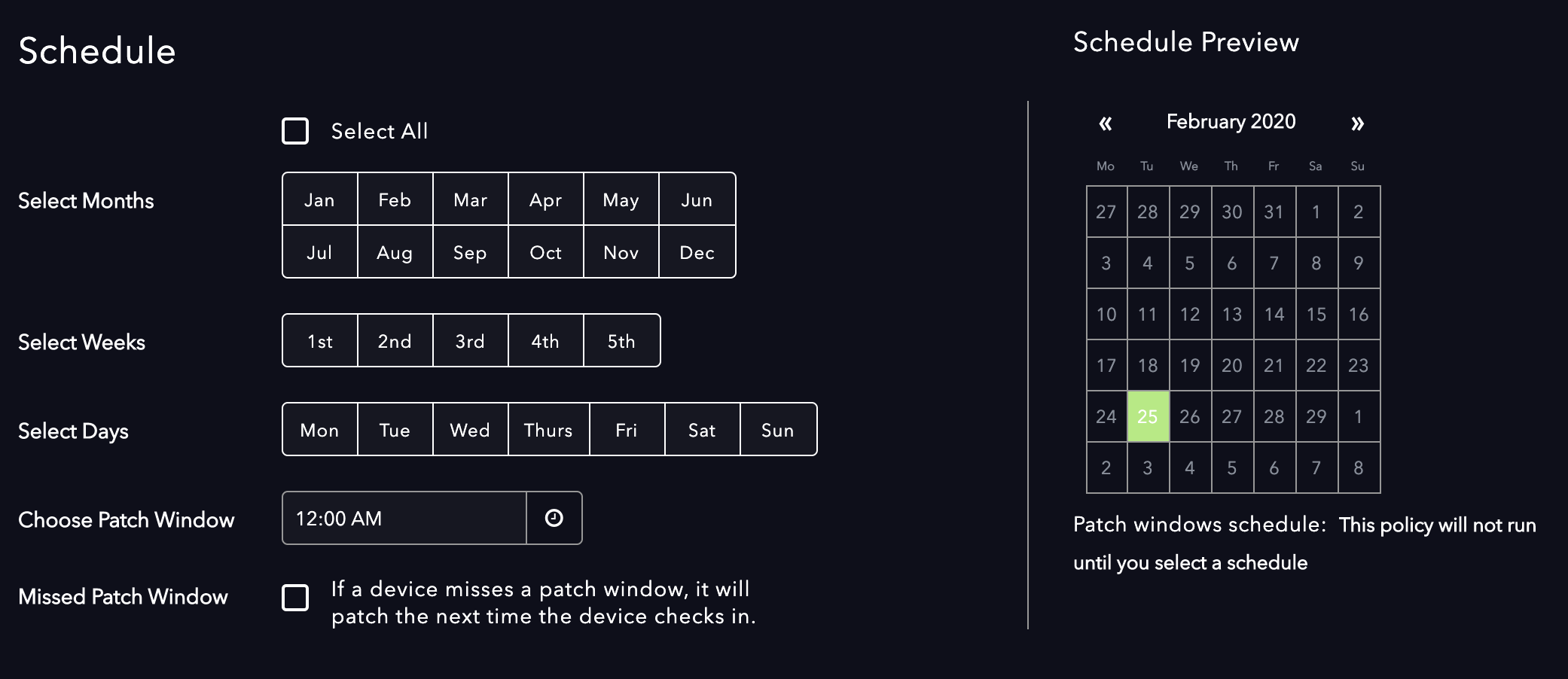
Bug Fixes: Fixed pending patch count on overview report Fix bug causing console requests to timeout during heavy load Fixed a problem where duplicate device names would not always sort in the same order on every page load Fixed bug where blank versioned macOS updates (ie. macOS 10.15.3 Update) did not show as pending in the console Enhancements: Added third party patching for iTerm2 and Transmit for Mac Added third party patching support for WinSCP for Windows Needs Reboot status for macOS now available Added a “check all” control for selecting all dates in the policy date/calendar tool (see below) 2082×902 85.8 KB 2092×1000 212 KB https://support.automox.com/help/archive-release-notes-2020
Enhancements: Added third party patching for iTerm2 and Transmit for Mac Added third party patching support for WinSCP for Windows https://support.automox.com/help/archive-release-notes-2020
How are folks handling updates for new PC deployments? At the moment we’re leveraging MDT with a classic gold image and some task sequences. One of these task sequences is to check into WSUS and apply outstanding Microsoft updates. Since the base image isn’t updated frequently we could be catching up on 5-6 months worth of patches during deployment. With the move the Automox and the eventual hope of dropping WSUS completely we haven’t figured out how to address this piece of the puzzle. If we simple disable the WUA task sequence and deploy the Automox agent the PC would likely be out-of-date until the next Automox update window. Not only does this pose a security risk but that first batch of updates will likely take a while providing a rather poor end-user experience. We could keep WSUS just for this purpose but that seems like wasted effort. We could update our GPOs to have the PCs reach out directly to MS during the deployment process but we lose control of feature updates as G
One of my Linux server admins asked me how Automox determines the reboot required status. He had just installed Automox on 20+ servers, and 3 of them immediately showed a “Reboot Required” device status. I’m sure it’s accurate, but it’d be nice to know the method for how that’s calculated. He was surprised to see it.
With today’s release we’ve added a select all option on the policy creation page, in the scheduling section. That way if you want all days selected, you can do that with one click: Screen Shot 2020-02-25 at 3.14.28 PM1392×473 38.9 KB Screen Shot 2020-02-25 at 3.14.39 PM1387×475 44.4 KB
Bug Fixes: Fix bug causing console requests to timeout during heavy load Fixed a problem where duplicate device names would not always sort in the same order on every page load Fixed bug where blank versioned macOS updates (ie. macOS 10.15.3 Update) did not show as pending in the console Enhancements: Added a “check all” control for selecting all dates in the policy date/calendar tool https://support.automox.com/help/archive-release-notes-2020
does anyone know where i can hire/outsource worklet writing? i am consulting a small company with an even smaller it dept. automox seems like a great fit for them. if i could further leverage worklets, this might be a win/win.
Chrome Releases Stable Channel Update for Desktop The stable channel has been updated to 80.0.3987.122 for Windows, Mac, and Linux, which will roll out over the coming days/weeks. A... Looks like a couple of High severity CVEs in here, one of which has an exploit in the wild. Patch away!
To satisfy auditors (and myself :-))… would be great if after a scheduled patch job, a report is sent via email indicating which machines failed to patch. Would enable a workflow within ITSM to circle back to re-run/debug if needed.
Bug Fixes: Fixed pending patch count on overview report https://support.automox.com/help/archive-release-notes-2020
Hey all! Due to some of our severs only being able to take an outage once every 6 months (cringe), we need a way to ensure newly relevant patches are applied after an initial policy execution. Short of requiring our patching administrators to manually click ‘execute policy’ again after it’s completed the first time, has anyone found a way to ensure any patches that become relevant after the initial policy execution are still applied during the same execution? This is critical for us to continue automating our patch process to be as hands-off as possible. Looking for something like a feature that applies all currently relevant and future relevant patches for the system up to the designated policy baseline. Any guidance would be appreciated!!
These are just the samples, but we’ll have boxes of them soon! IMG_17213024×4032 2.69 MB IMG_63423024×4032 2.67 MB
Already have an account? Login
No account yet? Create an account
Enter your E-mail address. We'll send you an e-mail with instructions to reset your password.