






Get the latest product updates, ask technical questions, and learn best practices
Recently active
Click here to start a new topic: https://community.automox.com/new-topic
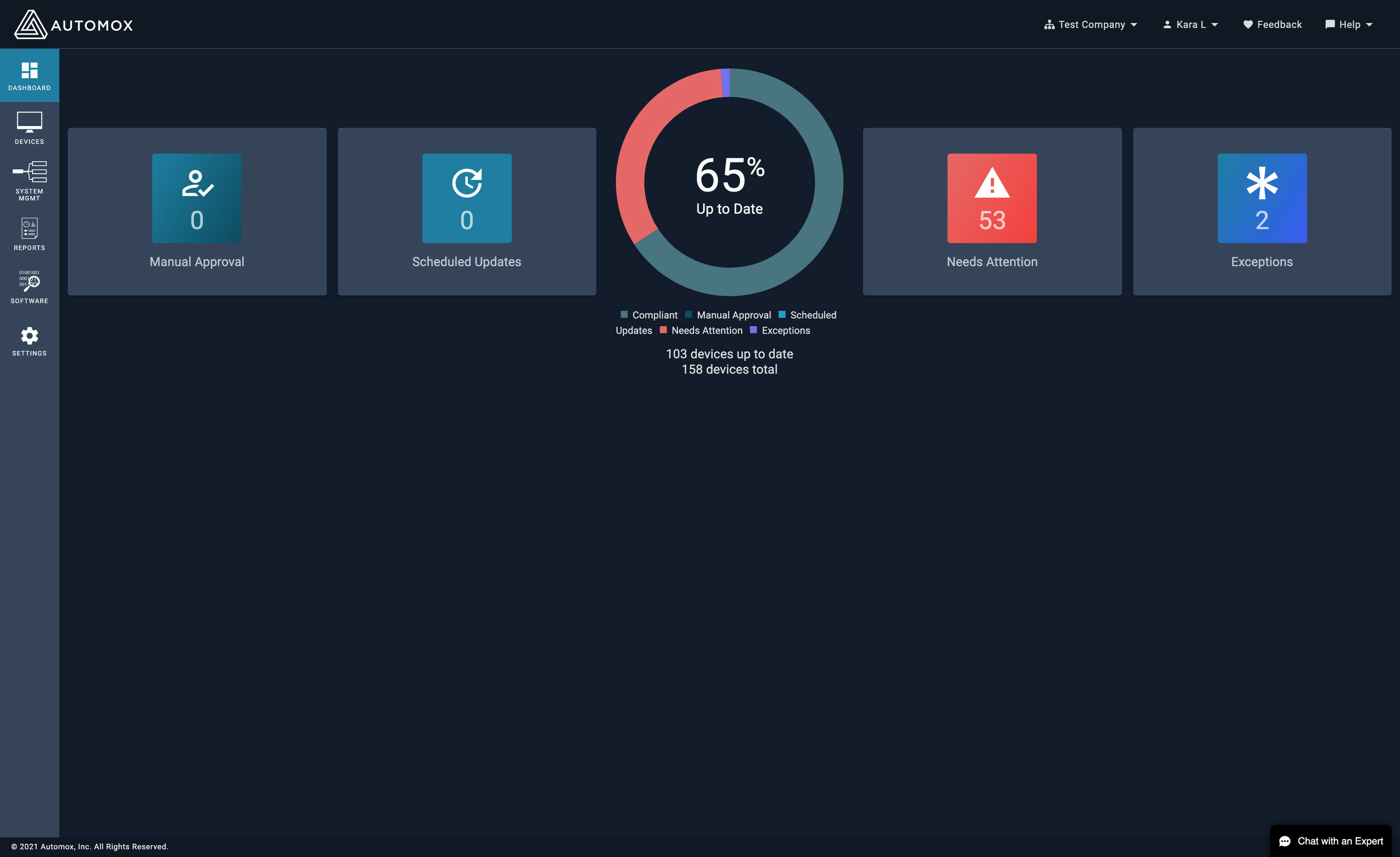
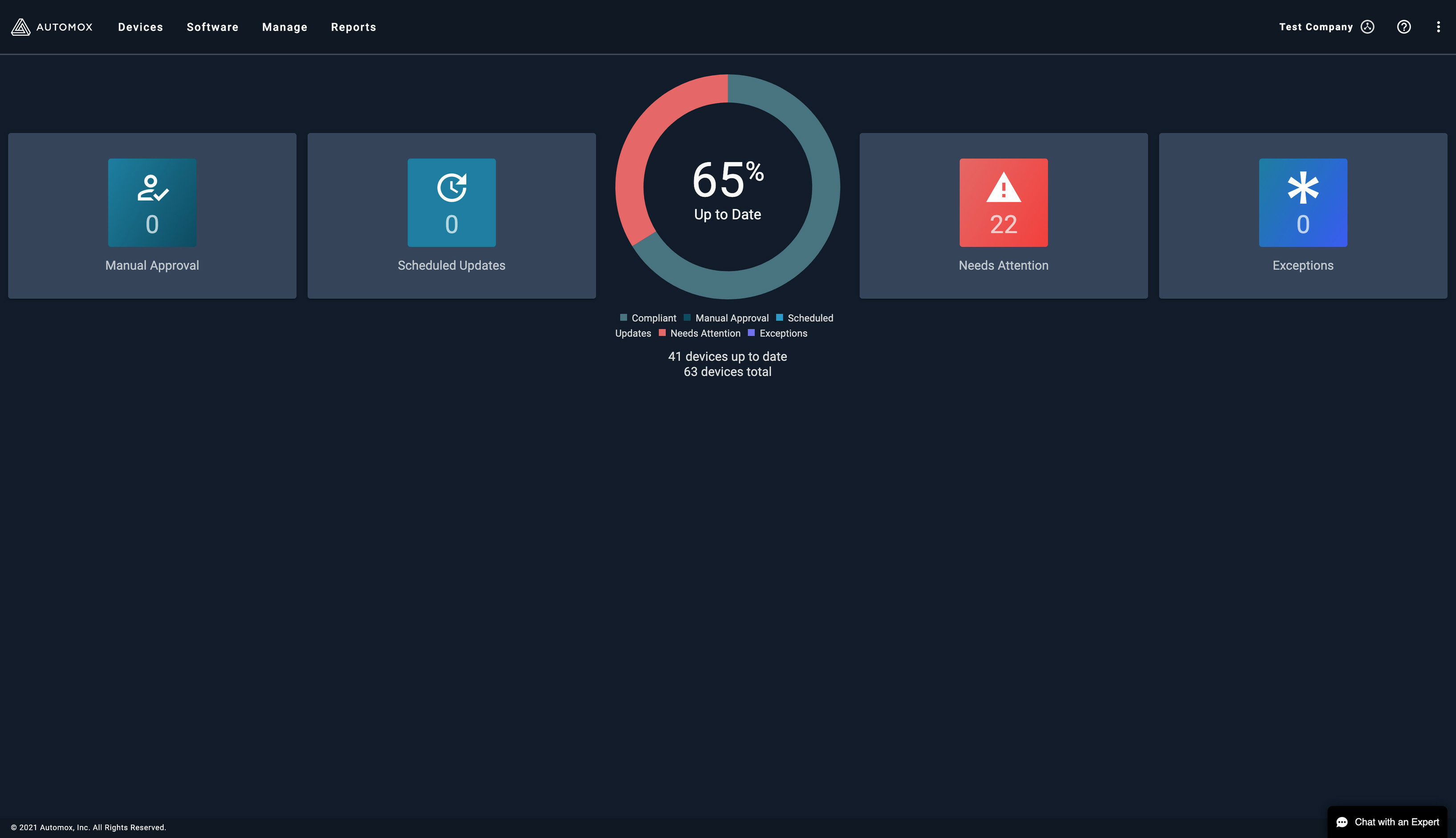
Next week we plan to launch a new navigation on the console, moving from a left navigation to a top navigation design. The change will hopefully be very easy for you all, most of of the button just move from the left to the top with the biggest change to the Settings button moving to the far right of the top navigation. Below are some screenshots: image3270×1882 216 KB Top Navigation: image1184×174 25.2 KB Org Navigation: image822×700 25.5 KB Documentation Navigation: image550×618 22.4 KB Settings Navigation: image528×726 21.6 KB
I’ve taken the feedback from the poll we did here and worked with our designers on a wireframe of what the new community would look like. If you can take a look at that and let me know what you think, I’d appreciate it! Automox Community Page600×1385 97.7 KB
https://support.automox.com/help/release-notes-for-week-ending-04162021 Bug Fixes Performance increase and bug fix for larger Activity Log report runs.
Is there a way to setup a notification in Automox to send the pre-patch report via email to a group to review the patches before they are applied?
Hi everybody, we are new deploying Automox, and want to have extra features from the tool, there is a way to get a report with the Hardware inventory using the API Commads? With Basics like Hostname, RAM, Disk, IP, OS, i know is possible get a Software inventory report with API, but no Hardware. I would appreciate any help
CVE-2021-26908 and CVE-201-26909: Automox Agent Information Disclosure In February 2021, two vulnerabilities were discovered and reported to Automox by Danny Jordan of Rapid7. CVE-2021-26908 and CVE-2021-26909 are two information disclosure bugs that affected all Automox agent versions previous to 31. Both vulnerabilities received a low CVSS. Automox began phased agent upgrades last week, and most if not all agents should be upgraded at the time of this disclosure. CVE-2021-26908, a vulnerability found in the Automox Agent due to improper logging of sensitive information on the endpoint. CVE-2021-26908 has a CVSS score of 3.3 (Low). Automox has removed all sensitive information from these agent logs. CVE-2021-26909, with the information disclosed via CVE-2021-26908, an attacker would be armed with enough information to brute force bucket URLs that store uploaded files in S3. Automox has masked and attached a time to live to these URLs to prevent an attacker from guessing them. This vul
Hello, Trying to install ESET software from Automox , Upload software and a Powershell command necessary ? Or is there another way to do it?
If you’ve never used an API before and want Automox to be your first (you always remember your first API) then this is the guide for you. By the end of this document you’ll have made your first API call and can see the results from your environment. Step 1: Download Postman Postman is a handy tool for testing out API calls to make sure they work before putting them in a script. They have a freemium version for individuals and small teams that you can download:https://www.getpostman.com/They’ve got versions for Windows, Mac and Linux so it doesn’t matter what OS you are working on. Install Postman and create yourself a login and you’re ready for the next step. Step 2: Find your API key in the console In your Automox console, click on Settings and then API: You’ll want the API key (the one on the bottom). There’s a handy copy icon to the right of the API key to get it into your clipboard. Step 3: Create your first API call For this exercise, we’re going to use the “Retrieve deta
Is there a way to set up a patch policy or create a worklet that will update the Security Intelligence Update for Microsoft Defender Antivirus for all Windows 10 devices daily? I’m trying to find a way to not have to manually go into software select the OS and then push out the Security Intelligence Update for Microsoft Defender Antivirus that are 1 day old. Thanks in advance for your help.
https://support.automox.com/help/release-notes-for-week-ending-04092021 Enhancements Release of this will prepare us for slow-roll upgrade of Agent 31 deployment, however agent downloads will now point to Agent 31. Policies using uploaded files will now use more secure presigned URLs for downloads. The deduplication algorithm on the Activity Log report has been improved for both speed and accuracy, customers should see fewer duplicates and a much more responsive interaction with this report. Updates the number of scheduled updates in the dashboard within a few seconds of a customer ignoring software updates. You will no longer be able to submit os_family via API as a configuration option for a Patch Policy. If you submit an os_family, it will be automatically removed during the processing of the request.
Automox Support, Open a ticket - Case Number: 00003011 Subject: Associate Policies not showing in Devices Details: Associate Policies are missing in some devices even though they are part of the group. Can someone check on this, please? Thanks! U
We will begin a phased rollout of the Automox Agent starting tomorrow, April 6. This release includes quality of life and security enhancements. These include the following: Custom policy logging changes Fix for a typo when issuing the --help command against the agent The agent will automatically update to the latest release across your endpoints. If you have any questions or wish to delay the Automox agent from automatically updating in your organization, please let Automox Support know at support@automox.com.
There is probably an obvious answer but I can’t figure it out…what are the numbers for on these column headers? 🤔 image1738×243 12.7 KB
Hi Guys, Was curious how you guys manage your baseline deployments of new devices? We’re currently evaluating cloud based options, but was curious if you guys used AX from the deploy stages. Our existing workflow is to use PDQ to push out a baseline set of apps, then let automox manage them after that. I also have been building out worklets to do the baseline deploy as well, but haven’t found a good way to ‘kick off’ the series of worklets. AX is included in our golden image and does correctly join our AX organization during imaging. Maybe theres a way to embed a powershell API call to pull down the baseline that way? I’m always trying to find new ways to make it easier and automated for our onboarding team, and maybe shed PDQ altogether (baseline deployment is basically all we use it for). Curious to see what your guys thoughts are, and how you do onboarding/baseline deployments.
Here is an API PowerShell script to export your Device Name, Model, Vendor, and Serial Number into a csv. If you have tried this, you may have found it can be tricky, as the model, vendor, and serial number are stored in a nested field named detail. This script provides the expanded “detail” column data for each device by name. Example Code: #Update these variables with your API Key and orgID. This script expects the $expDir path to already exist.# $apiKey = 'YOUR_API_KEY' $orgID = 'YOUR_ORG' $expDir = 'C:\Temp' ############################################################################################################# #Pull server detail from API and export as csv to defined directory $uri = "https://console.automox.com/api/servers?o=$orgID&api_key=$apiKey" $responseJson = (Invoke-WebRequest -UseBasicParsing -Uri $uri).Content | ConvertFrom-Json $Output = $responseJson | Select-Object NAME -ExpandProperty detail | Select-Object NAME, MODEL, VENDOR, SERIAL | Export-Csv -Path
Besides manually sorting the data in the console… How do you stay on top of pending patches that are creeping upwards in days exposed or clients disconnected for longer then x period of time (for clean up)? How are you assessing your patch program (mean time to patch) with Automox? Automox team - is there plans for additional reporting/notifications soon or a way to dump this data ongoing into PowerBi/Data Lake?
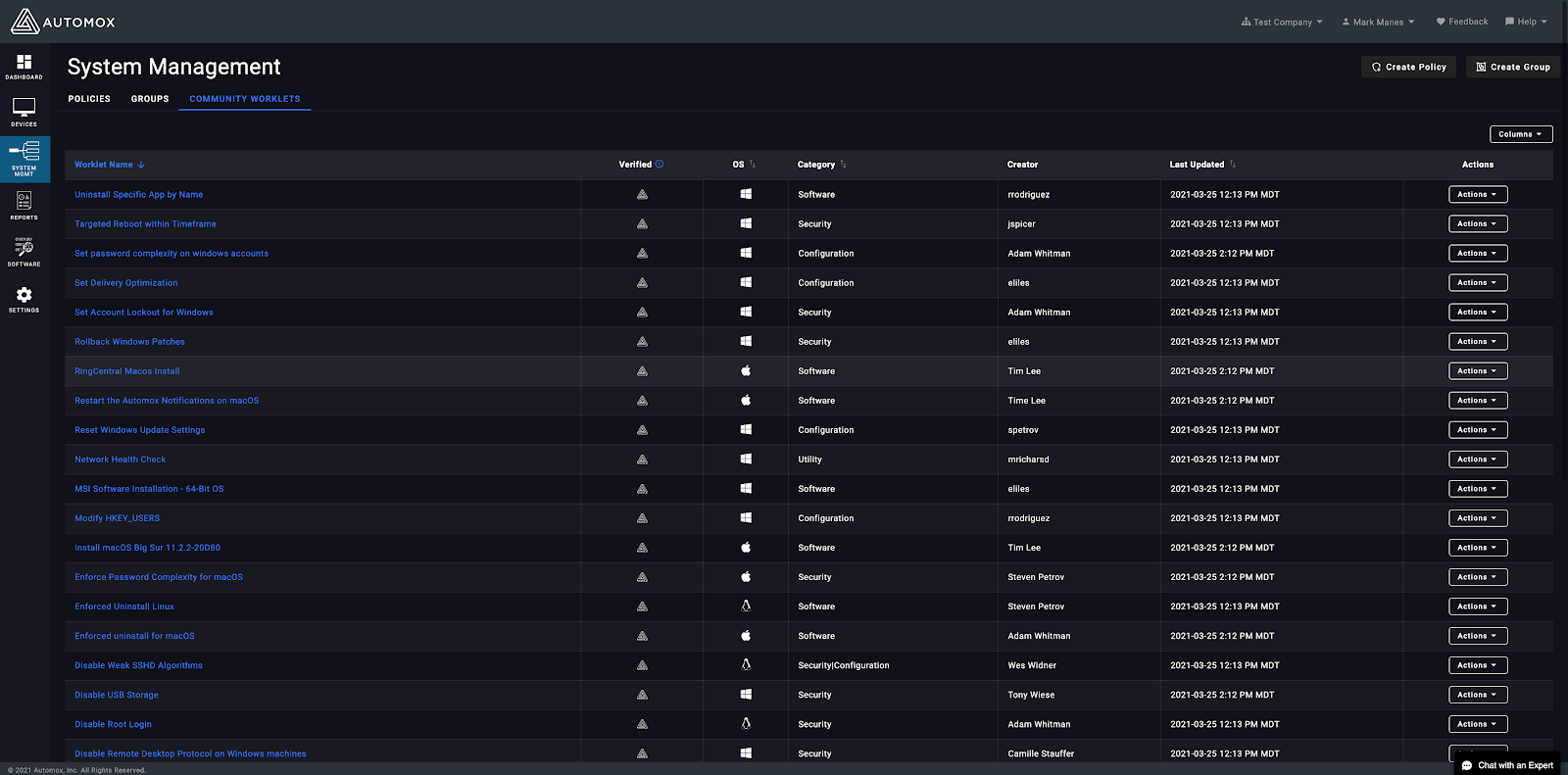
We are excited to announce the release of a new capability empowering the review, customization, and adoption of Community Worklets all from within the Automox Console! This capability can be found within the System Management page as depicted in the trailing screenshot below. From the Community Worklets tab, click any choice Worklet to review and preview the associated details of Evaluation, Remediation, Author, Notes, and more. Create Policy will draft the selected Worklet into the existing Worklet creation convention. If unfamiliar, this process is detailed in the Automox Console documentation. Be sure to consider fellow co-workers when testing new Worklets by applying an appropriate naming convention or prefix of intent such as “testing”. This helps in sorting later to prune temporary creations easier. Read more about this exciting new capability on our blog and leave us your feedback! image1600×791 202 KB
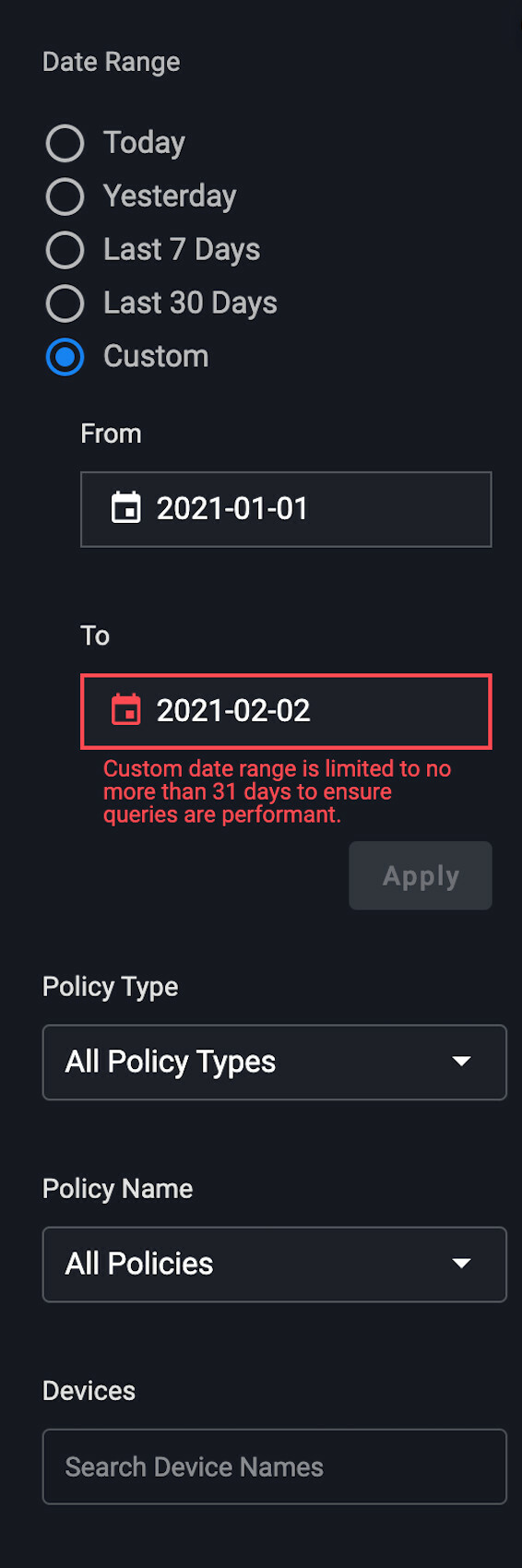
We will be rolling out updates to the Activity Log likely later this week based on final testing efforts. Highlights include: Faster queries and results Custom date ranges are limited to 31 days Results page has pagination image566×1700 99.9 KB image980×124 3.06 KB Post here if you have any questions.
When patching linux computers, which repos does Automox use? Does it go out to the current official repos, or does it look to the local computer and potentially modified repos? If its the latter, is there a way to change this? If not, it would be nice if it was an option (like windows update vs wsus).
This report is similar to viewing the software page, but it only reports the number of impacted devices (devices needing the patch) ordered by days exposed. It will look something like this: image2177×879 76 KB You’ll need to set the following before running the script: $apiKey = 'YOUR_API_KEY' - in your console, go to Settings->API and select the API key. Note that the API key is per admin user, so you and another admin in your console will have different API keys. $orgID = 'YOUR_ORG_ID' - put in your Org ID which can be found by looking at the URL on the dashboard and selecting the value after the “?o=”: [https://console.automox.com/dashboard?o=1234]. In this example, the Org ID is 1234. $apiKey = 'YOUR_API_KEY' $orgID = 'YOUR_ORG_ID' $filepath = "C:\Temp\software_not_installed.csv" $page = 0 $limit = 500 $data = @() Write-Output "Page" while($true) { $headers = @{"Authorization" = "Bearer $apiKey" } $url = "https://console.automox.com/api/orgs/$orgID/packages?l=$limi
I know we have https://console.automox.com/api/reports/noncompliance api to get non compliance reports. (I am assuming this api is only to get noncompliance device reports) I would like to get reports for all type of devices. Do we have any similar api to get Activitylogs where we have details why package is failed to install. If we don’t have api to get Activity logs do we have any other way to access information regarding why packages are failed to install. Can some one help me on this. Thanks.
Bug Fixes The Device ID sort on the Devices page will now work as intended. Sorting by group name now works correctly, with the special case of the Default Group always being first by name. Users will see an status of expired if a previously completed report is no longer available.
Hi, has anyone had trouble printing with the latest Windows 10 March security update? win10march1024×761 86.4 KB The Windows 10 KB5000802 and KB5000808 cumulative updates released yesterday are causing Blue Screen of Death crashes when printing to network printers. Microsoft released the Windows 10 KB5000802 and KB5000808 cumulative updates as part of the March 2021 Patch Tuesday. Since then, there has been a constant stream of complaints that printing is causing Windows 10 to crash with an “APC_INDEX_MISMATCH for win32kfull.sys” blue screen of death crash.
What I’ve done is basically create a deployment group to deploy o365, Sophos, TeamViewer, etc via worklet policies in Automox. Currently, if I assign a device to this deployment group I have to run all these policies manually. Would it be possible to run associated policies via the group? or even group policies in the policy tab to just click run to trigger multiple policies?
Already have an account? Login
No account yet? Create an account
Enter your E-mail address. We'll send you an e-mail with instructions to reset your password.