












Get the latest product updates, ask technical questions, and learn best practices
Recently active
Hi all, I’m a newbie with Automox, so please bear with me if this is a simple question! I couldn’t find anything related to it here on in the docs. I have a number of Ubuntu clients to support and I’m testing the bulk deployment method on a 20.04 system, however I keep running into the following error (access key removed): jc@jc-vm:~$ curl -sS “https://console.automox.com/downloadInstaller?accesskey=xxxx” | sudo bash Downloading file into /tmp/AwOskv.deb Installing package… dpkg-deb: error: ‘/tmp/AwOskv.deb’ is not a Debian format archive dpkg: error processing archive /tmp/AwOskv.deb (–install): dpkg-deb --control subprocess returned error exit status 2 Errors were encountered while processing: /tmp/AwOskv.deb Package installation failed Would anyone have any pointers as to why this might be happening? Thanks!
https://support.automox.com/help/release-notes-for-week-ending-07162021
I’m in the process of setting up all of our base applications as Required Software and Worklets. My intention is that when a newly built machine is added to the appropriate group, all the associated Required Software and Worklet policies are run. Is there a way to do this? If not, how are people managing this “onboarding” process?
The Automox agent will be compatible with macOS’s latest major release, Big Sur, which debuted as a stable release on November 12, 2020. All of Automox existing functionality will be available on macOS Big Sur. Please note that all new mac hardware will only run macOS Big Sur. Additionally, older hardware will ship with Big Sur installed out of the box (technically downgrade-able). We will continue our work to eventually support ARM based devices, however, Apple’s Rosetta 2 emulator will ensure compatibility for newer mac hardware in the meantime. We are planning on release in early December. Please check back for updates! CC: @ncolyer
https://support.automox.com/help/release-notes-for-week-ending-07092021
If you know someone affected send them good vibes, it’s a marathon not a sprint on the road to recovery. More information here: Risk Advisory: Kaseya VSA ‘supply-chain attack’ — Cydea
Come join the Automox community! Ask our Engineers anything beyond just using the Automox patching and endpoint hardening platform. (Starts at 2PM ET) Some topics we can cover: –Best practices for proactive endpoint management. –Technical questions around patch deployment. –The best way to gain visibility and control across your remote workforce. –Additional tips and tricks using the Automox platform. How can we help you? Click to save your seat and be sure to add your questions!
Hello everyone, I am not sure if there is any worklet to install the Pulsesecure client on Windows machines? Thanks, Omid Rajaee
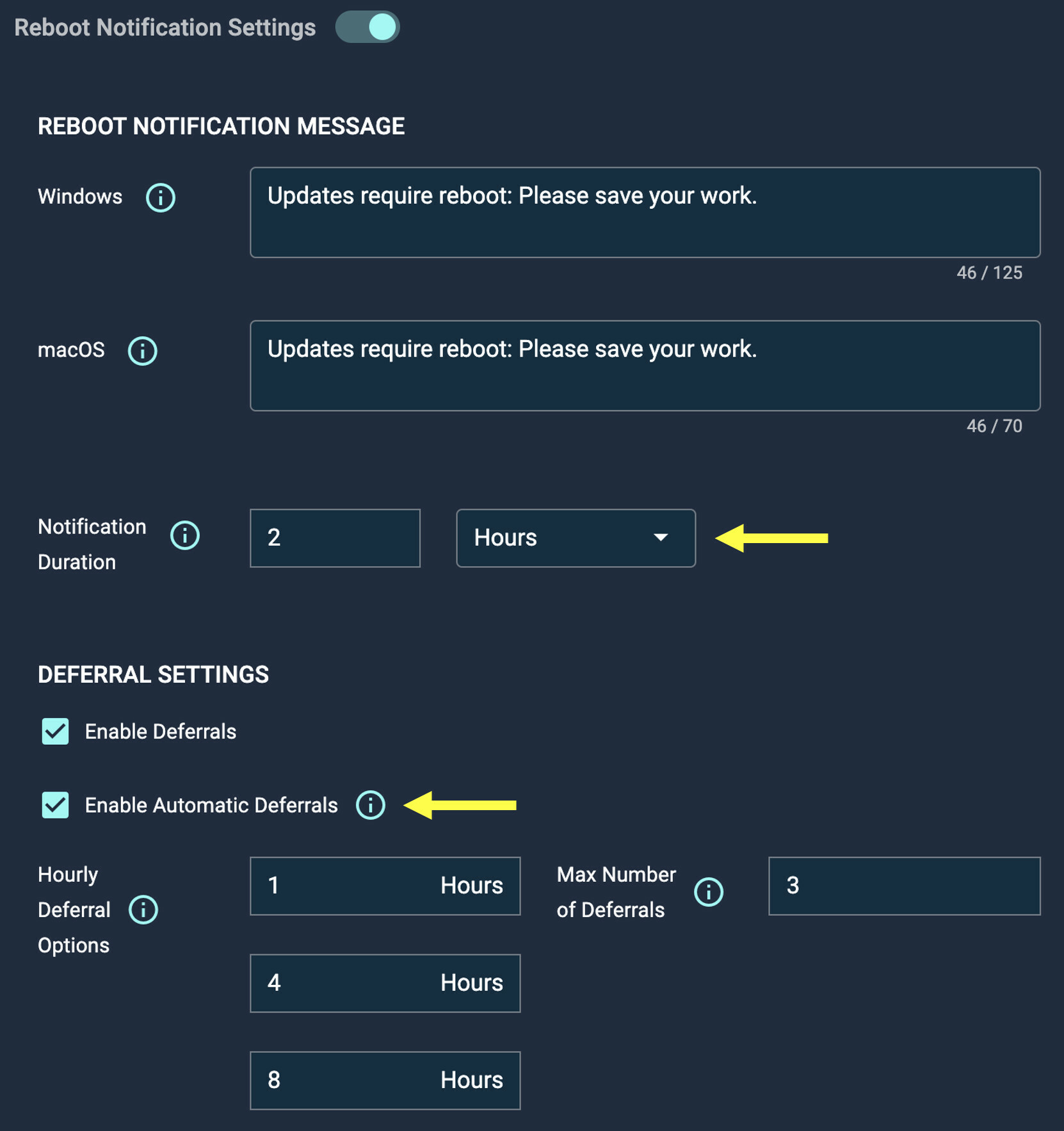
Today we released two new patch policy features to give admins even more control over end user notifications: Customizable Reboot Notification Length Admins can now customize the length of time that a reboot notification is displayed to the user, from 15 minutes up to 8 hours. Automatic Reboot Deferrals Admins can now enable automatic reboot deferrals when end users do not acknowledge the reboot notification at all. One of the user’s available deferrals will be automatically consumed on behalf of the user until they are out of deferrals. Automox will choose the longest available deferral time. Once a user is completely out of deferrals, their machine will restart instead. image1662×1766 184 KB
Many of the recent patch Tuesdays have contained critical vulnerabilities with remediation steps that involve updating apps from the Microsoft Store. I found some group policy settings to Automatically Download these. I checked in with several laptops last night and it appears to indeed show “Update apps automatically” checked, but then still lists a dozen or more updates that are available and haven’t pulled down. If I click “Get Updates” it even scans and finds more updates available as well. I was wondering if anyone has run into this issue and / or has a fix. I did run an admin command prompt with “wsreset” that apparently clears the Store cache. The below post is almost exactly the same problem as mine with screens included: tenforums.com Microsoft Store - Windows 10 Help Forums I have the Microsoft Windows Store set to update automatically: Yet, I have six updates sitting there and I have to manually click the "Update all" button to download them:
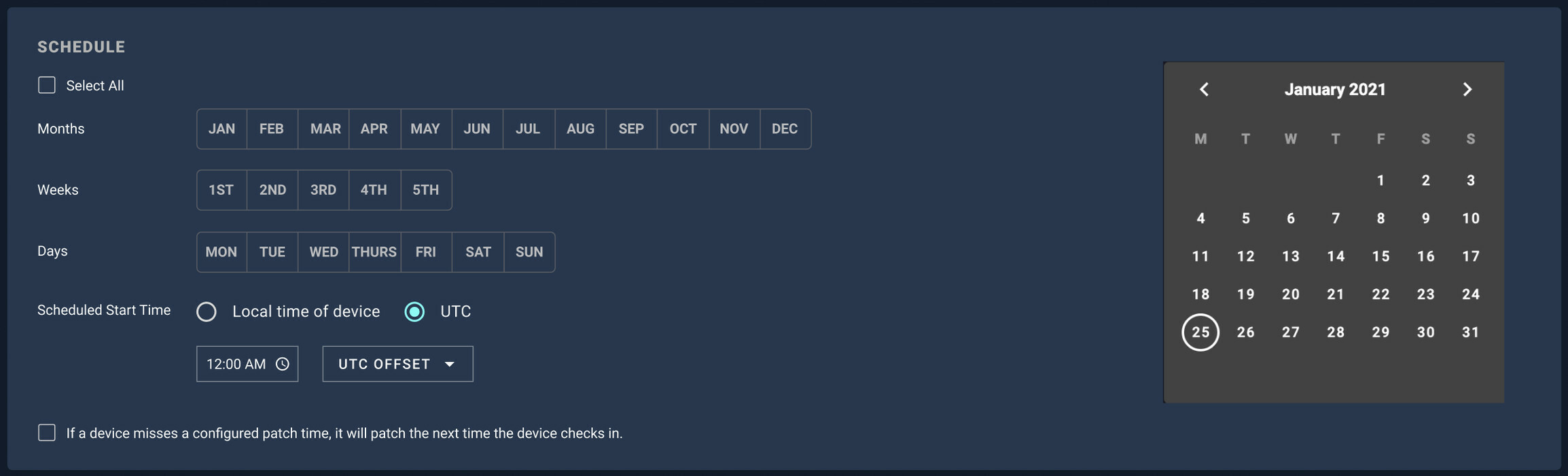
Today we released a feature that will allow for configuration of a UTC time for policy execution. We will continue to support local device time as well. Essentially, we can now grant users that choice. You’ll be able to patch off hours in a local user’s time zone. Or, you’ll be able to pick a precise start time for patching, regardless of time zone. Companies are more distributed than ever, and we’re giving you a powerful choice in policy scheduling. image2308×700 110 KB image2308×698 111 KB As always, we would appreciate your comments and feedback.
https://support.automox.com/help/release-notes-for-week-ending-06182021 Bug Fixes Fixed an issue with creating Data extracts in Firefox.
Are there any consideration when using worklets if your default terminal shell is set to zsh and not bash?
I am new to this product and am trying to figure out how to create a policy that will only report when servers have been updated (within a particular group) to also include sending a notification when an update has been completed. Thank you in advance for any assistance that can be provided.
Hi all, I’m the API Tech Docs Writer here at Automox, and I wanted to introduce myself and let you know I’m here for any API-related questions you might have. To kick things off, here’s a quick Bash script I created. This script will allow you to invite a list of users and assign roles from a CSV to a given Automox organization. This is particularly useful in cases where you might have a number of users that need to be added, like when onboarding new employees. This script is org specific, so if you have multiple orgs, you will need to create a separate CSV for each org, containing the users to be added to that org and their roles. You would then need to run the script against each org, using the specific org id and api key. Copy the script, and save it as adduser_csv.sh in the directory of your choice. Use chmod u+x adduser_csv.sh to change the permissions of the file to make it executable. Create a CSV file containing 2 columns. The headers for these columns should be Email and R
I’m creating various scripts to automate remediation and collection of service logs. I want to leverage the API to duplicate my worklets across our clients. It seems most of the info I need is in the API docs (Although if there is a more robust reference guide I would appreciate a link =) ), however, the files I need to upload to the worklet don’t seem to have a field in the JSON object. Is there a way to upload files to a worklet through the API? Thank you for any help.
Here at Automox, we think it’s important to be able to give back to our local communities whenever possible! And now that Automox spans across the country, our Giving Fridays have expanded to communities outside of the Colorado area. Take a look at what some of our employees were up to during the most recent Giving Friday - 20210604_1148424032×3024 2.23 MB Image from iOS (1)4032×3024 2.08 MB one-tree-planted - 12448×1632 1.76 MB (One Tree Planted in Colorado) 20210604_0857572992×2992 1.41 MB (Cleaning up trails in Veterans Park, KY) Image from iOS4032×3024 922 KB (Helping out a food pantry in Maine) If you have any pictures or stories of your most recent volunteer sessions, feel free to throw them down below!
We have been noticing over the past year that windows updates come fast and furious and to many of our users it has become an annoyance on how often updates are pushed out. Currently we have updates scheduled two days a week and without fail most every device has at least a single update on those days. And even with this schedule we still have clients missing updates due to just random update install issues. We allow most users to defer up to 3 times. How are other people handling updates? I feel there is a cost / benefit here from a security standpoint to be on top of updates as much as possible.
Is it possible to create a policy that evaluates whether a device has a specific TAG and if so, runs the remediation & if not, exits. For example: We have a specific application that needs to get installed on 20 computers; however, those computers are in different groups that we set up on Automox by department. Instead of taking those computers out of those groups and put into another temporary group, is it possible that i tag those computers with the application name and then create a policy that evaluates based on that tag?
Hi there! I’m (my users) facing a problem I don’t really find a good solution. Some of the updates of Microsoft Office involve restarting the app. Automox can notify users when a system is going to reboot. But seems to be no way to either stop restarting the app or notifying users in a proper way. The most we can do (and this was the idea that Automox team told me) is to notify users that there is an Office update and that they have to be careful because maybe the applications shuts down. As you can imaging, this is very important as this can result in loosing hours of work in a document. Does anyone faced this problem? What ideas you suggest?
Hi! I have an older post on the community forums: Worklet: Store Bitlocker Keys in Device Tags I was wondering if its possible to change the title? I am now realizing the title is somewhat misleading as it should be “Install BitLocker and store keys in device tags” rather than “Store BitLocker keys in device tags”. Any advice would be great
This API script will get a list of all of your policies in your organization and put them in an Excel spreadsheet. NOTE: Due to the way Excel auto-formats, the “schedule months” column may show in scientific notation due to the length. To fix the display of them, highlight the column, right-click on the column, click Format Column, choose Custom, then set the Type to 0. Just set the following: $apiKey = 'YOUR_API_KEY' - in your console, click on the three dots in the upper right, select KEYS, then copy your API key. Note that the API key is per admin user, so you and another admin in your console will have different API keys. $orgID = 'YOUR_ORG_ID' - put your Org ID which can be found by looking at the URL on the device page and selecting the value after the “?o=”: [https://console.automox.com/device-detail?s=99999&o=1234 ]. In this example the Org ID is 1234. Example days per week : For scheduling days of the week, there will be 7 digits with a trailing zero to mark the end. Th
This API script will move multiple computers - regardless of what group they’re currently in - to a group you specify. You’ll need to set the following before running the script: $apiKey = 'YOUR_API_KEY' - in your console, go to Settings->API and select the API key. Note that the API key is per admin user, so you and another admin in your console will have different API keys. $orgID = 'YOUR_ORG_ID' - put in your Org ID which can be found by looking at the URL on the dashboard and selecting the value after the “?o=”: [https://console.automox.com/dashboard?o=1234]. In this example the Org ID is 1234. $targetGID = 'GROUP_ID#_TO_MOVE_TO' - put your Group ID you want the devices moved to, which can be found by viewing the group page that lists devices in that particular group and grabbing the value after “gid=” in the URL. $toMove - Put your list of device names you want to be moved in quotes separated by a comma. You can also modify $logpath if you want to change the location where the
Greetings. We are deploying the Automox Agent to Windows endpoints, our plan being to embed our Automox Agent Access Key as part of the distributed .msi file (see https://support.automox.com/help/embedding-your-access-key-into-the-automox-msi). My concern is that this process may leave stray copies of the installer on endpoints post-deployment, each including its copy of our Agent Access Key, by which unintended additions to our account might occur. More generally, my research to date indicates our Agent Access Key has no privileges beside allowing a machine to add itself to our Automox account, but OTOH we seem to have no way of expiring or rotating this key. If so, it seems we may be open to unintended additions to our Automox account should our .msi file be discovered by a “bad actor” at some point. Put plainly, if we were to deploy private information to our endpoints via Automox, perhaps a “bad actor” could use his registered agent to accumulate this information. If the foregoi
Original script written by @AX-Jon in May 2021, this will check compliance against any system the policy is running against. It can check for a policy, worklet, or required software policy. Just set the following: $apiKey = 'YOUR_API_KEY' - in your console, click on the three dots in the upper right, select KEYS, then copy your API key. Note that the API key is per admin user, so you and another admin in your console will have different API keys. $orgID = 'YOUR_ORG_ID' - put your Org ID which can be found by looking at the URL on the device page and selecting the value after the “?o=”: [https://console.automox.com/device-detail?s=99999&o=1234 ]. In this example the Org ID is 1234. $policyID - put your PolicyID for the policy, worklet, or required software policy here. The easiest way to find the policy ID is to go to the page of the policy and grab the value in the URL after the “&pid=” : [https://console.automox.com/policy-custom-editor?frompage=system-management&pid=99
Already have an account? Login
No account yet? Create an account
Enter your E-mail address. We'll send you an e-mail with instructions to reset your password.