

AutomoxAutomox

Deploy Symantec DLP Agent on Windows

freddy91
December 29, 2022 at 7:34 am UTC
#Worklets#automox

Hi all,

I’m new to Automox tooling, would like to seek for your advice, if there is worklets for DLP agent deployment on Windows machine.

The criteria deployment would be as following:

  1. Check if there is any DLP agent install, if no, then install latest agent
  2. Check if the current version is outdated, if yes, then install latest agent

This discussion is archived and closed to replies. Continue it in the Automox Community Slack.

Discuss on Slack
Replies (1)

freddy91December 29, 2022
#1

In addition to that, we have tested with both required software policy and worklets, both are not working with remediation code below:

Install script

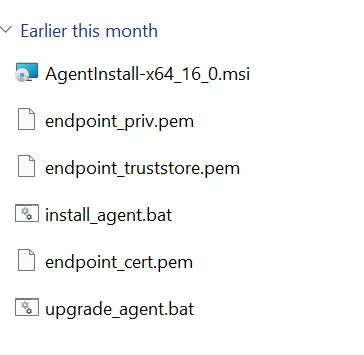
exit(Start-Process -FilePath 'msiexec.exe' -ArgumentList('/i','AgentInstall-x64_16_0.msi','/qn','INSTALLDIR="%PROGRAMFILES%\Manufacturer\Endpoint Agent"','ENDPOINTSERVER="dlp.mycompany.my:443"','TOOLS_KEY="tools_key"','RANDOM_KEY="RANDOM_KEY"','UNINSTALLPASSWORDKEY="Uninstallpasswordkey"','SERVICENAME="EDPA"','WATCHDOGNAME="WDP"','ARPSYSTEMCOMPONENT="1"','ENDPOINT_CERTIFICATE="endpoint_cert.pem"','ENDPOINT_PRIVATEKEY="endpoint_priv.pem"','ENDPOINT_PRIVATEKEY_PASSWORD="endpointprivatekeypassword"','ENDPOINT_TRUSTSTORE="endpoint_truststore.pem"','LOGDETAILS="Yes"','/L*v SystemDrive%\installAgent.log') -Wait -Passthru).ExitCode


The installer file package as following: