







Get the latest product updates, ask technical questions, and learn best practices
Recently active
Mine was probably to let me know that a computer had caught fire after a truck hit the power line to our building (there was still power, but we had a voltage spike that blew that computer’s power supply). What’s the worst, silliest or most alarming ticket you’ve gotten?
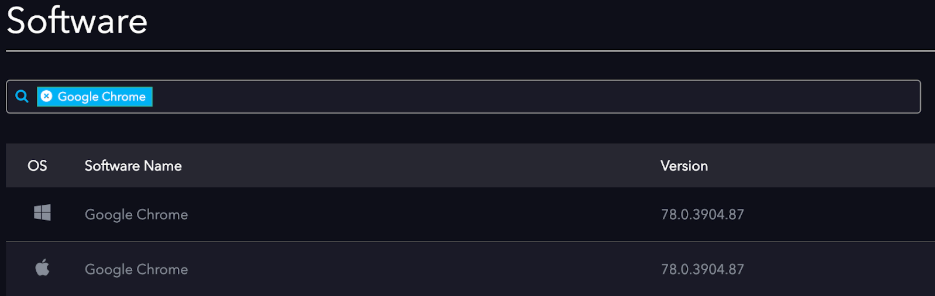
It was more trick than treat last night for Google Chrome users who found a new update pushed down that patched an exploited zero-day vulnerability and one other fix. Automox customers can deploy Chrome version 78.0.3904.87 for Windows, macOS, and Linux operating systems immediately from their console. Google Chrome Updates High CVE-2019-13720: Use-after-free in audio. Reported by Anton Ivanov and Alexey Kulaev at Kaspersky Labs on 2019-10-29 High CVE-2019-13721: Use-after-free in PDFium. Reported by banananapenguin on 2019-10-12 More information on the updates can be found via this Google Chrome blog post. CVE-2019-13720 The scariest of the two fixes, CVE-2019-13720, was discovered and reported to Google by Kaspersky. The exploit leverages a waterhole-style injection on Korean-language websites. Based in Javascript, the malicious code loads a profiling script from a remote site which would then check the victim’s machine for exploit potential. If the potential is there, the sc
< 2 days 2-7 days 8 to 20 days 20 to 30 days 30+ 0 voters
Hey Automox Customers! We are currently working on some new Automox training material, from KB articles, webinars, to video walkthroughs and I would love your feedback. Whether you are new to the product or consider yourself an expert, please weigh in. What topics would you love to see in our next iteration of material? What topic do you think we have covered really well? What is your preferred learning format? (Video, write up, self-guided material)? Thank you all in advance.
@rich from our support team has done a revision of our API documentation, available here:https://developer.automox.com/Most all of the pages have been updated with new information and the API is now 100% documented. If you run into any issues with the documentation or getting the API to work, please let us know!
Here’s how to grab the Windows Update log files so that you can get to the bottom of the issue: https://support.automox.com/help/how-to-retrieve-windows-update-log-files Note that for Windows 10 and Server 2016 you’ll need to run the Get-WindowsUpdateLog cmdlet to generate the log file. If there’s anything you find in the logs that you can’t decipher and fix, let us know and we’ll do our best to help.
Since Catalina is the Vista of OS X, here’s how to make sure the Automox notifications get allowed, using your MDM software: https://support.automox.com/help/allowing-automox-notifications-in-macos-catalina
Once? Twice? Three times a lady… oh wait, that’s a song. Seriously though, how many times and for how long do you let users defer updates? Are they generally happy with your policies or do they complain about getting interrupted still?
Bug Fixes Updated billing zip code field to accept alpha-numeric characters Updated text from “Require Reboot” to “Requires Reboot” to avoid confusion Fixed an error that was preventing Search Software and Search Device from showing completely in IE 11 Updated functionality for Display Name column in the Edit Group screen. Display Name column is now sortable. Removed duplicate columns on Devices Page Fixed an issue where Custom Notifications would not throw an error if reboot message was left blank Improved the Dashboard frontend to handle API failures more gracefully and present an error if one of the request API calls fails Enhancements Removed “Beta” tag from Software Page - New Software Page is now the default for all customers Changed “Edit Policy” to be “Edit Worklet” on System Management page Changed “Delete Policy” to “Delete Worklet” on Edit Worklet page Modified “Add Devices” text color for readability. Removed unnecessary check box. Updated color scheme on Reports page in
Our designer @todd.may has come up with some badge designs for us to try out. I’ve uploaded a couple to the badges page, namely the Autobiographer and Bug Finder badges. Let me know what you think of them in action: https://community.automox.com/badges
We’re looking into improving our change management processes and would like to treat our Automox configuration as code so we can use standard Git workflows for change management. We believe this to be a natural extension as worklets are already code and what we most need to control. Have others set up a configuration as code pipeline for Automox? Is there an API to configure worklets I’m missing in the documentation?
Good morning, Is there a way to enable Automox to restart services in a particular order on a server?
Has anyone created a policy specifically for patching MS SQL servers?
Enhancements This release contains architectural enhancements that will be used for future features and general performance improvements. No customer visible changes will be noticed. Bugs Resolved an issue while processing a result that could create a missing command. https://support.automox.com/help/archive-2017-2018-2019
Bug Fixes Zoom fix on Windows 7 that prevents the function GetSoftware from crashing. https://support.automox.com/help/archive-2017-2018-2019
Enhancements Reference scheduled downtime notice provided in Messages by Technical Support. Updates implemented in production database for general performance improvements. https://support.automox.com/help/archive-2017-2018-2019
Bug Fixes Fixed an issue when executing a batch “Scan” or “Reboot” action from the Devices page where a large number of API calls to the server queues causes controller timeouts. Fixed an issue in the System Management page where the Execute Now action encounters a gateway timeout and there is an uncaught TypeError in the console tab of the browser. Fixed an issue where the manual execution of a policy with a large number of devices times out in the HTTP request. Fixed an issue where the Patch Now function from the software page times out for a large number of devices. https://support.automox.com/help/archive-2017-2018-2019
Last night, reports were received of intermittent connectivity between agents and console. At this time, the main cause of the outage has been resolved. However, part of the fix caused orphaned entries in agent command queues which can result in some of the following symptoms: Agents can appear in the console as disconnected Agents can appear in the console as perpetually scanning Agents can appear in the console as perpetually updating We are currently working on clearing these up and will provide additional updates as things progress. Once normal functionality has been restored we will begin working on generating an Incident Report (RCA). If you would like to obtain a copy of the Incident Report or have any additional questions or concerns please email support@automox.com.
Better reporting? Improved error handling? Anything else that would make writing worklets easier? P.S. if you want to learn more about worklets I’m doing a webinar this Thursday: automox.com Automox | Leveraging the Power of Automox Worklets™ Join Nic Tolstoshev, Automox Alive community manager, to learn the ins and outs of Automox Worklets™.
I am wondering how other admins have configured Office 365 update policies. The issue I am working to resolve is having Office 365 applications all of a sudden close without warning. I have a “Patch All Except” policy that excludes Office 365 updates that is scheduled at 12:35 PM I have a “Advanced Policy” that patches Office 365 updates that is scheduled at 3:30 PM with end user notifications enabled Officer365%20Patches1209×703 35 KB Office365UpdatePolicy2235×1947 245 KB I have the “Reboot Notification” Worklet enabled and scheduled for 3:50 PM (shoutout to @awhitman for this super dope worklet!) Any recommendations to improve this? The last thing I want is an end user freaking out and smashing their 💻 because they didn’t save their Word or Excel document when Office 365 decides to update.
We are excited to inform you that the next version of the Automox Agent will be released this week. This release will add the following features and fixes: Support for MacOS 10.15 Catalina Increased consistency of Patch Notifications on Windows Resolved bug which added extra whitespace to Patch Notifications on Windows Improved Error Logging for failed agent commands. The agent release is tentatively scheduled for Wednesday 10/09/2019 barring any issues. This date could potentially move back a couple days if any issues are encountered in our final rounds of testing.
Enhancements Notarized the macOS installer package for 10.15. Bugs End User Notification was not appearing in user sessions. Surround installation URL with quotes to support mac OS 10.15.x (Catalina) OSX 15: Beta OS updates not returning in GetSoftware. OSX 15: Notifications weren’t displaying. White space was appearing Under Notification Window. Agent command failures were not properly reported if script exits with non-zero. Agent Log and associated CQ response only showed “Exit Status xx” instead of the stderr output previously displayed. Notification related error in agent log (Invalid Session ID). https://support.automox.com/help/archive-2017-2018-2019
BleepingComputer Windows 10 KB4524147 Update May Cause Boot and Printing Issues Windows 10 1903 users have started reporting boot, printing, and Start Menu issues after installing the KB4524147 cumulative update that go away once the update is uninstalled. Microsoft has not acknowledged any of these issues as of yet, but the... Here’s the support article on rolling back patches should any of your endpoints need it: https://support.automox.com/help/how-to-rollback-an-installed-patch-on-devices
Hi All, Im struggling abit to get a worklet working correctly for both mac and windows. No need for applying a licence as all users are individually licenced upon login. Can any one share your wisdom with this one? spent the last few hours on forums and seems like an easy one for jamf and munki but not here. Thanks
Here’s the rundown of all the latest patches: automox.com October 2019 Patch Tuesday Index For the latest Patch Updates from Microsoft and third-party vendors, read our October 2019 Patch Tuesday index consisting of live updates throughout the day. Make sure to attend the Patch Tuesday webinar for more info! automox.com Webinar: Automating Patch Tuesday: October 2019 Join Richard Melick, Automox’s Technology Raconteur, for a review of October's Microsoft Patch Tuesday security patches and learn tips for automatically protecting your infrastructure from these vulnerabilities.
Already have an account? Login
No account yet? Create an account
Enter your E-mail address. We'll send you an e-mail with instructions to reset your password.