








Get the latest product updates, ask technical questions, and learn best practices
Recently active
Saw this on an /r/sysadmin thread: shellcheck.net ShellCheck – shell script analysis tool ShellCheck finds bugs in your shell scripts Looks like it might be handy for error checking your scripts before you run them.
We just added a new knowledge base (KB) article that describes how to bulk deploy our agent using Windows Group Policy for devices that connect to company networks via VPN. https://support.automox.com/help/deploying-the-automox-agent-using-windows-gpo-for-remote-users
https://support.automox.com/help/week-in-review-release-notes-for-week-ending-8212020Bug FixesUpdated error messages in the Edit Policy page to provide more detailed responses. (8/17) Fixes an issue where Crowdstrike invitations were expiring too quickly. Account linking invitations are now valid for seven days. (8/20)
For our windows machines I use a chocolatey package to install the Automox agent, and we just started seeing failed installs as the URL I was using for the agent download referenced a version of the agent that was too old. Is there a URL that will always download the latest version so that I dont have to update the chocolately package with every new release?
We at Automox wanted to share the details of an outage that we had last week by providing a Root Cause Analysis. You may have noticed on the Automox Status Page during that time and if not can view the entire posting at status.automox.com. If you are not set up to receive alerts please subscribe by clicking the button on that page. Thank you for your patience while we formalized our response. If you should have any questions about the content or need further details please log a ticket at https://support.automox.com/help. RCA August 10-11.pdf (30.2 KB)
We’re giving the Group Editor page a facelift. No big changes to functionality, but hopefully the new page layout will be easier to use. Here’s what the new pages will look like once the feature rolls out sometime in the next month (note that these aren’t final screenshots so there might be minor variations in the final version): image1600×961 207 KB image1600×1422 355 KB image1232×1064 33.7 KB
What are most people doing as a best practice for organizing groups? We currently have 3 groups, User Laptops, Servers, Testing. This has worked fine for our needs except for the fact that worklets for Macs show up on the list for windows devices and same for Windows worklets on Macs. It seems like the way to keep things clean is to make sub-groups by OS, but since policies cant be inherited things like patching policies that apply to both would need to be assigned to each subgroup. Not a huge deal with our small size (currently) but am a little concerned how this will scale out in the future since it leaves the opportunity open to forget to apply a policy to a sub group.
What a fun day to have a Citrix cluster! 😃 https://support.citrix.com/article/CTX279897
https://support.automox.com/help/week-in-review-release-notes-for-week-ending-8142020 Bug Fixes Display name for the Skype is consistent across different systems. (8/12) Enhancements The Patch Only and Patch All Except policy types now have an “Automox Supported Software” checkbox when you filter the Package List, so you can filter the list down to software packages that are managed by Automox. (8/12)
So I used Spiceworks in the past but meh… they’ve all but given up supporting it the way most companies support their products and the on-prem is dead. The cloud one just doesn’t do it for us either. We are currently using this equally ugly concoction our dev team baked up and it’s causing a lot of problems. I’ve been casually looking for months now but nothing has really clicked. Honestly - my requirements are very simple: It’s 2020, I want it to be pretty. I want it to literally look like Google did it. Over complexity in the UI drives me nuts. I don’t need anything crazy as far as features go. I just want tickets to be created and closed and later reported against. I also want a KB if that’s available but we have Confluence right now so it’s not a dealbreaker. I just like being able to attached a KB article to a ticket. I don’t want to break the bank for a stupid ticketing system. I’ve seen a billion of them in the last few months and there are pieces of some I like but nothing ha
We just added in this checkbox to filter out software that we don’t patch, so that you don’t have to see those in the list when building a Patch All Except policy, for instance: Shout out to @paul.burdick for adding this in!
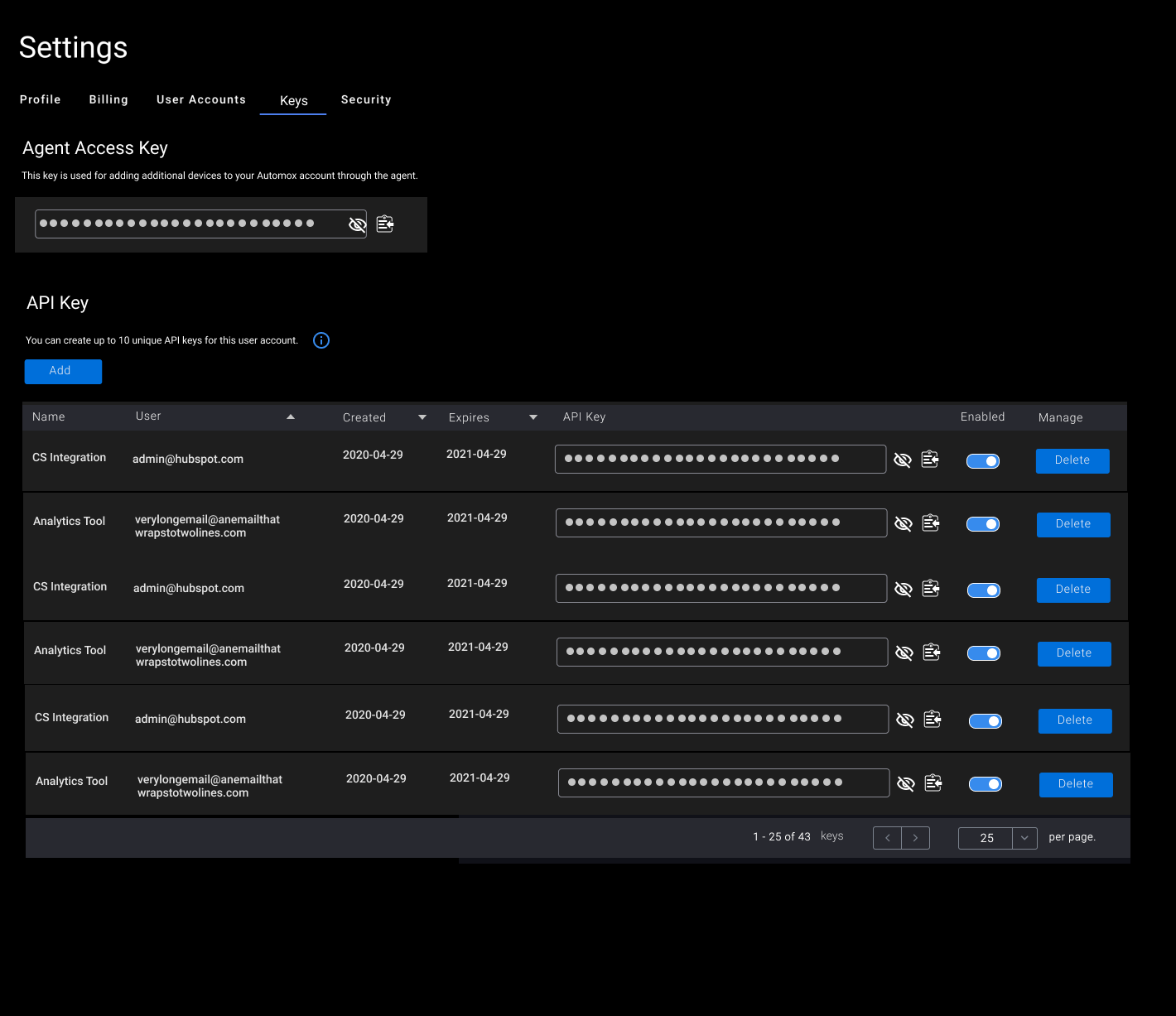
We have a new feature on the way, which is the ability to manage your API keys as an Automox administrator. Currently each console user has just the one API key that can’t be changed or expired. We’re looking at launching this in Q3 2020 - stay tuned for updated release info as we get closer to release. Here’s how that feature will work: The API Key Management in the Settings section of the console is a feature that enables a full administrator to disable, delete, re-enable, and generate new API Keys associated with their organization’s account through the Settings page. All other roles can only view and manage the API Keys they have created with their logins. API keys can be managed either through the console or via the API. The API key value is obfuscated in the console interface. When a new API is created, the user can associate an optional expiration date with that key. If no expiration date is associated, the default value is no expiration date. Each organization can associat
Have you ever needed to run a scan from the client side? There are times when you may want to trigger a scan from the device as part of an automation rather than from the console (or waiting for the next scheduled scan to run). One example is to automatically update the Automox inventory when a Windows 10 in-place upgrade successfully completes. Luckily, @Nic recently published a topic to clean up inactive devices (Powershell script to remove devices that have been disconnected longer than X days) that I was able to repurpose to manage this task. Thank you @Nic! This script leverages the API to identify the local device, and then sends a secondary API call to schedule a scan for itself (Pretty handy, right?). There are two areas in the code you’ll need to update to get the script to function: $orgID = ‘YOUR_ORG_ID’ - put your Org ID, which can be found by looking at the URL of your console and selecting the value after the “?o=”: https://console.automox.com/dashboard?o=999999 1. In
Hey guys, Curious to know if anyone has come across an issue with Automox not grabbing the bios serial number after performing an agent installation? We have found that a few VMs in our environment fail to register the serial number within the Device Details screen yet we can verify on the VM itself that it can retrieve the serial number okay e.g. wmic bios get serialnumber Have tried removing and re-adding the agent but not sure what else we can do to remediate. We have a support ticket in already but figured I’d see if anyone else in the community has come across this before. Thanks in advance! westyy
Hi all, I have a desktop PC on which we installed Ubuntu server edition. I’ve just downloaded and installed the Automox agent, but in the console it says there is not enough disk space left. Since usually we have a dedicated guy for Linux stuff, I am not really familiar with this OS, but the guy broke his leg and now I had to take over. So I am asking for a little bit of guidance of how to troubleshoot this issue. When I run “df -h” it tells me the following: for me it looks like there is enough space? I am not exactly sure how to go from here, so any advice is greatly appreciated! Many thanks!
Hi all, I’ve ran into a weird problem where I randomly have Windows servers refusing to register in the Device Manager console. The MSI appears to be launching, but doing nothing. I’ve launched from command line, with and without the -quiet tag, I’ve also ran it manually with no success. Occasionally, I get an error message box saying ‘the specified account already exists’, but again, this seems to be random. Has anyone seen anything like this before?
https://support.automox.com/help/week-in-review-release-notes-for-week-ending-8072020 Bug Fixes Pressing Enter in the Create Organization form will create organization with name specified. (8/04) Newly created policies will now show as ‘Pending’ on affiliated devices before first evaluation. (8/05) Duplicate records for servers will no longer be created if a previously removed server is re-added for an organization. (8/07) Enhancements Groups will now appear in alphabetical order in dialog, and hierarchical and then alphabetical order in the system management page. (8/03) A new API Key management feature has been added within the Settings page that allows administrators to issue, delete, and generate new API keys for whatever purposes you need. (8/06)
Hi all My console has gone nuts. In a span of 24 hours, the number of endpoints suddenly doubled from 500+ to 1100+. I’m seeing the same computer appearing multiple times in the console. This is also messing up my policies since these computers end up in the “Default” group. 😦 Bug? Help??? I’m going to attempt to clean it up manually.
Hey team, Just been having thoughts about worklets and some QoL features which got me thinking to post here and ask. We have found worklets are extremely useful for almost everything. We have been tapping into the Required Software policies for new servers and workstations and come across an issue with one of our applications. The policies work perfectly fine and the software installs. For whatever reason our application doesn’t link to the endpoint. To counter this we have a remediation script which we can throw into a worklet which is no big deal. This works just fine. 🙂 Getting to my point; we find that you can allocate a worklet to a group and run the policy adhoc which is great however is Automox considering adding a feature in future which would allow you to possibly run worklets outside of linking it to a group from within the Device Details screen or via some alternative method? Here is a poor Paint job to kind of convey what I’m suggesting. 😅 image1901×864 90.3
https://support.automox.com/help/week-in-review-release-notes-for-week-ending-7312020 Bug Fixes: Fixed issue with version scraping for Slack. (7/29) Fixed issue with Mac .14 where choosing “Now” in a patch notification still resulted in a 15 minute delay. (7/29) Fixed issue where some customers on a legacy billing plan could not update their billing info. (7/30) Enhancements: We have upgraded our Settings page to use a new frontend architecture, which will be slowly rolled out this year to all of our Console pages. No functionality should change (let us know if you see something that is broken!), but this new frontend will provide a new, more expandable foundation for our Console application going forward. (7/29)
Has a nice technical overview for how the platform works and a very spiffy diagram! patch.automox.com Technical-Solution-Guide.pdf 388.75 KB
https://support.automox.com/help/week-in-review-release-notes-for-week-ending-07242020 What a good week of enhancements! Sometimes our week’s release notes are sparse because we’re heads down on core infrastructure work, query optimization, or other non-flashy pieces. But this week we were able to start shipping some of the features and enhancements we’re excited to give everyone. Have a great weekend everyone! Bug Fix Resolved an issue where some Device states (Connected/Disconnected) were inaccurate in the Non-Compliant Report. (7/22) Enhancements The Automox console 404 page has been redesigned to include helpful links for those who may have wandered off the path. (7/22) Your chosen pagination limit on the Devices page will now be stored in your browser’s localStorage and be sticky between requests. (7/22) Improved detection and patching support for the rebranding of “Microsoft Office 365” to “Microsoft 365 Apps for Business/Enterprise”. This affects all versions above 16.0.1300
I was reviewing some different Automox Youtube videos this morning to see if there were any good overview video I could send some of my customers looking to leverage the platform. One video I stumbled upon called ‘Get Started with Automox’ refers to a feature that allows you to schedule systems based on time zones (1:34). My understanding was that this was an upcoming feature - I wasn’t able to find any documentation on the website around this either. Is this currently available? If not, do we know any timelines on when this may be released?
Does anyone else see incorrect counts in the dashboard or devices page for devices with scheduled patches? It seems the act of editing a group or policy resets the scheduled patches info of all devices to zero except those associated with the edit.
We have been using custom end-user notifications with deferral options for quite a while with success. In July, a lot of employees received a notification, but with no deferral option, and their PCs rebooted in the middle of videoconference meetings or other inconvenient times. Is it possible that earlier deferral options were not seen and so the employees had already exceeded the maximum number of deferrals? How long is the deferral option displayed if it is not acknowledged?
Already have an account? Login
No account yet? Create an account
Enter your E-mail address. We'll send you an e-mail with instructions to reset your password.