








Get the latest product updates, ask technical questions, and learn best practices
Recently active
What am I doing wrong here? This doesn’t seem to be working and I can’t seem to figure out why. Thanks all. Eval Code $user = ‘DomainNameHere\DomainGroupHere’ $LocalGroup = ‘Administrators’ if ((Get-LocalGroupMember -Group $LocalGroup).Name -contains $user)) { exit 0 } else { Exit 1 } Remediation Code $user = ‘DomainNameHere\DomainGroupHere’ $LocalGroup = ‘Administrators’ Add-LocalGroupMember -Group $LocalGroup -Member $user
While Software as a Service (SaaS) and Infrastructure as a Service (IaaS) industries have both grown tremendously in the past few years, according to IDC sales of cloud IT infrastructure products increased over 34% in the second quarter of 2020 compared to the same period in 2019. Cloud saw incredible growth in 2020 and may be worth a better look. Here are 5 ways cloud-based IT management solutions can improve the operational cybersecurity whether it’s business as usual or during a time of crisis: Asset Visibility No Matter the Location A sudden change, such as shifting in-house staff to remote positions, can represent a huge security challenge that organizations need to address. Having visibility into these new endpoints may be challenging depending on how they connect to the corporate network. Without proper visibility, security and IT operations are limited in knowing how secure these devices may be. Even worse, if these devices aren’t patch managed, employee machines may be low
We’re kicking off a new interview series where we go behind the scenes with a worklet writer to see how the sausage gets made. @Mrichards graciously agreed to go first, so I chatted with him about how the Workstation Network Health Check worklet came to be. Nic: What was the impetus for creating this worklet? Matt: So this worklet was originally developed right after COVID work from home started, mainly because a handful of our users complained “IT gave me a bad laptop, it’s slow and disconnects from my home wifi all the time”. We had no real way to get any real data on what was going on at their house (we don’t do house calls). So we had no way to refute their claims about it being “IT’s fault!”. Originally it was just a wifi checker, but we desired more data. It slowly became a “workstation health” script over time. Nic: What difficulties or obstacles did you run into getting it created? Matt: The biggest difficulty was working with the Activity Log, honestly. It doesn’t really form
Hello Automox Community, Does anyone here have a worklets for uninstalling adobe flash player in Mac. Automox is showing a new version of Adobe Flash Player NPAPI but we are getting failure to install. See below patches error: System OS: OS X Patches: “Adobe_Flash_Player_NPAPI” Failure: malformed JSON string, neither array, object, number, string or atom, at character offset 0 (before “<!DOCTYPE HTML PUBLI…”) at /usr/bin/json_pp5.28 line 44. curl: no URL specified! curl: try ‘curl --help’ or ‘curl --manual’ for more information UpdateFlash: Unable to download install file Thanks in advanced! U
hello, What is the method to upgrade Okta AD agents with Automox? https://help.okta.com/en/prod/Content/Topics/Directory/ad-agent-new-integration.htm Thanks,
Patching servers quickly and accurately is critical for security. Servers provide the backbone of any network infrastructure, and as such they have more dependencies than we experience with laptops. Server patches should be piloted prior to a deployment, maintenance windows must be set, and installation requirements for each patch must be understood. In order to manage the patch needs of multiple servers and operating systems, companies should adhere to recommended best practices - Establish a set patch management schedule Each server OS releases patches on a separate schedule. Microsoft is famous for releasing updates on the second Tuesday of each month, but Linux and applications that run on top of your server will release updates at different times. We recommend checking for new server patches at least once a week, and subscribing to alerts for critical patches that are released in-between your scheduled patching times. Prioritize server patches by severity Some patches need to
I have several devices that are awaiting reboot after patching. However, I’ve had a few users reboot their device themselves and they still show on my list needing attention. Just tested this with a user. She would not fall off the list until I initiated a restart from Automox. I also have a vacant desktop that has been “rebooting” all week.
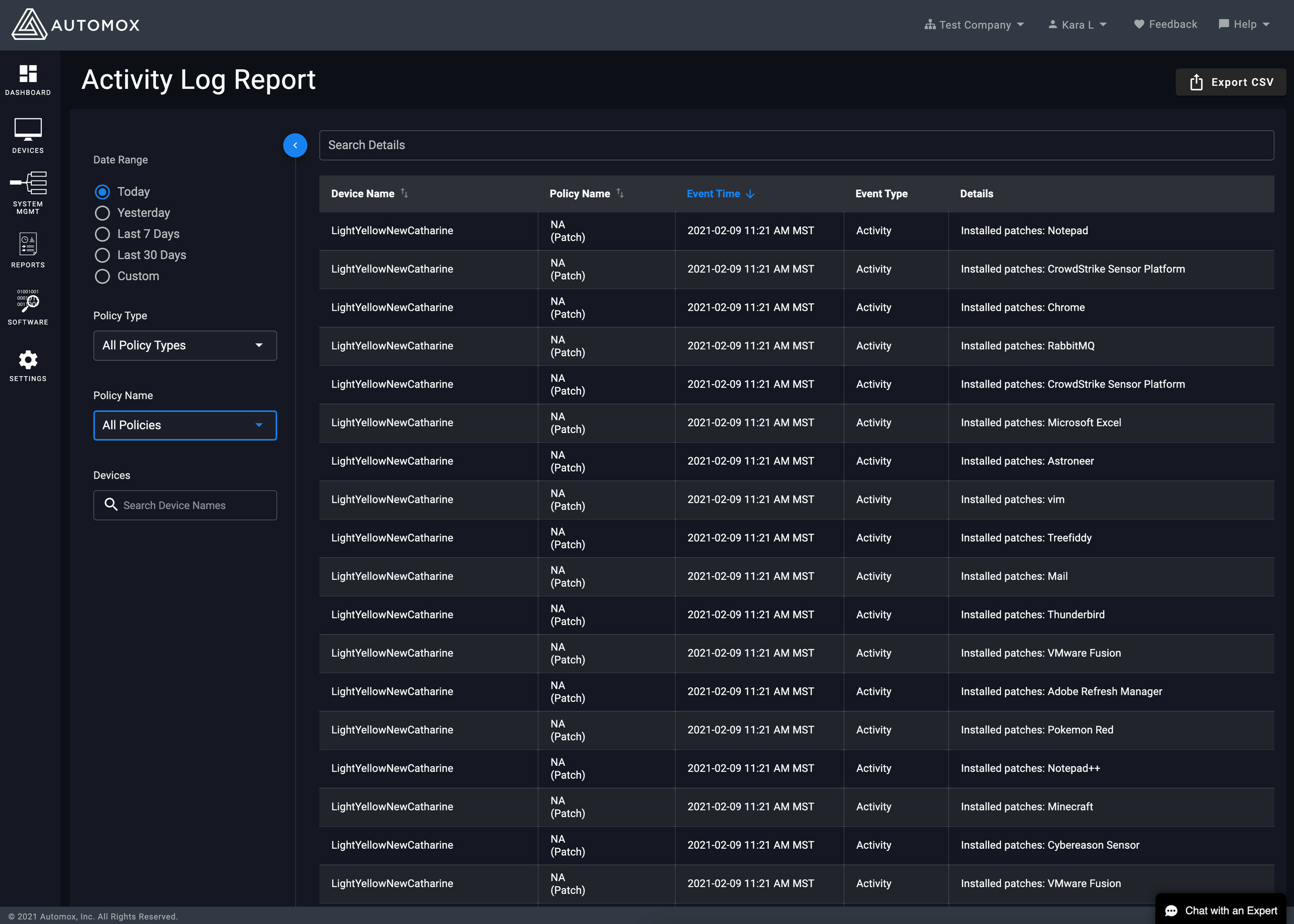
The new Activity Log Report in the UI looks much better! Thanks everyone!
I don’t have any to share It’s too much work to share them My code isn’t good enough to be shared I don’t know how to write scripts I don’t know how to use the worklet functionality Developing a worklet through Automox is too difficult Not enough rewards or swag for sharing Too hard to sanitize and remove company info from code Testing my worklet code in the console is too difficult I can get my script to work locally but not when run through Automox 0 voters
Later this month, we will be releasing an updated look and feel for the Activity Log. We will be moving the Activity Log to a dark theme. We have also moved the search and filters to a collapsable left panel. Both of these updates will bring the Activity Log more inline with the rest of the console experience. Some screenshots: image2564×1831 494 KB image536×1012 37.1 KB image562×1146 42.3 KB
New to automox. Need to catch up on getting Windows patches out to machines. So I am writing a guide for what my users can expect. Part of that is testing it on a VM. But I applied updates 30 minutes ago and should be seeing a notification prompting the user to install updates or delay. Nothing happening. Using Apply All Patches for Optional and Recommended Updates on a Win10 1909 VM. Automox just shows it pending. How do I know anything is actually being done?
Does anyone have a worklet or guidance regarding installing office via automox?
We are excited to announce the release of Agent 30 for Automox coming Thursday December 10th. This agent will include several key improvements such as: Being able to pass the starting group argument to the MSI installer for Windows Bulk installs. Big Sur support. Better and more secure Automox agent. The Automox agent will have an even smaller footprint on systems with a 30% reduction in overall size. Several other improvements in overall functionality/reliability of the Automox agent. The agent should automatically update to agent 30 without having to do so for your Automox endpoints. If you wish to delay the Automox agent from Automatically updating, please let support know at Support@automox.com.
Hello, I had successfully setup a required software policy for installing Zoom with customer options, but for some reason I cannot get any commands to work after the install occurs. For example the start-process command installs the MSI just fine with the arguments, but when I want to run a command after that e.g. starting the Zoom app via the start-process command. Is there something wrong with how the first process is ending and or causes powershell to just stop processing further commands? I have tried taking off -wait and -passthru and no change. Any help will be appreciated. Start-Process -FilePath ‘msiexec.exe’ -ArgumentList (’/qn’, ‘/quiet’, ‘/norestart’, ‘MSIRESTARTMANAGERCONTROL=”Disable”’, ‘/i’, ‘“ZoomInstallerFull.msi”’,‘ZConfig=“nogoogle=1;nofacebook=1;DisableLoginWithEmail=1”’, ‘ZoomAutoStart=“true”’, ‘ZSSOHOST="******.zoom.us"’, ‘ZSILENTSTART=“true”’) -Wait -Passthru Start-Process “C:\Program Files (x86)\Zoom\bin\Zoom.exe” -WindowStyle Minimized exit
HI Team, Looking at the documentation for SAML SSO, it says if SAML enabled it disables 2FA. Is it possible to re-enable 2FA after SAML completed, or is it one or the other? Cheers, Chris.
Currently using WSUS (hate it) and looking to migrate to Automox. How do you guys have your GPOs configured in regards to WIndows Updates? Do you just leave them as default or do you suppress them from looking to Microsoft for updates so Automox is needed to trigger and manage?
Hi all, can someone point me to the right API reference guide for approving pending patches? I’m trying to build out a process that’ll approve these patches in a given policy. thanks, Alan
This API call will generate a list of all software in your organization and a count of how many are installed of each. Just update your API key, org ID, and where you want the file saved. It will overwrite an existing file if it exists. It also shows how you can use pagination to account for more than 500 results. $apiKey = 'YOUR_API_KEY' $orgID = 'YOUR_ORG_ID' $filepath = "C:\Temp\packages.csv" $page = 0 $limit = 500 $data = @() Write-Output "Page" while($true) { $headers = @{"Authorization" = "Bearer $apiKey" } $url = "https://console.automox.com/api/orgs/$orgID/packages?l=$limit&p=$page" $response = (Invoke-WebRequest -Method Get -Uri $url -Headers $headers).Content | ConvertFrom-Json Write-Output $page $data += $response $page += 1 if($response.count -lt $limit) { break } } $data | Group-Object display_name | Sort-Object name | Select-Object Count,name ` | Export-Csv -Path $filepath -NoTypeInformation
I see that it isnt officially named, but it is based on debian. Has anyone tried this?
Hi Guys, Looking for a powershell script that utilizies the API to make a report based on a software title and its versioning… for example: Show me all machines who have VMWare Workstation installed, and what version they are running. I could find a bit of this info in software tab on the AX UI, but no way to export into a nice report for executives… Thoughts? Thanks!
https://support.automox.com/help/release-notes-for-week-ending-01292021 Enhancements A new design for the Device Details page Details available Here
Hello! Does anyone know if activity logs from the reports page purge at all after a specific amount of time? We store some important bitlocker leys within tags, but it is also stored in the reports.
Automox does not patch firmware updates. If we have Automatic updates turned off on a workstation or surface how do we get the firmware patched?
Today we released a new Device Details page as part of our overall Vue migration. The updated design of the Device Details page has been updated with a few enhancements. Auto save for editable Device attributes has been changed to an explicit action. We are now exposing the status for the Device, Connection and Policy. The icons for each status has had a minor refresh. The policy and software tables remain sortable with the same actions exposed. As always, we would love to hear your feedback - so feel free to reply to this thread with your thoughts. image2708×3611 738 KB
I have a couple of reporting questions: Do we have a method to see if a device has opted to defer an update or reboot? I receive weekly summary updated, but that report doesn’t have the ability to drill down. Is there a way to see this same type of information (outstanding patches by groups and time they have been available)? Is there a way to view the history of patches/updates to include dates when applied? Thank you, Brad Brad
Already have an account? Login
No account yet? Create an account
Enter your E-mail address. We'll send you an e-mail with instructions to reset your password.