worklet for pushing Windows KB

  • March 6, 2026
  • 1 reply
  • 7 views

Hi, Any one have successful worklet that install specific KB? Tried the Out-of-band patch worklet available in the worklet catalog however keeps getting command timeout. Thanks

1 reply

  • Automox Employee
  • March 6, 2026

Hey cagwait101!


Thanks for reaching out here! In order to help resolve this with you, could you provide the Evaluation & Remediation Code of the Worklet and what KB you want to target? That will greatly help us determine the issue.


If you require assistance in building the Windows - Configuration - Install Out-of-Band Patch (MSU) Worklet, here is an example you can follow where I want to push out KB5078127, which is an OOB patch from Microsoft


In Evaluation code, I edit the variable on line 28 with that KB number:

<#
.SYNOPSIS
Windows - Configuration - Install Out-of-Band Patch (MSU)

.DESCRIPTION
This worklet gives an admin the ability to install an out-of-band KB on a device.
Only .MSU files are supported. CAB and EXE based patches should be deployed using a different worklet.

.USAGE
Replace the $kb variable with the update you wish to install.
Replace the $UpdateURL variable with the full URL for the KB from the Microsoft Update Catalog. This should point to the .MSU file.
The .MSU file is then downloaded and installed silently via the Windows Update Standalone installer tool (WUSA.exe).

Depending on the KB, a restart may be required to finalize the installation.
If required, you may use the worklet's native automatic restart feature to achieve this.
The default behavior in the script is no restart.

.EXAMPLE
$kb="KB5019178"
$UpdateURL = "https://catalog.s.download.windowsupdate.com/d/msdownload/update/software/updt/2023/02/windows11.0-kb5019178-x64_1372573297db9903de0ecf377226e902cd42eca0.msu"

.NOTES
Author: John Guarracino
Date: May 16, 2023
#>

####### EDIT WITHIN THIS BLOCK #######
$kb = 'KB5078127'
######################################

if (Get-HotFix -Id $kb -ErrorAction SilentlyContinue)
{
# If KB is already installed, exit without remediation.
Write-Output "$kb is already installed on this device. Now exiting."
Exit 0
}

else
{
#If KB is not found, continue to remediation script for installation.
Write-Output "$kb was not found. Running remediation code to download and install it."
Exit 1
}


In Remediation, I add the KB again and also the direct download URL of the .msu file:

<#
.SYNOPSIS
Windows - Configuration - Install Out-of-Band Patch (MSU)

.DESCRIPTION
This worklet gives an admin the ability to install an out-of-band KB on a device.
Only .MSU files are supported. CAB and EXE based patches should be deployed using a different worklet.

.USAGE
Replace the $kb variable with the update you wish to install.
Replace the $UpdateURL variable with the full URL for the KB from the Microsoft Update Catalog. This should point to the .MSU file.
The .MSU file is then downloaded and installed silently via the Windows Update Standalone installer tool (WUSA.exe).

Depending on the KB, a restart may be required to finalize the installation.
If required, you may use the worklet's native automatic restart feature to achieve this.
The default behavior in the script is no restart.

.EXAMPLE
$kb="KB5019178"
$UpdateURL = "https://catalog.s.download.windowsupdate.com/d/msdownload/update/software/updt/2023/02/windows11.0-kb5019178-x64_1372573297db9903de0ecf377226e902cd42eca0.msu"

.NOTES
Author: John Guarracino
Date: May 16, 2023
#>

####################### EDIT WITHIN THIS BLOCK #######################
# Define the KB to install.
$kb = 'KB5078127'

# Define the full URL to the KB's .MSU file in the Microsoft Update Catalog.
$UpdateURL = "https://catalog.sf.dl.delivery.mp.microsoft.com/filestreamingservice/files/f263aa64-f367-42f0-9cad-328f342b93f7/public/windows11.0-kb5043080-arm64_df540a05f9b118e339c5520f4090bb5d450f090b.msu"
######################################################################

try
{
# Stage a temp directory for the payload
$DownloadFolder = "C:\Temp\UpdateStaging\$KB.msu"
New-Item -ItemType Directory -Path 'C:\Temp\UpdateStaging\' -Force | Out-Null

# Download the MSU
Write-Output "Downloading the out-of-band patch from the Microsoft Update Catalog."
[Net.ServicePointManager]::SecurityProtocol = [Net.SecurityProtocolType]::Tls12
(New-Object System.Net.WebClient).DownloadFile("$UpdateURL", "$DownloadFolder")
Write-Output "Download complete. Attempting install."

# Execute WUSA.exe with a call to the newly download MSU
Start-Process wusa.exe -Wait -ArgumentList "C:\Temp\UpdateStaging\$KB.msu /quiet /norestart"

# Cleanup temp staging directory
Remove-Item -Path "C:\Temp\UpdateStaging\" -Recurse -Force

# Evaluating state of KB install
if (Get-HotFix -Id $kb -ErrorAction SilentlyContinue)
{
Write-Output "Out of band patch $kb has been successfully installed!"
Exit 0
}

else
{
Write-Output "$kb failed to install or is not applicable for this device."
Exit 1
}
}

# Output any installation errors.
catch
{
Write-Output "An error has occured:"
$Exception = $error[0].Exception.Message + "`nAt Line " + $error[0].InvocationInfo.ScriptLineNumber
Write-Output $Exception
Exit 1
}

Optional:

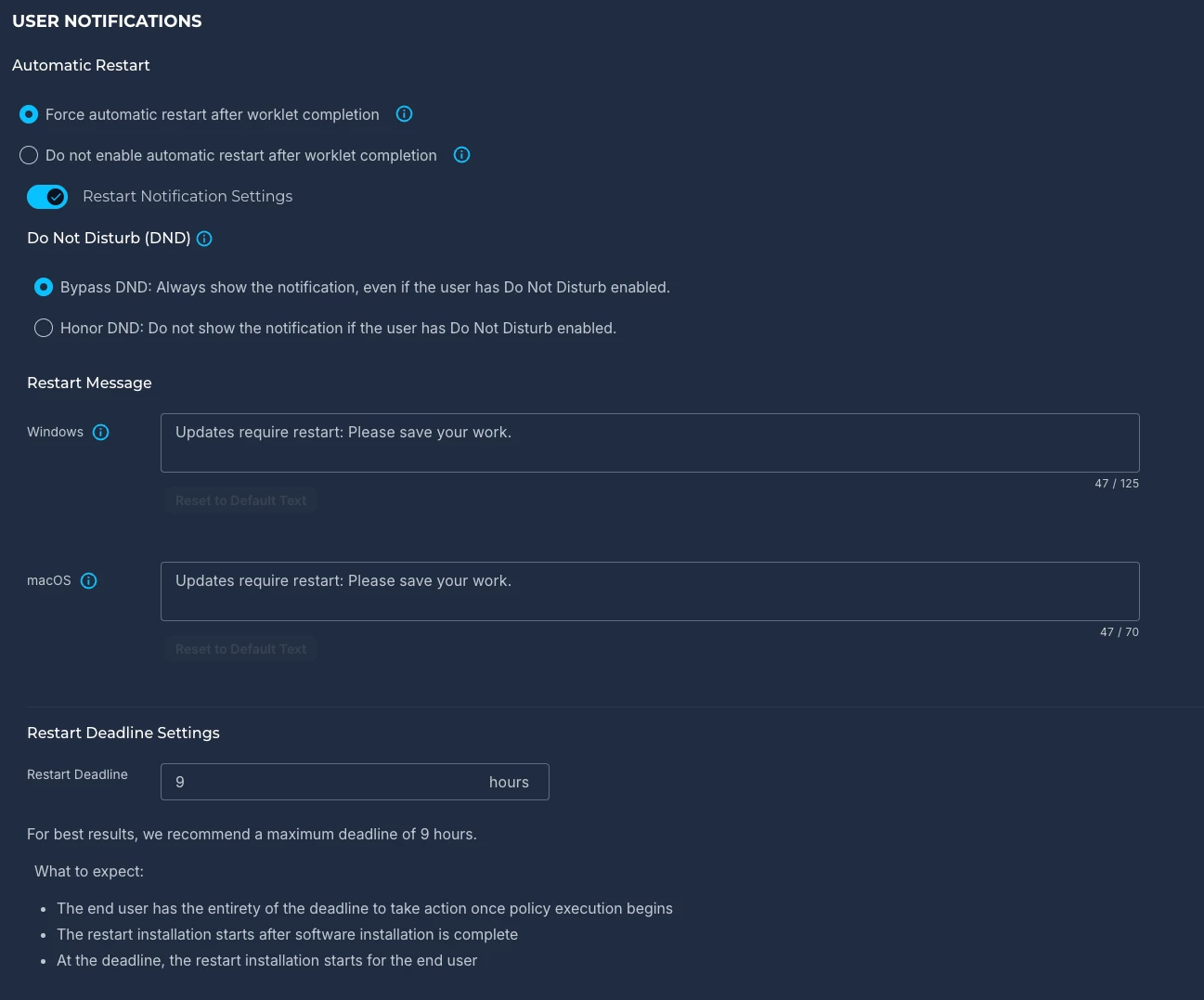
If the KB requires a restart to complete installation, you can enable restarts with notifications at the bottom of the Worklet:


Simply add a schedule to the Policy, assign your Groups and click “Create Policy”.


Hope this helps! Please let us know if you require further assistance!