

AutomoxAutomox

Need to run a policy to run a weekly reboot on windows machines

rcruz
June 7, 2024 at 7:22 pm UTC
#support#Windows#Worklets#powershell#reboot#automox

I hail you, Automox Gods

Newbie here, working today with Automox. Day 1. So please bare with me.

I am trying to run a policy for a weekly reboot, but am unable to. Would like to have your input.

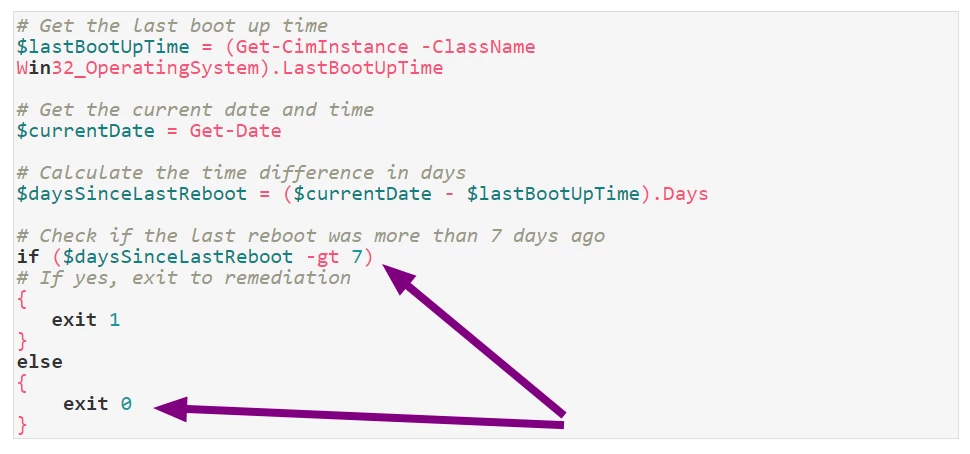
This is the script i got:

powershell19 lines
# Get the last boot up time
$lastBootUpTime = (Get-CimInstance -ClassName Win32_OperatingSystem).LastBootUpTime

# Get the current date and time
$currentDate = Get-Date

# Calculate the time difference in days
$daysSinceLastReboot = ($currentDate - $lastBootUpTime).Days

# Check if the last reboot was more than 7 days ago
if ($daysSinceLastReboot -gt 7) 
# If yes, exit to remediation
{
   exit 1
}
else
{
    exit 0
}


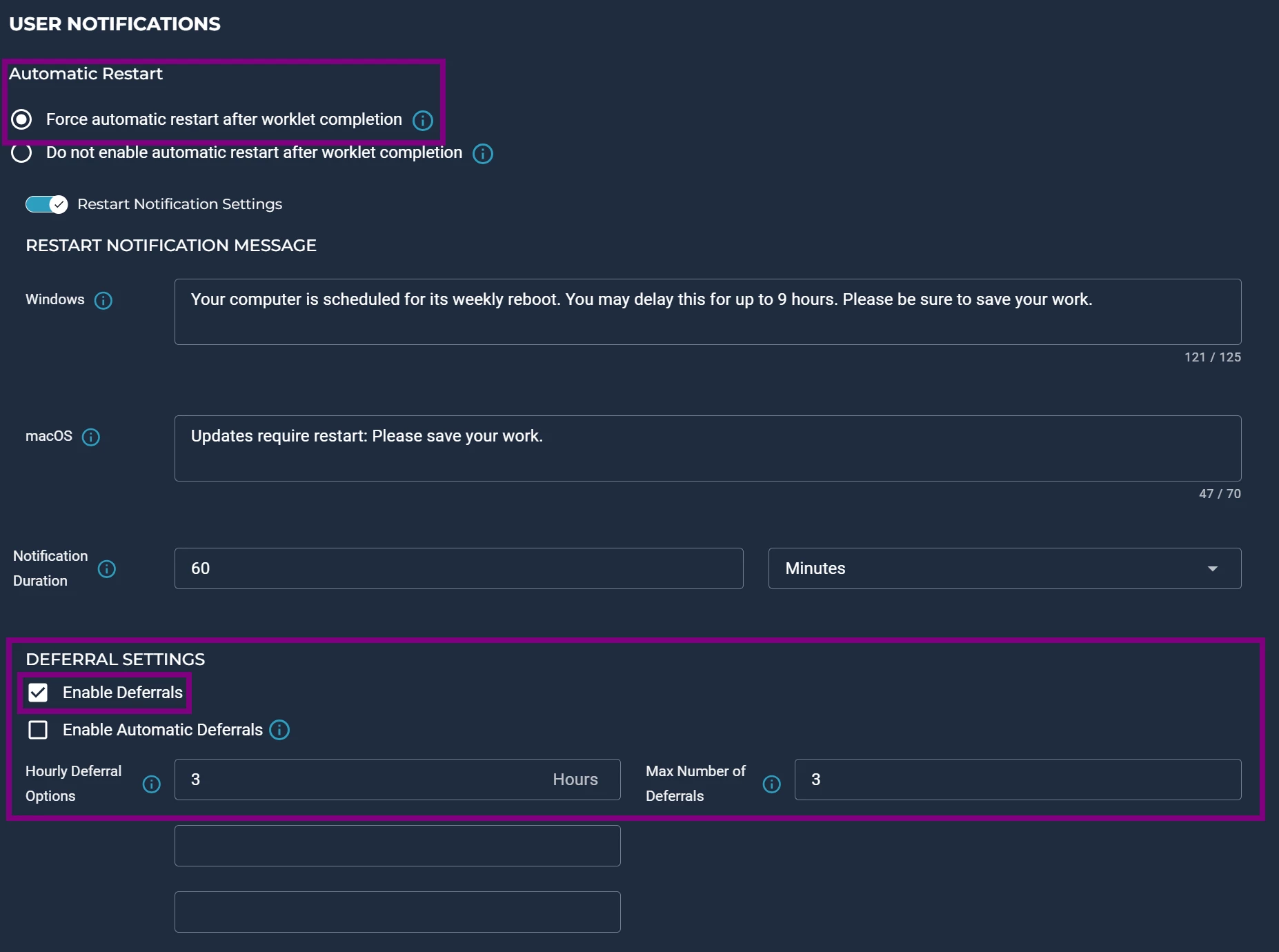
Force automatic restart after worklet completion is ticked, with the deferrals enabled, to run if the the machine is to have the reboot

My first thought was putting that script on the evaluation code, and a simple write output on the remediation code; no go.

I have tried putting exit 1 on the evaluation code and the script on the remediation code; no go.

I have tried removing the exit 0; no go.

Every time i run the policy, i get the popup for the system reboot required. The laptop has a fresh reboot, made manually or made by pressing the reboot now, so, under the 7 days the script requests. Am testing on 3 different devices, on 3 different locations, the outcome is always the same. I force run the policy, and i get the popup with the System Reboot Required, which i should only get if the laptop hadn't had a reboot in two days.

I am sure i am missing something, can i get a little help, please?


Thank you so much

This discussion is archived and closed to replies. Continue it in the Automox Community Slack.

Discuss on Slack
Replies (12)

CallmePHJune 11, 2024
#1

Try this one.

powershell16 lines
# Get the current date and time
$currentDate = Get-Date

# Get the last reboot time of the system
$lastReboot = Get-CimInstance Win32_OperatingSystem | Select-Object -ExpandProperty LastBootUpTime

# Calculate the time difference between the last reboot and the current time
$timeDifference = $currentDate - $lastReboot

# Check if the time difference is greater than 6 days
if ($timeDifference.TotalDays -ge 6) {
    Write-Host "System last rebooted more than 6 days ago. Rebooting now..."
    Restart-Computer -Force
} else {
    Write-Host "System reboot is not required."
}

With the eval code I simply have Exit 1

CallmePHJune 11, 2024
#2

There is the worklet to check in a restart is required as well! I like to run that after patch days just to make sure the reboots actually happen lol!

rcruzJune 11, 2024
#3

My script is functional. If you run it on powershell it works fine. My issue is getting it to work with Automox, in that remediation and execution. I did try Exit 1 in the Evaluation code, no dice.


If i put the restart-force on the script, it won’t get me to the deferral options below, which is exactly what i need from automox. Otherwise i’d just leave a running script on the machines


CallmePHJune 11, 2024
#4

Using the deferral your exit code needs to be 0. In eval just go Exit 1. Remediation should exit 0 IF the pc needs rebooted. That should trigger the deferral popup.  

rcruzJune 11, 2024
#5

That’s exactly what i (think i am) doing right here,  or am i missing something?


rcruzJune 11, 2024
#6

So now i got Exit 1 on the Evaluation Code and this on the Remediation Code

powershell19 lines
# Get the last boot up time
$lastBootUpTime = (Get-CimInstance -ClassName Win32_OperatingSystem).LastBootUpTime

# Get the current date and time
$currentDate = Get-Date

# Calculate the time difference in days
$daysSinceLastReboot = ($currentDate - $lastBootUpTime).Days

# Check if the last reboot was more than 7 days ago
if ($daysSinceLastReboot -gt 7) 
# If yes, exit to remediation
{
   exit 0
}
else
{
   Write-Output "The computer is good."
}

Still no dice, the popup shows up whether the laptop has a reboot under 7 days or over 7 days

CallmePHJune 11, 2024
#7

Does this work? Still with Exit 1 in Eval

powershell17 lines
# Get the last boot up time
$lastBootUpTime = (Get-CimInstance -ClassName Win32_OperatingSystem).LastBootUpTime

# Get the current date and time
$currentDate = Get-Date

# Calculate the time difference in days
$daysSinceLastReboot = ($currentDate - $lastBootUpTime).Days

# Check if the last reboot was more than 7 days ago
if ($daysSinceLastReboot -gt 7) 
{
   exit 0
}

# If the last reboot was within the last 7 days, exit with code 1
exit 1


rcruzJune 12, 2024
#8

No dice. When i run the policy with that, the Activity Log immediately gives out this: 


CallmePHJune 12, 2024
#9

Think the issue might be with the Automox deferral popups. I may just need coffee, but I think the pop up upon ANY successful remediation, either exit 1 or 0. I have this that will give just a normal pop up 3 times every 3 hrs(can bed edited of course) that is a yes or wait? Can try that, no Automox pop ups, still exit 1 for eval etc.. After that my depth might have been hit hahaah!!

powershell53 lines
# Function to prompt user for reboot
function PromptForReboot {
    $caption = "Reboot Required"
    $message = "A reboot is required. Do you want to reboot now?"
    $yes = New-Object System.Management.Automation.Host.ChoiceDescription "&Yes", "Reboot the computer now."
    $wait = New-Object System.Management.Automation.Host.ChoiceDescription "&Wait", "Postpone the reboot for 3 hours."
    $options = [System.Management.Automation.Host.ChoiceDescription[]]($yes, $wait)
    $result = $host.ui.PromptForChoice($caption, $message, $options, 0)
    return $result
}

# Get the last boot up time
$lastBootUpTime = (Get-CimInstance -ClassName Win32_OperatingSystem).LastBootUpTime

# Get the current date and time
$currentDate = Get-Date

# Calculate the time difference in days
$daysSinceLastReboot = ($currentDate - $lastBootUpTime).Days

# Check if the last reboot was more than 7 days ago
if ($daysSinceLastReboot -gt 7) 
{
   exit 0
}

# If the last reboot was within the last 7 days, prompt for reboot
$rebooted = $false
$attempts = 0
$maxAttempts = 3

while (-not $rebooted -and $attempts -lt $maxAttempts) {
    $choice = PromptForReboot

    switch ($choice) {
        0 {
            Write-Output "Rebooting now..."
            Restart-Computer -Force
            $rebooted = $true
            break
        }
        1 {
            $attempts++
            Write-Output "Reboot postponed. Attempt $attempts/$maxAttempts"
            Start-Sleep -Seconds (3 * 60 * 60)  # Wait for 3 hours
            break
        }
    }
}

if (-not $rebooted) {
    Write-Output "Maximum attempts reached. Reboot postponed."
}


CallmePHJune 12, 2024
#10

Oh and @jack.smith has this post that has the PC toast notification as well! 

rcruzJune 12, 2024
#11

Tested that out on a powershell, popup came askong me to reboot, even tho my laptop’s last reboot was yesterday

jack.smithJune 12, 2024
#12

Tested that out on a powershell, popup came askong me to reboot, even tho my laptop’s last reboot was yesterday

Add in some logic in the Worklet to tell you what’s going on. Example

powershell1 line
Write-Output "Last Boot Up Time: $lastBootUpTime ($daysSinceLastReboot)"

Also examine C:\ProgramData\amagent\amagent.log at the time the worklet executes (need to know the worklet ID which can be found in the URL of the worklet). Or just gage based on time.
