
Question

Cannot Respond to Tray Notification

  • April 10, 2025
  • 2 replies
  • 107 views

Forum|alt.badge.img

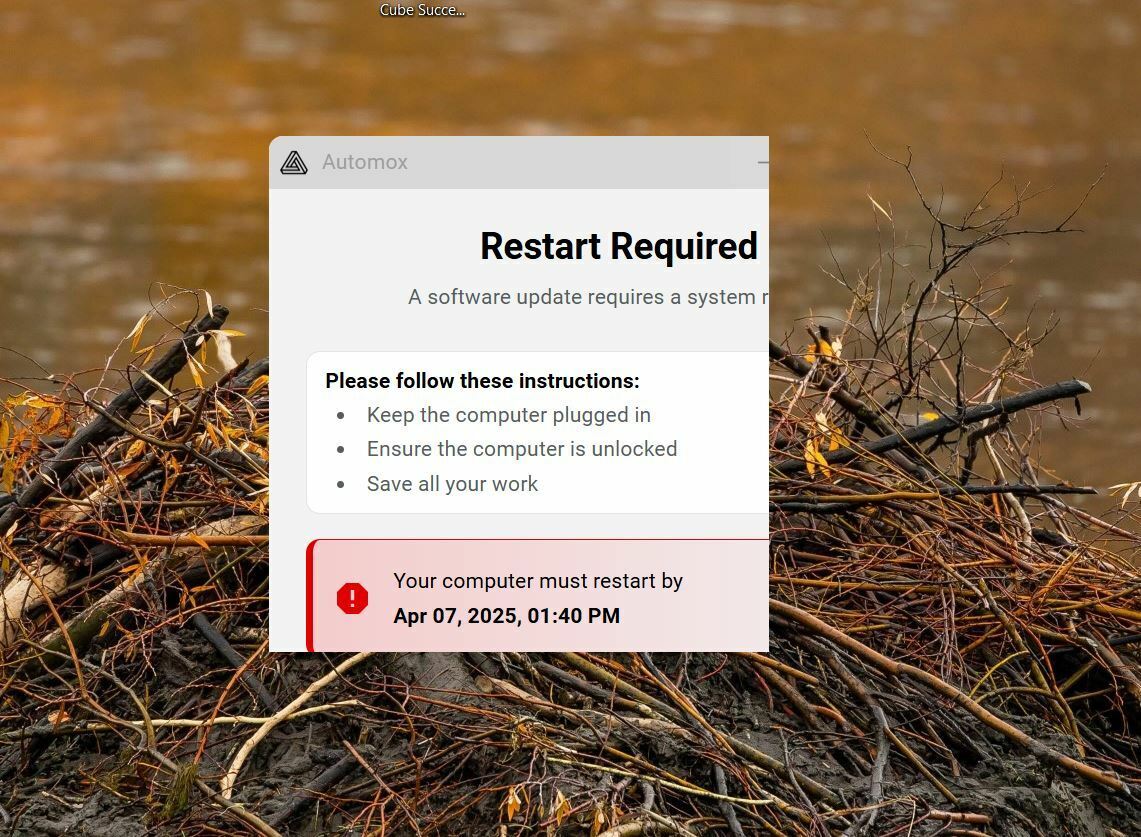
I’m getting a notification from Automox that my PC needs to be rebooted, but the right hand and bottom edges of the notification window aren’t being rendered, so I cannot see or click on the “Restart Now” button. Restarting from either the Windows start menu or by using CTRL-ALT-DELETE apparently does not suffice to enable Automox to actually do the necessary updates, because after such a restart the notification just comes back. The only option I have is the wait for the deadline to arrive and allow Automox to force the restart. This generally is just a minor annoyance, but if the deadline arrives while, say, I’m in the midst of a Teams meeting, it becomes a major annoyance. I’ve attempted to change my resolution and scaling, but it doesn’t change how the window looks. I’m attaching a screen capture. Any ideas what could be going wrong here?


2 replies

Forum|alt.badge.img
  • Community Manager
  • April 15, 2025

Hello ​@Ipsifendus
We’re sorry you’ve run into this challenge with the interface scaling. We have a new agent release available for download directly within the Automox Console that resolves that.


You can go to the Automox Console to the Devices page and click “Add Device”, then choose your operating system for a direct file installer package.

Hope that helps! 


Forum|alt.badge.img
  • Novice
  • April 15, 2025

@SophiaAX I happened to see this post pop up and your response about the agent release.   May I ask what triggers the agents to upgrade automatically?  We have some users that have been successfully connected to the console since the feature release who still don’t have the newest agent.  Thank you!!