

AutomoxAutomox

Tip of the day: Quoting posts

Nic-Automox
August 21, 2019 at 8:14 pm UTC

If you’re replying to a specific post in a longer discussion thread, you can quote the person you are replying to. That makes it clear which person you are replying to and what question you are answering.

There are two ways to quote. The first is to highlight a section of text in the post you are replying to, and then hitting the reply button. The second is to click on the quote button (the word balloon icon) after hitting the reply button. Note that you need to click on the reply button directly underneath the post you are quoting, rather than the reply button at the very bottom of the the discussion topic:
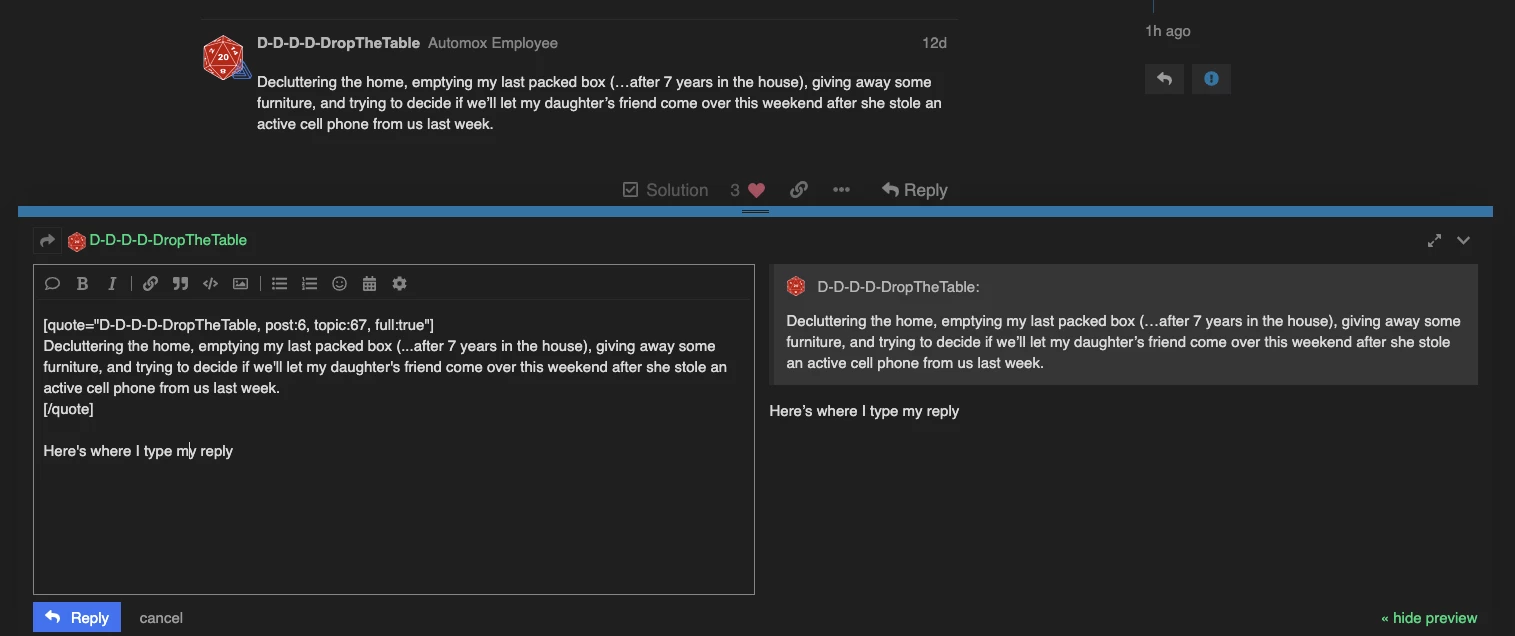
Let me know if you have any problems getting quoting to work!

This discussion is archived and closed to replies. Continue it in the Automox Community Slack.

Discuss on Slack

Replies (10)

Jarod-AutomoxAugust 21, 2019
#1

It would appear I didn’t

Nic-AutomoxAugust 21, 2019
#2

And you get a badge for your first post with a quote in it!

dimforestAugust 22, 2019
#3

How does the sharing and linking work?

dimforestAugust 22, 2019
#4

Oh… maybe I figured it out. HA

AnonymousAugust 22, 2019
#5

Grats

JasonG-AutomoxAugust 22, 2019
#6

It appears we both didn’t. Or did we?

DiegoF1000101August 22, 2019
#7

Oh look, it appears I also didn’t! (or… did?)

Nic-AutomoxAugust 22, 2019
#8

Shrodinger’s quote!

AnonymousAugust 23, 2019
#9

Ah, thanks guys.

Rich-AutomoxAugust 23, 2019
#10

I prefer TruncateTheTable, but that’s just my personal preference. ( I like easy badges too)