

AutomoxAutomox

odd OSX permissions issues with a worklet

emjaydee
September 21, 2020 at 4:40 pm UTC

I am running into an issue with a cleanup worklet I am writing.

If I try to do anything in a users Downloads folder (/Users/username/Downloads) the commands return nothing, as if the directory is empty. The same behavior exists whether its a find command, or just a simple ls. I can do an ls on /Users/username, but not /Users/username/Downloads, and both directories are world readable.

running the same bash script from the command line both as root and as a non admin user show the script working fine.

I must be missing something obvious, but is there a reason automox wouldn’t be able to do this? or do I have some permission messed up?

This discussion is archived and closed to replies. Continue it in the Automox Community Slack.

Discuss on Slack
Replies (2)

Nic-AutomoxSeptember 21, 2020
#1

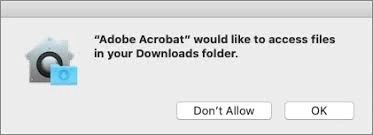
It’s probably a permissions issue. If you look at the endpoint is there a user prompt for permission to that directory? Something similar to this?
image

If you have an MDM setup you can configure those permissions centrally but otherwise you’ll need configure them by hand on each device. https://support.apple.com/en-lb/guide/mdm/mdm38df53c2a/web

The protected folders specifically are Desktop, Downloads and Documents, which is why you can get to the root user folder but not Downloads.

emjaydeeSeptember 22, 2020
#2

I didn’t get any notifications, but your fix did work. I added a new PPPC policy to allow access to the protected folders and the worklet is now functioning as expected. Thanks for the tip