
Question

Mac OS Updates & Reboots

  • August 11, 2026
  • 3 replies
  • 38 views

Forum|alt.badge.img

A number of our mac users have complained that their devices are rebooting unexpectedly. I’ve been testing this myself to ensure they were not just somehow missing the notifications however I’ve observed this:


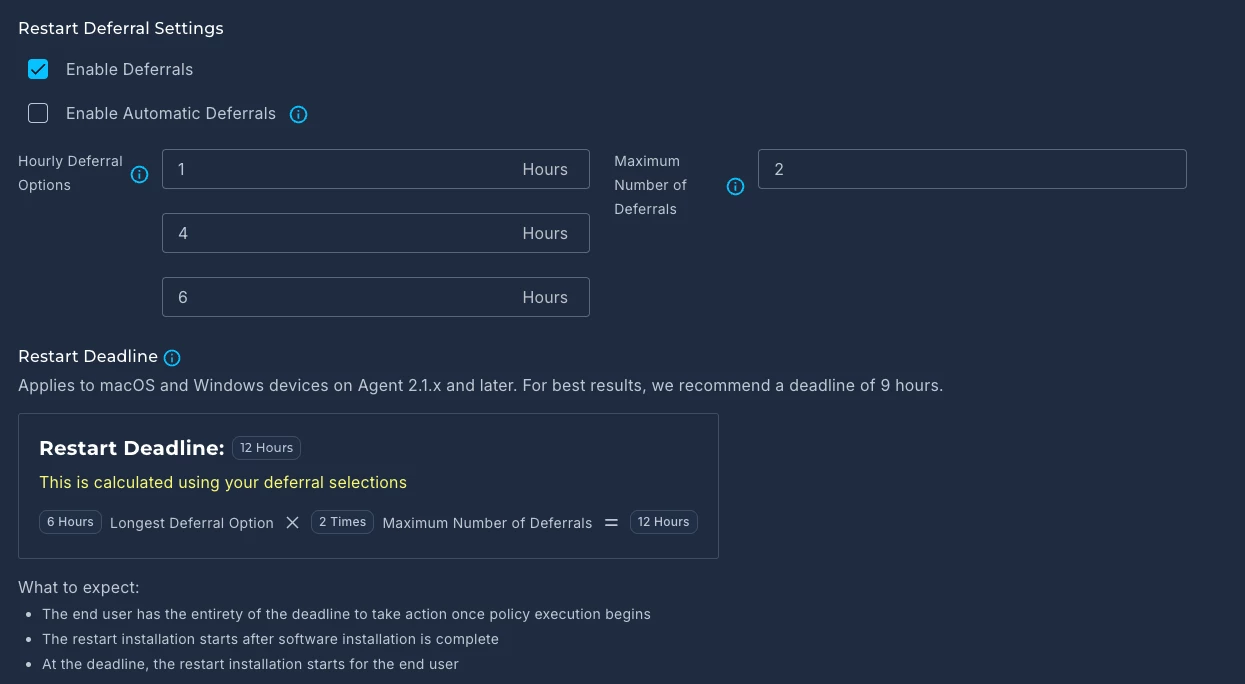
Device needed the 26.6.1 update. Automox notification popped up on the device stating the update required and a reboot would be required by 8pm. There was never any option presented for deferral (1,4,6 hours x2 configured). The policy executed at 4pm, so 8pm doesn’t line up with the max deferral option being taken automatically.

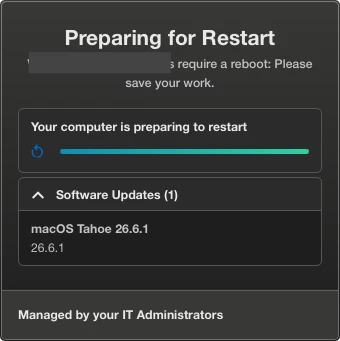
I left the device without performing any action and it did not reboot automatically at 8pm. My notification on the mac now states the device is preparing to restart but with no indicator of when that might be, and I’m expecting the device to reboot without warning any moment.


With regards to the original reboot at 8pm not happening, i assume this may have been because the device was not shutdown, but likely sleeping.

Is there any way I can deduce when it might decide the reboot from it’s current state?

If the device needs to be on and ‘active’ for those reboots to occur, should policies execute earlier in the day rather than EOD to prevent devices sleeping?

How come I’m not presented with any deferral options besides ‘restart now’?


Apologies for the barrage of questions, I appreciate any help that can be provided as some of the users are quite irate when it drops them mid-meeting.
 

3 replies

Forum|alt.badge.img
  • Community Manager
  • August 12, 2026

Hey there ​@jfver91! Would you mind opening up a support ticket so our team can take a closer look? Here’s how if you need it!


BrandonG-Automox
Forum|alt.badge.img

Hello,


I’m Brandon on the Success and Enablement team. Thanks for reaching out! I’ll answer with some suggestions and clarifications below, but I’d also highly encourage you to open a support ticket so our engineers can do a live call to walk through troubleshooting as needed.


As for the suggestions:

The first thing that comes to mind is that you are seeing our old console UI because you have devices on an old, and outdated Agent version. I would encourage you to deploy the latest Automox Agent version to your devices and then you’ll see a new UI that simplifies deferrals into a simple deadline.
End users can choose to interact with the system tray icon at any time that is convenient for them to complete a patch or a reboot (depending on what notification you configured) up until a stated deadline (date and time). This does away with the old, clunky method where someone had to sit and wait for it to pop back up before they could move forward if they chose to defer it.


Secondly, you are right that scheduling your primary patching to earlier in the day has a greater chance of completion because you can ensure devices are powered on and connected to the internet. If you haven’t reviewed your patch policies in while, then you may be delighted to know we have created brand new best practice templates you can copy straight out of the Automox console.
Navigate to Automate at the top, and then Policies, and on that page we have a new tab called “Policy Catalog.” You can filter by OS (MacOS for example) and find options for first-party OS patches and options for third-party software. These are preconfigured with schedules if you’d like to see examples.

If you’d like to learn more, then I’d encourage you to join today’s workshop webinar focusing on patching best practices, or any Tuesday Q&A session where we answer broad spectrum best practices.
 

Again, I’d encourage you to open a support ticket if it’s urgent and you’d like some live troubleshooting assistance. Otherwise join the webinars (also live, but more like a classroom) and we’d be happy to cover some best practice tips.


All the best,
Brandon


Forum|alt.badge.img
  • Author
  • Rookie
  • August 12, 2026

Thanks ​@BrandonG-Automox and ​@SophiaAX. I’ve opened a support ticket as requested.

I note that my device, and most others, should be on the latest agent version available. Mine is specifically on 2.6.49, the latest offered within our console.