

AutomoxAutomox

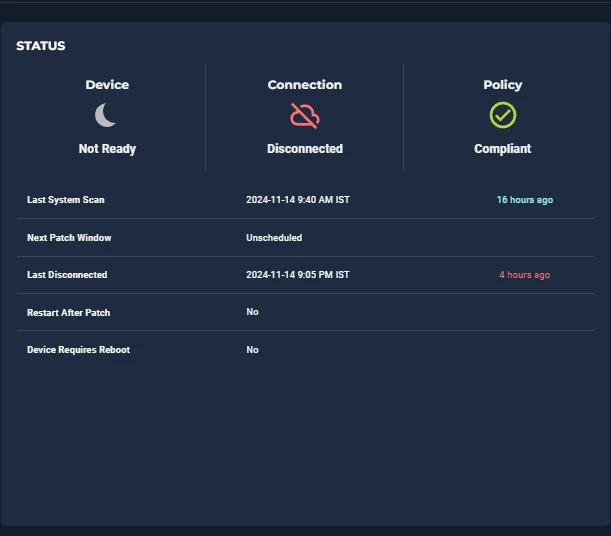
Device Status Shows Disconnected, but user is Logged In

Mohan
November 14, 2024 at 8:05 pm UTC
#Offline#communication#Not Ready

Device Status Shows Disconnected, but user is active Logged In.
Any Idea why this is showing as Disconnected?
 

This discussion is archived and closed to replies. Continue it in the Automox Community Slack.

Discuss on Slack

Replies (5)

AX-YazMorenoNovember 14, 2024
#1

Hello ​@Mohan,

If a device appears disconnected in the console but is powered on, the most likely cause is the agent being turned off. You may need to restart the service from task manager or you can reference Agent Command Line Guide for instructions for your OS.


Automox shows that my device is disconnected when I'm logged in


MohanNovember 14, 2024
#2

Any idea why the agent being turned off when the device is active and user working on it.

Is it normal behavior of the Automox agent? 

bachtenbergAugust 11, 2025
#3

We’re also experiencing this on a frequent basis.

AX-YazMorenoAugust 11, 2025
#4

​@Mohan ​@bachtenberg, 

This is not expected behavior. Please reach out to our support team to triage the repeated issue you’re encountering. 

bachtenbergAugust 12, 2025
#5

​@Mohan ​@bachtenberg, 

This is not expected behavior. Please reach out to our support team to triage the repeated issue you’re encountering. 

Opened a ticket - Currently I have an intune remediation script that runs to resolve this

For anyone who might come across this in the future - This is my detection script

powershell16 lines
# Detect-amagent.ps1
$serviceName = 'amagent'

$svc = Get-Service -Name $serviceName -ErrorAction SilentlyContinue
if (-not $svc) {
    Write-Output "$serviceName not installed. Skipping remediation."
    exit 0  # Treat as compliant if agent isn't installed
}

if ($svc.Status -eq 'Running') {
    Write-Output "$serviceName is running."
    exit 0
} else {
    Write-Output "$serviceName is $($svc.Status). Remediation required."
    exit 1
}

This is my remediation script


powershell43 lines
# Remediate-amagent.ps1
$serviceName = 'amagent'
$maxWaitSeconds = 30

$svc = Get-Service -Name $serviceName -ErrorAction SilentlyContinue
if (-not $svc) {
    Write-Output "$serviceName not installed. Nothing to remediate."
    exit 0
}

# If someone set it to Disabled, flip to Manual so we can start it
try {
    if ($svc.StartType -eq 'Disabled') {
        Write-Output "$serviceName is Disabled. Setting StartupType to Manual."
        Set-Service -Name $serviceName -StartupType Manual
    }
} catch {
    Write-Warning "Failed to change StartupType: $($_.Exception.Message)"
}

if ($svc.Status -ne 'Running') {
    try {
        Start-Service -Name $serviceName -ErrorAction Stop
    } catch {
        Write-Warning "Start-Service failed: $($_.Exception.Message). Retrying via sc.exe..."
        sc.exe start $serviceName | Out-Null
    }

    # Wait until Running or timeout
    $deadline = (Get-Date).AddSeconds($maxWaitSeconds)
    do {
        Start-Sleep -Seconds 1
        try { $svc = Get-Service -Name $serviceName -ErrorAction Stop } catch { break }
    } while ($svc.Status -ne 'Running' -and (Get-Date) -lt $deadline)

    if ($svc.Status -ne 'Running') {
        Write-Error "$serviceName failed to start (status: $($svc.Status))."
        exit 1
    }
}

Write-Output "$serviceName is running."
exit 0