Write Worklet result (winget update check) into Custom Field of device

  • September 5, 2025
  • 1 reply
  • 80 views

Hi guys!

We are testing Automox and are very impressed of its capabilities. 


I already deployed winget successfully using Automox to our Windows machines. 

Now I am looking for a way to store the result of our worklet to check for winget updates into a field of the device (the “notes” field?). Or can we create an own field and put it in there?

This way I can see the winget status directly in the device.


What do you suggest how to realize this?


Looking forward for your ideas.

1 reply

Forum|alt.badge.img

Hi Chris,
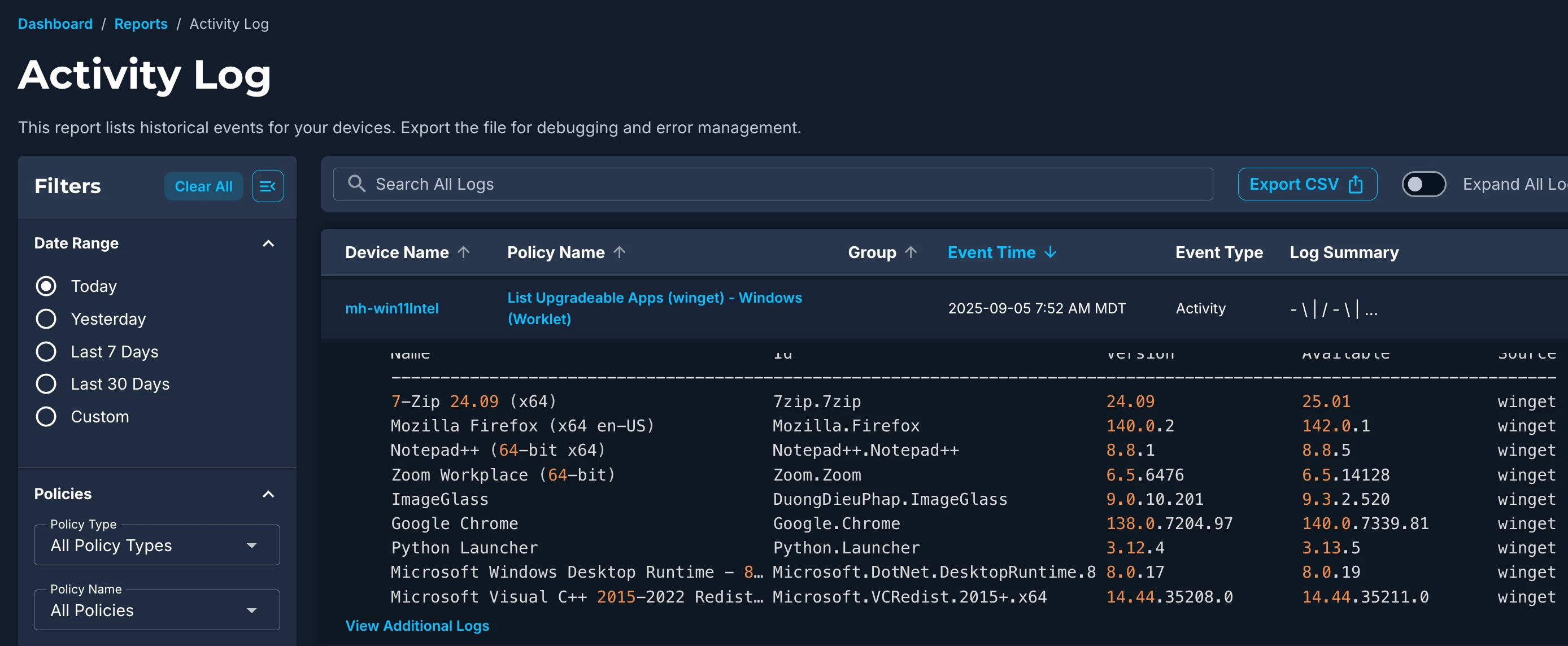
Something like this would take some comprehensive API scripting, and to implement something right now without any effort, we can utilize the Activity Log to pull a list of pending updates which is only a single extra click to view. 

With the Worklet put together, set it to run on a schedule (where the eval code can act as a trigger if you would like).
 

Remediation code snippet

Each time the Remediation code runs it grabs a list and stores it in the Activity Log, accessed by the button directly on the device details page:
 

Click ‘Activity Log’ on the right
Expand results to view pending updates.

There will be some crossover in many cases due to our extensive third party catalog coverage.

Regards,