

AutomoxAutomox

Powershell execution policy issue

sparrowhawk
May 16, 2022 at 10:18 am UTC
#powershell#automox

Following a vulnerability test recommendation, I enabled the Powershell execution policy on a Windows 2012 server that had had Automox running fine for ages. Now Automox can no longer communicate with the server and it seems this is because the Powershell scripts it tries to run are being stopped by the execution policy. So I disabled the execution policy but this hasn’t resolved the issue. running a Get-ExecutionPolicy - List command shows that at the machine level, the policy is still set to require signed scripts. However, in the local group policy editor and in the registry, the policy has been disabled.

I need to find a way to set the execution policy to run all local and signed remote scripts, so that I can have Automox running but still secure the server.

Any help will be most welcome! Thanks.

This discussion is archived and closed to replies. Continue it in the Automox Community Slack.

Discuss on Slack
Replies (3)

sparrowhawkMay 16, 2022
#1

I forgot to add that I tried running


 Set-ExecutionPolicy -ExecutionPolicy RemoteSigned -Scope MachinePolicy

And got a warning that policies at the machine level must be controlled by Group Policy, which on the local machine it is. The machine is bound to a domain and there is a default GP in place, but this doesn’t prescribe a Powershell execution policy.

Thanks

jack.smithMay 17, 2022
#2

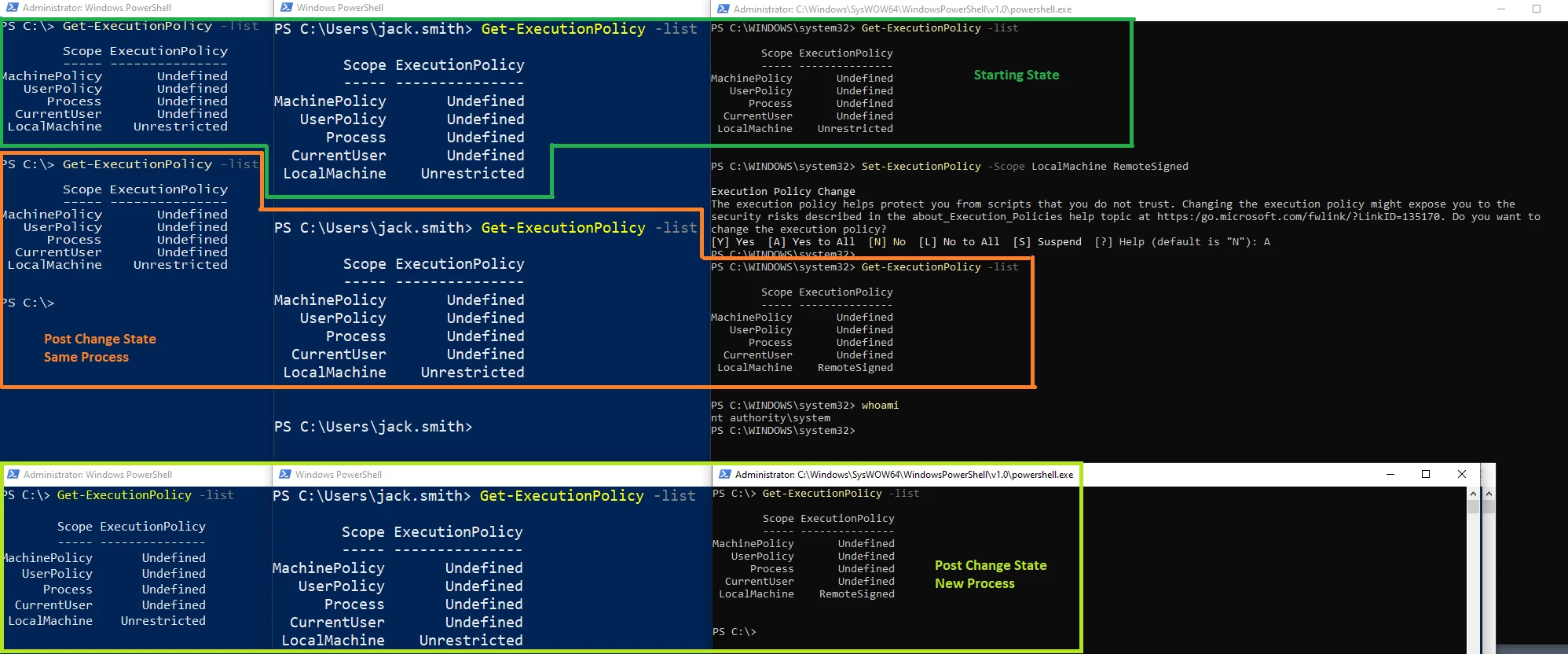
There is something about execution policy I'm not totally grasping but may be related to your situation. In an effort to better understand what’s happening I did some testing to see if I could make heads or tails of this. So far I'm still churning...

For the test I’m using three vantage points

  1. User who is an Administrator
  2. User
  3. NT Authority\SYSTEM

First was to list out the current state of the execution policy. Then I updated the execution policy using the “NT Authority\SYSTEM” account. After the update I reviewed the current configuration for each policy in the currently opened window. Next I opened a new instance and checked the configuration again.


Here are the results. 


What I think should be tested next is to implement the configuration through Group Policy and see how that influences each account. 

sparrowhawkMay 17, 2022
#3

Hi Jack, I’ve been in training workshops all day so will give this some proper thought tomorrow, but you might be on the right track.

Thanks